

QVault-Assessments
Dr. Dishant Pandya Education In-app purchases
Secure Classroom Quizzes
- Downloads
- 100+
- on Google Play
- Price
- Free
- In-app purchases
- Updated
- Sep 7
- 2026 · v2.0.25
Screenshots


About QVault-Assessments
Create quizzes, run live assessments, monitor student activity, and review results with calmer classroom control. Whether you teach in a school, coaching class, tuition setup, or training environment, QVault helps you move from quiz creation to live delivery without messy workflows.
CREATE QUIZZES YOUR WAY
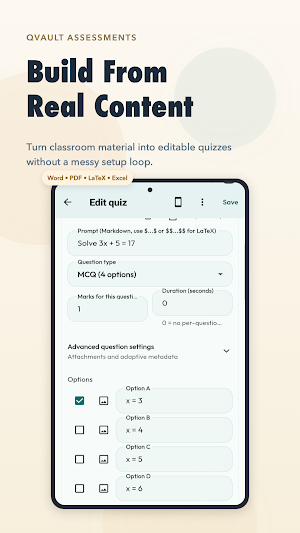
Build assessments directly in the app or import questions from multiple sources:
• Excel
• Markdown
• OCR / photo input
• Copied text with Smart Paste
This makes it easy to turn existing teaching material into ready-to-run quizzes without rebuilding everything manually.
RUN LIVE ASSESSMENTS WITH CONTROL
QVault is designed for real classroom use, not just casual practice quizzes.
Teachers can:
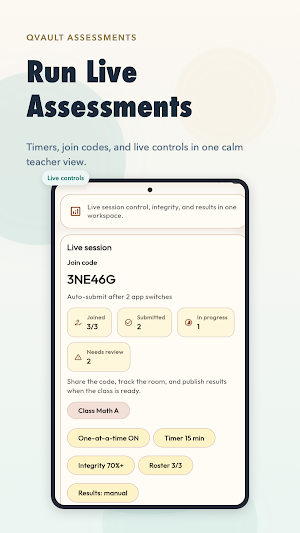
• Start live sessions with join codes
• Let students join on their own device
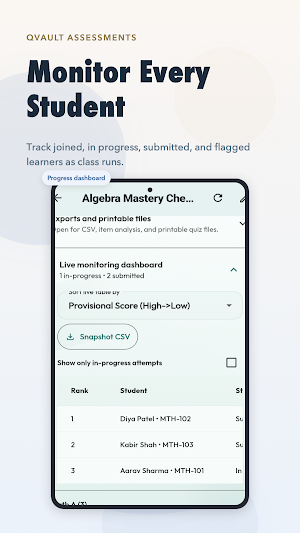
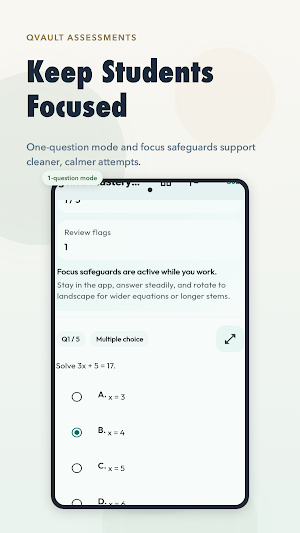
• Monitor integrity signals during active attempts
• Review attempt activity more clearly
• End sessions and manage result workflows from one place
Teachers can draft quietly on-device, prepare on a larger screen using the hosted web builder, and switch into live delivery when the class is ready.
STRONGER ASSESSMENT INTEGRITY
QVault includes anti-cheating and exam-readiness features designed for monitored assessments:
• Join-code based session access
• App-switch and integrity visibility during live sessions
• Proctor alerts for important integrity events
• Screenshot and screen-capture protection where supported by the platform
• Secure result access flows for individual students
• Device-readiness guidance before high-stakes attempts
These tools are designed to help teachers run more focused, accountable, and trustworthy assessments.
RESULTS, EXPORTS, AND EVIDENCE
After the session, QVault helps you review what happened and keep useful records.
Available workflows include:
• Result review
• Item-level analysis
• Evidence Pack exports
• Results CSV
• Item Analysis CSV
• Quiz PDF
• Live Snapshot CSV
• Proctor Incident CSV
• On-device preview before saving exports
This helps teachers decide what to export, what to share, and what to keep for internal records.
TEACHER-FIRST EXPERIENCE
QVault-Assessments is designed to reduce clutter and support real teaching flow:
• Cleaner route from drafting to live use
• Better monitoring during real assessments
• Easier result review and export workflows
• Responsive layouts for mobile, tablet, and web-supported workflows
• Accessibility and usability improvements for everyday use
FOR REAL TEACHING ENVIRONMENTS
QVault works well for:
• Schools
• Coaching classes
• Tuition teachers
• Test practice workflows
• Internal training and learning environments
If you run live quizzes, class tests, practice exams, or monitored student response sessions, QVault gives you a more focused and practical way to do it.
BACKUP AND TEACHER CONTROL
QVault supports teacher-controlled backup and restore paths so important work stays recoverable. Local and live workflows are clearly separated, helping teachers choose the right mode for rehearsal, practice, or real classroom delivery.
WHY QVAULT-ASSESSMENTS
• Teacher-first design
• Secure classroom assessment workflows
• Faster quiz import and creation
• Live session monitoring
• Better result clarity
• Practical export tools
• Built for serious classroom use
QVault-Assessments is built by TeachVault as part of a broader educator-focused ecosystem designed to make classroom technology more practical, more secure, and easier to trust.
What’s new
Version 2.0.25 · Updated September 7, 2026
Save faculty defaults for question count, random selection, types and duration across devices. Instructions precede questions and choices follow directly. Final check shows selected dropdown answers, including partially completed questions. Fixes ended-session result publishing and false quiz-changed warnings. Session insights use each student's latest submitted attempt. Active related runs still protect answer review.
Alternatives to QVault-Assessments
Looking for apps like QVault-Assessments? Here are 4 similar Android apps on Google Play. All of them are free to download.



| App | Rating | Price | Installs | Last updated | Compare |
|---|---|---|---|---|---|
| QVault-Assessments | – | Free | 100+ | Sep 7, 2026 | |
| Satsang Diary Sanchalak | – | Free | 50+ | Oct 18, 2026 | Compare |
| Satsang Diary Central | – | Free | 10+ | – | Compare |
| Satsang Diary Yuvak | – | Free | 500+ | – | Compare |
| TeachVault - Smart Attendance | – | Free | 500+ | Oct 25, 2026 | Compare |
Compare QVault-Assessments with the top alternatives: ratings, updates, ASO score and keyword gaps →