
AR Float Draw
Art & Design
AR Float Draw - AR Tracing & Sketch Learning App
- Downloads
- 500+
- on Google Play
- Price
- Free
- No in-app purchases
- Updated
- Mar 17
- 2026 · v1.1
Screenshots

About AR Float Draw
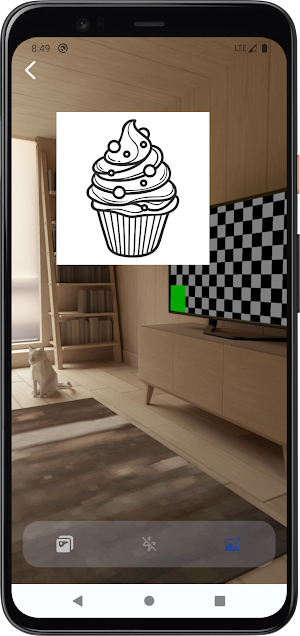
Discover a new way to learn drawing with AR Float Draw! This innovative AR-powered tracing app lets you float sketch outlines over real-world environments, making it easier than ever to practice lines, proportions, and composition. Whether you’re a beginner or an aspiring artist, turn any space into your personal drawing studio and create beautiful art with confidence.
🎯 Core Features
1. Extensive Sketch Library
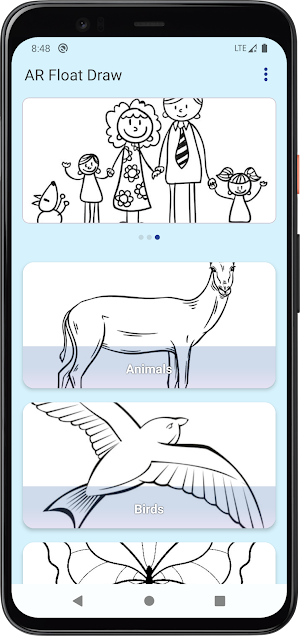
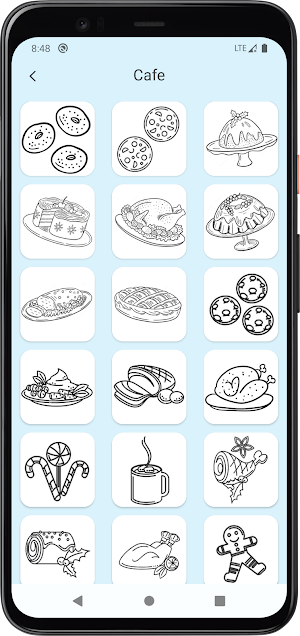
Diverse Categories: Explore a wide range of sketch collections including Animals, Birds, Cafe & Food, Properties & Architecture, and more.
High-Quality Templates: Choose from hundreds of clean, line-art templates—from cute family portraits and wildlife to delicious desserts and famous landmarks like the Leaning Tower of Pisa.
Easy Navigation: Browse categories with intuitive grid layouts to find the perfect sketch for your practice.
2. AR Floating Tracing
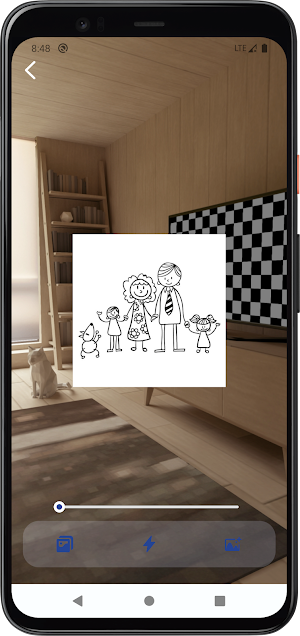
AR Overlay: Place any sketch template as a semi-transparent floating layer in your real environment using your device’s camera.
Adjustable Opacity: Fine-tune the transparency of the sketch with a slider, so you can see both the template and your real-world background clearly while tracing.
Flexible Placement: Move, resize, and position the floating sketch anywhere in your space to fit your drawing setup.
3. Customization & Tools
Import Your Own Images: Turn any photo from your gallery into a traceable floating sketch for unlimited creative possibilities.
Camera Capture: Snap a new photo directly in the app and instantly convert it into a tracing template.
User-Friendly Interface: Clean, minimal design keeps focus on your drawing, with easy access to all essential tools.
🌟 Why Choose AR Float Draw?
Perfect for Beginners: AR tracing removes the guesswork, helping you learn basic drawing skills and build muscle memory gradually.
Immersive Learning: Drawing in a real-world context makes practice more engaging and helps you understand spatial relationships.
Huge Template Variety: From cute cartoons to detailed architecture, there’s a sketch for every interest and skill level.
Lightweight & Smooth: Optimized for all Android devices, ensuring a lag-free AR experience without draining your battery.
Privacy-Friendly: We only access the camera and photos you explicitly select for AR tracing—your data stays safe and private.
🎯 Core Features
1. Extensive Sketch Library
Diverse Categories: Explore a wide range of sketch collections including Animals, Birds, Cafe & Food, Properties & Architecture, and more.
High-Quality Templates: Choose from hundreds of clean, line-art templates—from cute family portraits and wildlife to delicious desserts and famous landmarks like the Leaning Tower of Pisa.
Easy Navigation: Browse categories with intuitive grid layouts to find the perfect sketch for your practice.
2. AR Floating Tracing
AR Overlay: Place any sketch template as a semi-transparent floating layer in your real environment using your device’s camera.
Adjustable Opacity: Fine-tune the transparency of the sketch with a slider, so you can see both the template and your real-world background clearly while tracing.
Flexible Placement: Move, resize, and position the floating sketch anywhere in your space to fit your drawing setup.
3. Customization & Tools
Import Your Own Images: Turn any photo from your gallery into a traceable floating sketch for unlimited creative possibilities.
Camera Capture: Snap a new photo directly in the app and instantly convert it into a tracing template.
User-Friendly Interface: Clean, minimal design keeps focus on your drawing, with easy access to all essential tools.
🌟 Why Choose AR Float Draw?
Perfect for Beginners: AR tracing removes the guesswork, helping you learn basic drawing skills and build muscle memory gradually.
Immersive Learning: Drawing in a real-world context makes practice more engaging and helps you understand spatial relationships.
Huge Template Variety: From cute cartoons to detailed architecture, there’s a sketch for every interest and skill level.
Lightweight & Smooth: Optimized for all Android devices, ensuring a lag-free AR experience without draining your battery.
Privacy-Friendly: We only access the camera and photos you explicitly select for AR tracing—your data stays safe and private.
Alternatives to AR Float Draw
Looking for apps like AR Float Draw? Here are 2 similar Android apps on Google Play. All of them are free to download.

| App | Rating | Price | Installs | Last updated | Compare |
|---|---|---|---|---|---|
| AR Float Draw | – | Free | 500+ | Mar 17, 2026 | |
| Color Glow Keyboard | – | Free | 1,000+ | Mar 26, 2026 | Compare |
| Gallery Wallpapers | – | Free | 100+ | Dec 19, 2025 | Compare |
Compare AR Float Draw with the top alternatives: ratings, updates, ASO score and keyword gaps →