
ScanKit: Doc & QR Scanner
Productivity
Scan documents to PDF with OCR, QR, auto crop, edge detection & smart editing.
- Downloads
- 151+
- on Google Play
- Price
- Free
- No in-app purchases
- Updated
- Sep 11
- 2026 · v1.0.5
Screenshots
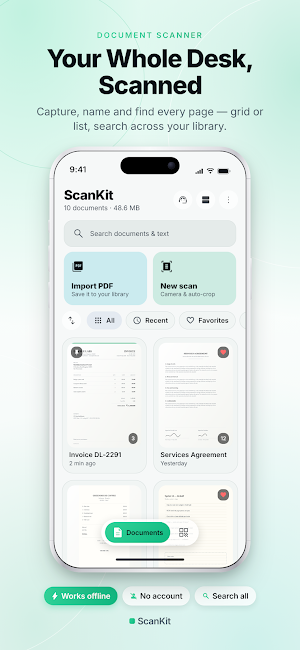
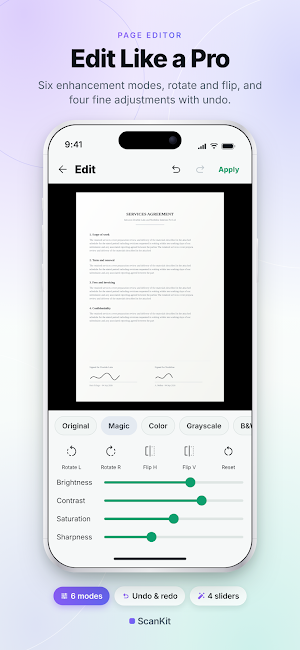
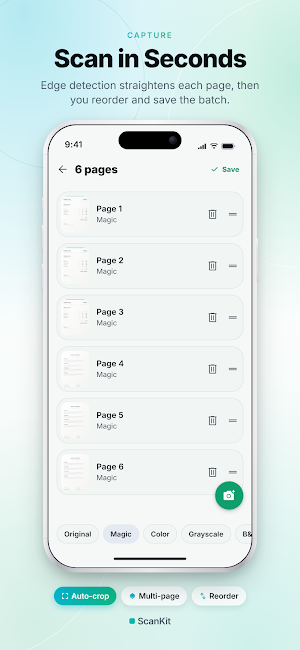
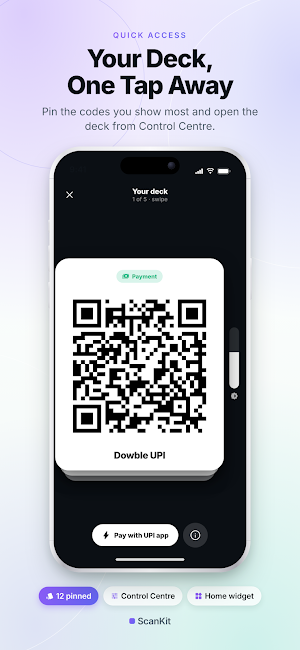


About ScanKit: Doc & QR Scanner
Whether you're working, studying, or organizing paperwork, ScanKit helps you create professional-quality PDF scans in seconds.
Smart Document Scanning
• Automatic document detection
• AI-powered edge detection
• Auto crop & perspective correction
• Manual crop adjustment
• Multi-page document scanning
• Continuous scanning mode
• Import photos from gallery
• High-resolution scans
• Flash support
• Auto image enhancement
Powerful PDF Creator
• Scan to PDF
• Create multi-page PDFs
• Reorder pages
• Rotate pages
• Delete pages
• Merge scanned pages
• Compress PDF size
• High-quality PDF export
• Print documents
• Share PDFs instantly
Image Enhancement
• Magic document enhancement
• Remove shadows
• Improve readability
• Brightness adjustment
• Contrast adjustment
• Sharpen text
• Black & White mode
• Color mode
• Grayscale mode
• Original image mode
OCR Text Recognition
• Extract text from documents
• Copy recognized text
• Search scanned documents
• Share extracted text
• Convert scanned pages into editable text
• Supports multiple languages
Organize Documents
• Rename documents
• Create folders
• Search documents
• Sort by date or name
• Favorite important files
• Recent documents
• Document thumbnails
Share Anywhere
• Share as PDF
• Share as JPG
• Print documents
• Email scans
• Save to device
• Open in other apps
Perfect For
• Receipts
• Invoices
• Contracts
• Notes
• Homework
• Books
• Whiteboards
• Business cards
• Identity documents
• Passports
• Certificates
• Forms
• Tax documents
Why Choose ScanKit?
✓ Fast document scanning
✓ Professional-quality results
✓ Simple and clean interface
✓ Automatic edge detection
✓ Smart image enhancement
✓ OCR text recognition
✓ High-quality PDF export
✓ Works offline for scanning
✓ No watermark
✓ Dark mode support
Whether you're a student, professional, freelancer, teacher, or small business owner, ScanKit makes scanning and managing documents simple, fast, and reliable.
Download ScanKit today and turn your phone into a powerful PDF document scanner.
What’s new
Version 1.0.5 · Updated September 11, 2026
💎 Pay Once. Enjoy for a Lifetime. No subscriptions. No recurring charges. Just pay once and enjoy the app forever. 🎉 🛟 24/7 Customer Support We’re always here whenever you need help. 🤝 Reach out to us at [email protected] 💬 Your Feedback Matters Have a suggestion or issue? We value your feedback and aim to address it within 2 business days. 🚀 ✨ Simple. Premium. No Hassle. One payment. Lifetime access. ❤️
User reviews

i buy this

ScanKit: PDF Scanner works perfectly 🙌
Alternatives to ScanKit: Doc & QR Scanner
Looking for apps like ScanKit: Doc & QR Scanner? Here are 6 similar Android apps on Google Play. The highest rated is Genius Scan - PDF Scanner (4.9/5), and all 6 are free to download.
-
QWatch Pro 3.1
-
vFlat Scan - PDF Scanner, OCR 4.6
-
Genius Scan - PDF Scanner 4.9
-
ROM Coach (Mobility Workouts) 4.6
-
Mobile Scanner App - Scan PDF 4.6
-
FITEQ
| App | Rating | Price | Installs | Last updated | Compare |
|---|---|---|---|---|---|
| ScanKit: Doc & QR Scanner | – | Free | 100+ | Sep 11, 2026 | |
| QWatch Pro | 3.1 / 5 | Free | 1,000,000+ | Sep 4, 2026 | Compare |
| vFlat Scan - PDF Scanner, OCR | 4.6 / 5 | Free | 10,000,000+ | – | Compare |
| Genius Scan - PDF Scanner | 4.9 / 5 | Free | 10,000,000+ | Sep 22, 2026 | Compare |
| ROM Coach (Mobility Workouts) | 4.6 / 5 | Free | 50,000+ | Sep 23, 2026 | Compare |
| Mobile Scanner App - Scan PDF | 4.6 / 5 | Free | 10,000,000+ | – | Compare |
| FITEQ | – | Free | 5,000+ | Sep 10, 2026 | Compare |