
Watermark Screen
Dolgore Tools In-app purchases Contains ads
Displays watermarks on screen that is automatically captured in screenshots!
- Downloads
- 2.9K+
- on Google Play
- Price
- Free
- In-app purchases
- Updated
- Jan 22
- 2026 · v1.7
Screenshots
About Watermark Screen
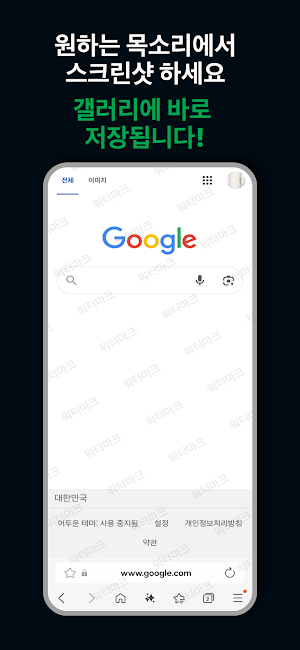
Once activated, the watermark remains visible even over other apps, and it is automatically included whenever you take a screenshot.
This tool helps protect personal information, prevent unauthorized sharing, and clearly indicate content ownership when capturing or sharing important screens.
🔍 Key Features
✔ Real-Time On-Screen Watermark
The watermark stays visible at all times—
even when you switch apps or use your device normally.
It is automatically included in every screenshot you capture.
✔ Customizable Watermark Text
Enter any text you want, such as your name, email, company name, warning messages,
or phrases like "Do Not Share" or "Confidential."
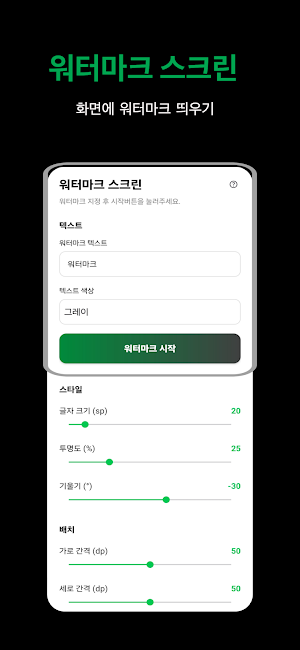
✔ Advanced Customization Options
Choose watermark color
Adjust transparency (alpha)
Change text size
Set watermark angle (rotation)
Adjust horizontal and vertical spacing (tiling)
Create your own unique watermark pattern with full control.
✔ Easy Start & Stop
Start the watermark with a single tap.
Turn it off just as easily whenever you no longer need it.
Designed to be quick and non-disruptive to your workflow.
👍 Recommended For
Users who need leak prevention marks when capturing company documents, plans, or source code
Students, instructors, and creators who frequently take screenshots or record their screens
Anyone who wants to protect content rights and clearly show ownership when sharing materials
📱 How to Use
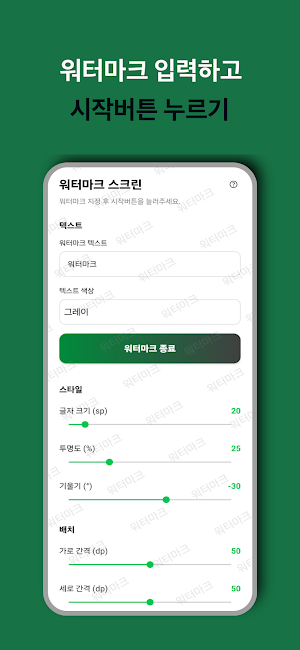
Open the app and enter your watermark text.
Adjust color, size, transparency, angle, and spacing to your preference.
Tap Start to display the watermark across your entire screen.
Any screenshot you take will automatically include the watermark.
Tap Stop when you no longer need it.
⚠️ Note
Overlay permission may be required to display the watermark above other apps.
This app uses a Foreground Service to display a real-time watermark over the screen.
The watermark must remain visible even when the app is not in use to serve security purposes, such as protecting personal information, preventing content leakage, and indicating the source on screenshots.
What’s new
Version 1.7 · Updated January 22, 2026
Added real-time watermark overlay displayed on top of the screen. Watermark is automatically included in screenshots. Added custom watermark text input feature. Supports customization of color, transparency, size, angle, and spacing. Added easy Start/Stop controls for quick access. General UI improvements and stability enhancements.
Alternatives to Watermark Screen
Looking for apps like Watermark Screen? Here are 6 similar Android apps on Google Play. The highest rated is Watermark PLUS –Easy WaterMark (4.8/5), and all 6 are free to download.
-
Watermark PLUS –Easy WaterMark 4.8
-
iconiconi
-
Card Info Reader
-
QR Barcode Scanner
-
Phone Temperature Monitor
-
Dolgorecord
| App | Rating | Price | Installs | Last updated | Compare |
|---|---|---|---|---|---|
| Watermark Screen | – | Free | 1,000+ | Jan 22, 2026 | |
| Watermark PLUS –Easy WaterMark | 4.8 / 5 | Free | 10,000+ | – | Compare |
| iconiconi | – | Free | 1+ | Apr 25, 2026 | Compare |
| Card Info Reader | – | Free | 100+ | Apr 2, 2026 | Compare |
| QR Barcode Scanner | – | Free | 10+ | Feb 2, 2026 | Compare |
| Phone Temperature Monitor | – | Free | 100+ | Jan 20, 2026 | Compare |
| Dolgorecord | – | Free | 10+ | Oct 28, 2025 | Compare |
Compare Watermark Screen with the top alternatives: ratings, updates, ASO score and keyword gaps →
Similar apps on Google Play
- Watermark PLUS –Easy WaterMark
- iconiconi
- Card Info Reader
- QR Barcode Scanner
- Phone Temperature Monitor
- Dolgorecord
- 정보 보관함
- Character Count
- CaptureMark - Auto Watermark
- Click Together!
- ScreenStop - Screen Lock App
- 포카체인지 - 오프라인 포토카드 교환 앱
- Streaming Watermark
- My Movie Star
- Korean Interview 100
- Japanese Interview 100
- Spanish Interview 100
- Korean Name 100
- 영어 인터뷰 100
- Random English Name
- LOTOTO | Lotto Number Drawer
- Simple Memo 90s