
Slidebox: Sort & Clean Photos
AICODE Productivity Contains ads
Swipe to sort photos, clean clutter & free storage — on-device
- Downloads
- 6+
- on Google Play
- Price
- Free
- No in-app purchases
- Updated
- Sep 7
- 2026 · v1.0.0
Screenshots

About Slidebox: Sort & Clean Photos
Slidebox makes organizing photos feel fun.
Most camera rolls get messy fast — screenshots you never reopen, blurry shots, near-duplicates, and random clutter eating storage. We built Slidebox to help you clean that mess without turning photo cleanup into a chore.
We tried a lot of gallery organizers and photo cleaner apps. None felt right. So we made a simple, elegant solution — and we’d love for you to try it.
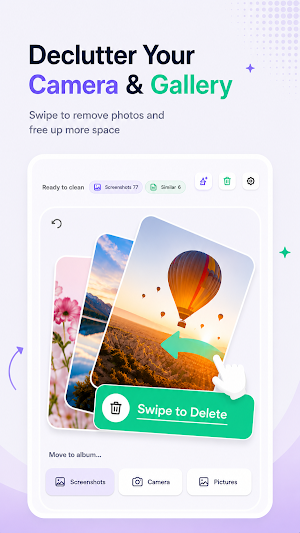
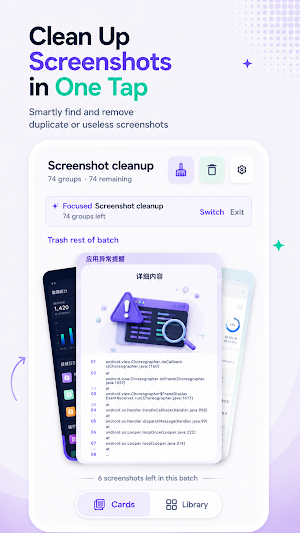
Here’s how it works: browse your photos one by one like a card deck and decide what to do. With a single gesture you can move something to Trash, file a keeper into an album, or keep flipping. Made a mistake or changed your mind? Undo anytime. When you’re ready, empty Trash to permanently free up storage on your phone.
Here’s the thing: it’s hard to describe how enjoyable it feels to tidy your gallery with Slidebox. So try it yourself. The app is free, with no ads and no pressure. We take privacy seriously — sorting and cleanup run on your device, and your photos aren’t uploaded for an account cloud. No tricks.
You’ll end up with the gallery you actually want: a set of well-organized memories. Keeping up with your camera roll stops feeling like busywork. Once you get the hang of it, you’ll look forward to the next batch.
Feature highlights:
• Swipe sorting — up to Trash, down to file into albums, left/right to browse
• Batch sessions — tidy a small set in spare moments instead of all at once
• Local Trash with undo — review before you permanently delete photos
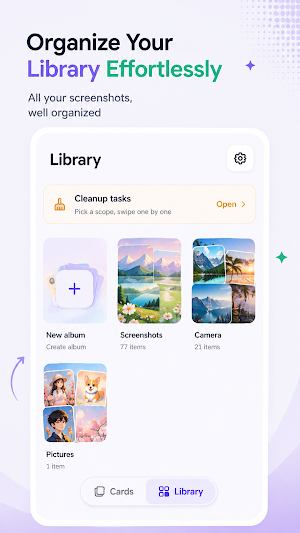
• Custom albums — keep favorites and keepers neatly organized
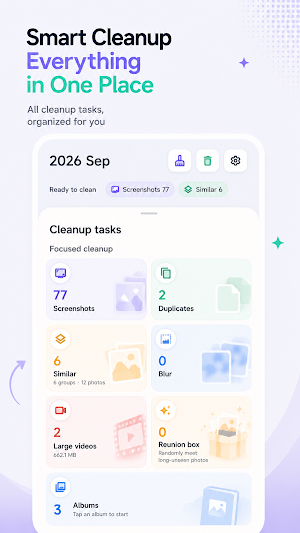
• Focused cleanups — screenshots, duplicates, similar shots, blurry photos, by month, and large videos
• Home screen widget — see what’s waiting to sort and what space you can reclaim
• Light & dark themes — match how you like to review your photos
• On-device photo organizer — clean your gallery and free storage without uploading your library
Download Slidebox and start swiping toward a cleaner, more meaningful gallery.
Most camera rolls get messy fast — screenshots you never reopen, blurry shots, near-duplicates, and random clutter eating storage. We built Slidebox to help you clean that mess without turning photo cleanup into a chore.
We tried a lot of gallery organizers and photo cleaner apps. None felt right. So we made a simple, elegant solution — and we’d love for you to try it.
Here’s how it works: browse your photos one by one like a card deck and decide what to do. With a single gesture you can move something to Trash, file a keeper into an album, or keep flipping. Made a mistake or changed your mind? Undo anytime. When you’re ready, empty Trash to permanently free up storage on your phone.
Here’s the thing: it’s hard to describe how enjoyable it feels to tidy your gallery with Slidebox. So try it yourself. The app is free, with no ads and no pressure. We take privacy seriously — sorting and cleanup run on your device, and your photos aren’t uploaded for an account cloud. No tricks.
You’ll end up with the gallery you actually want: a set of well-organized memories. Keeping up with your camera roll stops feeling like busywork. Once you get the hang of it, you’ll look forward to the next batch.
Feature highlights:
• Swipe sorting — up to Trash, down to file into albums, left/right to browse
• Batch sessions — tidy a small set in spare moments instead of all at once
• Local Trash with undo — review before you permanently delete photos
• Custom albums — keep favorites and keepers neatly organized
• Focused cleanups — screenshots, duplicates, similar shots, blurry photos, by month, and large videos
• Home screen widget — see what’s waiting to sort and what space you can reclaim
• Light & dark themes — match how you like to review your photos
• On-device photo organizer — clean your gallery and free storage without uploading your library
Download Slidebox and start swiping toward a cleaner, more meaningful gallery.
What’s new
Version 1.0.0 · Updated September 7, 2026
Welcome to Slidebox 1.0! • Swipe to sort — Trash, albums, browse • Batch tidy in spare moments • Local Trash with undo before deleting • Clean screenshots, duplicates, similar & blurry photos • Large video cleanup & monthly review • Home screen widget + light/dark themes • 100% on-device — photos stay private Sort your camera roll. Free storage. Have fun doing it.
Alternatives to Slidebox: Sort & Clean Photos
Looking for apps like Slidebox: Sort & Clean Photos? Here are 6 similar Android apps on Google Play. All of them are free to download.
-
Gallery: Photos & Albums
-
TVRemote: TV Remote Control
-
Weather: Forecast & Alerts
-
Recorder: Cut & Transcribe
-
DailyBrain: Training Games
-
OPlayer - Video Player
| App | Rating | Price | Installs | Last updated | Compare |
|---|---|---|---|---|---|
| Slidebox: Sort & Clean Photos | – | Free | 5+ | Sep 7, 2026 | |
| Gallery: Photos & Albums | – | Free | 100+ | Sep 7, 2026 | Compare |
| TVRemote: TV Remote Control | – | Free | 100+ | Sep 7, 2026 | Compare |
| Weather: Forecast & Alerts | – | Free | 100+ | Sep 2, 2026 | Compare |
| Recorder: Cut & Transcribe | – | Free | 100+ | – | Compare |
| DailyBrain: Training Games | – | Free | 100+ | Jul 17, 2026 | Compare |
| OPlayer - Video Player | – | Free | 500+ | Jul 3, 2026 | Compare |