
DocMaster - PDF Editor & AI
Productivity In-app purchases Contains ads
Edit, sign & chat with PDFs using on-device AI. 100% private, works offline.
- Downloads
- 2.4K+
- on Google Play
- Price
- Free
- In-app purchases
- Updated
- Aug 29
- 2026 · v1.0.16
Screenshots


About DocMaster - PDF Editor & AI
DocMaster is the all-in-one PDF editor and AI document assistant built for Android — everything happens on your device. No cloud uploads. No subscriptions. No data sent to servers.
Whether you need to sign a contract, compress a scanned report, extract text from an image, or literally have a conversation with a document using AI, DocMaster does it all — even with no internet connection.
---
🤖 ON-DEVICE AI DOCUMENT CHAT
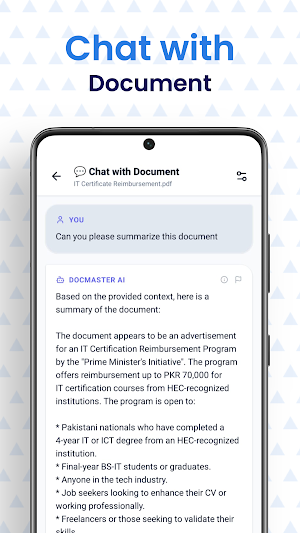
• Ask questions about any PDF and get instant answers — powered by LLaMA 3.2 running entirely on your phone
• Summarize long contracts, legal documents, or reports in seconds
• Extract key facts, dates, and clauses without reading the whole document
• Your documents never leave your device — zero privacy risk
📄 COMPLETE PDF TOOLKIT
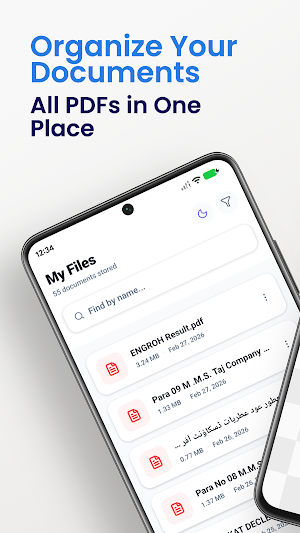
• View PDFs smoothly with zoom, scroll, and night mode
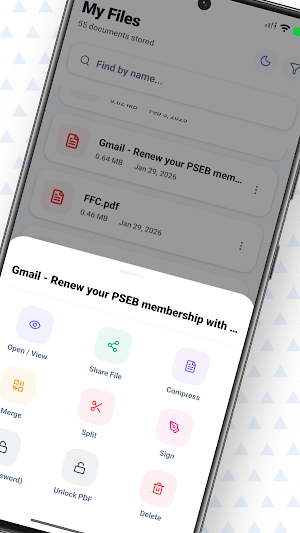
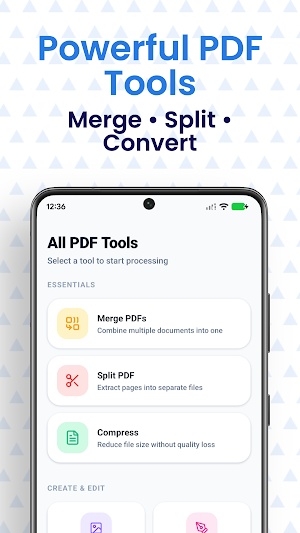
• Merge multiple PDFs into one file in seconds
• Split a PDF into individual pages or custom ranges
• Reorder pages with a simple drag-and-drop interface
• Compress PDFs to reduce file size without visible quality loss
• Lock PDFs with a password — or unlock them when you have the password
✍️ SIGN & ANNOTATE
• Draw your signature directly on screen and place it anywhere in a PDF
• Sign contracts and forms without printing a single page
• Save your signature for reuse across documents
🔍 OCR TEXT EXTRACTION
• Extract text from scanned PDFs, photos, and images
• Works on receipts, business cards, whiteboards, and handwritten notes
• Copy, share, or export extracted text instantly
• Supports multi-language recognition
🖼️ IMAGE TO PDF
• Convert JPG, PNG, and other images into a clean PDF in one tap
• Combine multiple photos into a single PDF document
• Perfect for scanning receipts, IDs, notes, and physical documents
📱 DOCUMENT SCANNER
• Use your camera to scan physical documents
• Auto-detects edges and corrects perspective automatically
• Enhances scan quality for clean, readable output
📊 WORD & EXCEL VIEWER/EDITOR
• Open and edit Microsoft Word (.docx) and Excel (.xlsx) files
• No Microsoft Office required
• Export edited documents back to their original format
---
WHY DOCMASTER BEATS THE COMPETITION
Most PDF apps send your files to a remote server to process them. DocMaster does everything locally — your confidential documents, tax returns, medical records, and contracts stay on your phone.
Most AI PDF tools require a cloud subscription at $10–20/month. DocMaster includes on-device LLaMA 3.2 AI at no extra cost.
Most PDF apps are either too simple (just a viewer) or too bloated (dozens of features you never use behind a paywall). DocMaster gives you the complete professional toolkit without the subscription wall.
---
PERFECT FOR:
• Professionals who sign and edit contracts on the go
• Students who want to summarize lecture notes and research papers
• Small business owners managing invoices and forms
• Anyone who values document privacy and offline access
• Developers and freelancers working with client documents
---
PRIVACY FIRST
All processing — PDF editing, OCR, AI chat, compression, merging — runs 100% on your device. DocMaster does not require an account. DocMaster does not upload your files. Your documents are yours.
---
DocMaster is completely free to use. An optional one-time "DocMaster Pro" upgrade is available to permanently remove all ads and support future development.
Get started free. Edit your first PDF today.
Whether you need to sign a contract, compress a scanned report, extract text from an image, or literally have a conversation with a document using AI, DocMaster does it all — even with no internet connection.
---
🤖 ON-DEVICE AI DOCUMENT CHAT
• Ask questions about any PDF and get instant answers — powered by LLaMA 3.2 running entirely on your phone
• Summarize long contracts, legal documents, or reports in seconds
• Extract key facts, dates, and clauses without reading the whole document
• Your documents never leave your device — zero privacy risk
📄 COMPLETE PDF TOOLKIT
• View PDFs smoothly with zoom, scroll, and night mode
• Merge multiple PDFs into one file in seconds
• Split a PDF into individual pages or custom ranges
• Reorder pages with a simple drag-and-drop interface
• Compress PDFs to reduce file size without visible quality loss
• Lock PDFs with a password — or unlock them when you have the password
✍️ SIGN & ANNOTATE
• Draw your signature directly on screen and place it anywhere in a PDF
• Sign contracts and forms without printing a single page
• Save your signature for reuse across documents
🔍 OCR TEXT EXTRACTION
• Extract text from scanned PDFs, photos, and images
• Works on receipts, business cards, whiteboards, and handwritten notes
• Copy, share, or export extracted text instantly
• Supports multi-language recognition
🖼️ IMAGE TO PDF
• Convert JPG, PNG, and other images into a clean PDF in one tap
• Combine multiple photos into a single PDF document
• Perfect for scanning receipts, IDs, notes, and physical documents
📱 DOCUMENT SCANNER
• Use your camera to scan physical documents
• Auto-detects edges and corrects perspective automatically
• Enhances scan quality for clean, readable output
📊 WORD & EXCEL VIEWER/EDITOR
• Open and edit Microsoft Word (.docx) and Excel (.xlsx) files
• No Microsoft Office required
• Export edited documents back to their original format
---
WHY DOCMASTER BEATS THE COMPETITION
Most PDF apps send your files to a remote server to process them. DocMaster does everything locally — your confidential documents, tax returns, medical records, and contracts stay on your phone.
Most AI PDF tools require a cloud subscription at $10–20/month. DocMaster includes on-device LLaMA 3.2 AI at no extra cost.
Most PDF apps are either too simple (just a viewer) or too bloated (dozens of features you never use behind a paywall). DocMaster gives you the complete professional toolkit without the subscription wall.
---
PERFECT FOR:
• Professionals who sign and edit contracts on the go
• Students who want to summarize lecture notes and research papers
• Small business owners managing invoices and forms
• Anyone who values document privacy and offline access
• Developers and freelancers working with client documents
---
PRIVACY FIRST
All processing — PDF editing, OCR, AI chat, compression, merging — runs 100% on your device. DocMaster does not require an account. DocMaster does not upload your files. Your documents are yours.
---
DocMaster is completely free to use. An optional one-time "DocMaster Pro" upgrade is available to permanently remove all ads and support future development.
Get started free. Edit your first PDF today.
What’s new
Version 1.0.16 · Updated August 29, 2026
✨ Refreshed the AI onboarding experience with a cleaner, more polished onboarding flow — clearer visuals and smoother first-launch guidance.
User reviews

👍👍👍👍👍

Fast and efficient and makes the experiencing of using it intriguing

it's easy to use , I'm impressed

ab datart kia h

it's better than other documents app

This app is so good. It makes my work very easy and saves my time. As a student I make the most of it for my assignments
Alternatives to DocMaster - PDF Editor & AI
Looking for apps like DocMaster - PDF Editor & AI? Here are 6 similar Android apps on Google Play. The highest rated is Jotform - Form, Sign & Survey (4.6/5), and all 6 are free to download.
-
VASA Fitness 4.2
-
FormsApp 3.1
-
Jotform - Form, Sign & Survey 4.6
-
Office Reader - PDF,Word,Excel 3.9
-
PDF Reader(KDAN PDF): Edit PDF 3.8
-
Foxit PDF Editor 4.0
| App | Rating | Price | Installs | Last updated | Compare |
|---|---|---|---|---|---|
| DocMaster - PDF Editor & AI | – | Free | 1,000+ | Aug 29, 2026 | |
| VASA Fitness | 4.2 / 5 | Free | 500,000+ | Sep 3, 2026 | Compare |
| FormsApp | 3.1 / 5 | Free | 10,000,000+ | Sep 23, 2026 | Compare |
| Jotform - Form, Sign & Survey | 4.6 / 5 | Free | 1,000,000+ | Oct 23, 2026 | Compare |
| Office Reader - PDF,Word,Excel | 3.9 / 5 | Free | 1,000,000+ | – | Compare |
| PDF Reader(KDAN PDF): Edit PDF | 3.8 / 5 | Free | 10,000,000+ | – | Compare |
| Foxit PDF Editor | 4.0 / 5 | Free | 10,000,000+ | Oct 26, 2026 | Compare |
Similar apps on Google Play
- VASA Fitness
- FormsApp
- Jotform - Form, Sign & Survey
- Office Reader - PDF,Word,Excel
- PDF Reader(KDAN PDF): Edit PDF
- Foxit PDF Editor
- pdfFiller Edit, fill, sign PDF
- Rocketbook
- My Lawn: A Guide to Lawn Care
- Farm Your Yard: Gardening App
- PDF Merge: Scan, Sign & Edit
- PDF Reader & Editor: Xodo
- Genius Scan - PDF Scanner
- SignNow: Sign & Fill PDF Docs
- PDF Editor – Edit Everything!
- Regula Document Reader
- DOCX Editor: PDF, DOC, XLSX
- Summons Partner+
- Rocket Lawyer Legal & Law Help
- SCRIBZEE®
- OfficeSuite Pro + PDF
- Mobi PDF・Editor・Scanner・Reader
- Office Depot®- Rewards & Deals
- CS PDF Reader - PDF Editor