
DOBI Operador
ehive Tools
Run your connected machines from your phone: switches, sliders and alarms.
- Downloads
- 1+
- on Google Play
- Price
- Free
- No in-app purchases
- Updated
- Aug 29
- 2026 · v1.2.0
Screenshots


About DOBI Operador
DOBI Operador is the operator app for machines connected to the DOBI platform. It is built for the person who has to act now, from a phone, without walking through five screens first.
QUICK ACTIONS
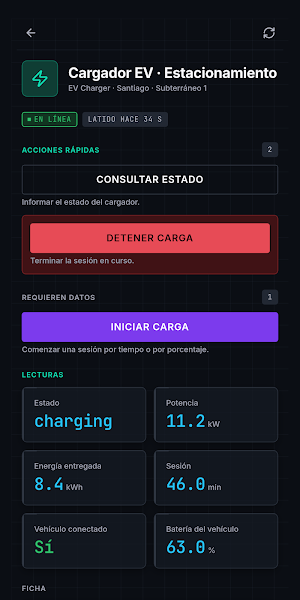
Every machine shows its own controls, built from what that machine actually supports: switches for what turns on and off, sliders for what has a range, forms for what needs a value. One screen, one tap. Nothing to memorise.
LIVE STATE
Current metrics for each machine, whether it is connected, and the history of what was commanded and what came back. When a machine is offline the app says so instead of pretending the command went through.
ALARMS AND APPROVALS
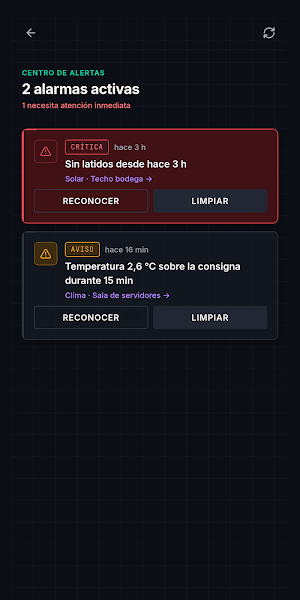
Alarms arrive with their severity and can be acknowledged from the list. Actions considered critical - stop everything, restart, emergency shutdown - do not fire on a tap: they open a supervision request that a person has to approve.
TRY IT WITHOUT AN ACCOUNT
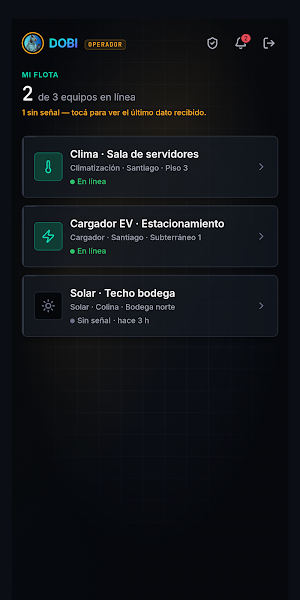
The sign-in screen has a demo button. It opens the full interface with a sample fleet of three machines, one of them offline on purpose, so you can see how the app behaves when things do not go well. The demo runs entirely inside the app and touches no real machine.
SIGN-IN
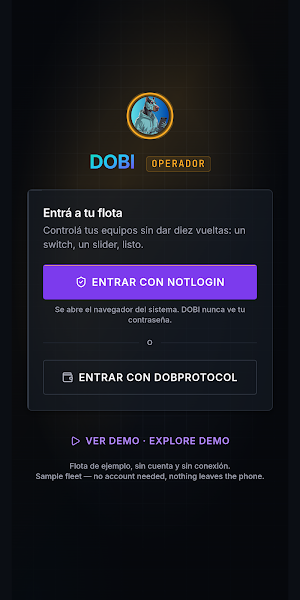
To control your own machines you sign in with Notlogin, an email-verified provider, or with your DobProtocol account - the same one you already use on the web. The app only ever shows machines that belong to you.
DOBI is an agent-native IoT platform: https://dobi.guru
Privacy policy: https://dobi.guru/privacy
QUICK ACTIONS
Every machine shows its own controls, built from what that machine actually supports: switches for what turns on and off, sliders for what has a range, forms for what needs a value. One screen, one tap. Nothing to memorise.
LIVE STATE
Current metrics for each machine, whether it is connected, and the history of what was commanded and what came back. When a machine is offline the app says so instead of pretending the command went through.
ALARMS AND APPROVALS
Alarms arrive with their severity and can be acknowledged from the list. Actions considered critical - stop everything, restart, emergency shutdown - do not fire on a tap: they open a supervision request that a person has to approve.
TRY IT WITHOUT AN ACCOUNT
The sign-in screen has a demo button. It opens the full interface with a sample fleet of three machines, one of them offline on purpose, so you can see how the app behaves when things do not go well. The demo runs entirely inside the app and touches no real machine.
SIGN-IN
To control your own machines you sign in with Notlogin, an email-verified provider, or with your DobProtocol account - the same one you already use on the web. The app only ever shows machines that belong to you.
DOBI is an agent-native IoT platform: https://dobi.guru
Privacy policy: https://dobi.guru/privacy
What’s new
Version 1.2.0 · Updated August 29, 2026
Operador now looks and works like an instrument panel: graphite surfaces, amber signal accent and monospaced readouts, so status is readable at a glance. Quick actions: switches and sliders to run a machine without digging through menus. Sign in with Notlogin or with your DobProtocol account, or tap "Explore demo" to try it with a sample fleet.
Alternatives to DOBI Operador
Looking for apps like DOBI Operador? Here are 6 similar Android apps on Google Play. All of them are free to download.






| App | Rating | Price | Installs | Compare |
|---|---|---|---|---|
| DOBI Operador | – | Free | 1+ | |
| DOBI Pay | – | Free | 1+ | Compare |
| 100AURA | – | Free | 1+ | Compare |
| Dobprotocol | – | Free | 0+ | Compare |
| apuchat: chat & video with AI | – | Free | 10+ | Compare |
| Orquesta | – | Free | 1+ | Compare |
| apumail | – | Free | 1+ | Compare |
Compare DOBI Operador with the top alternatives: ratings, updates, ASO score and keyword gaps →