
DEWALT WiFi
Stanley Black & Decker Inc Productivity
The DEWALT Jobsite WiFi app works with DEWALT Jobsite WiFi Access Points.
- Rating
- 5.0
- 6 ratings
- Downloads
- 500+
- on Google Play
- Price
- Free
- No in-app purchases
- Updated
- May 13
- 2020 · v2.3.1
Screenshots


About DEWALT WiFi
Use the DEWALT Jobsite WiFi app to:
* Create a DEWALT account
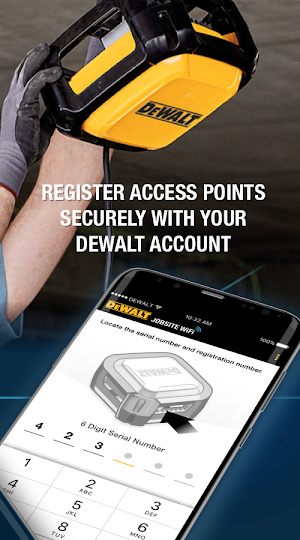
* Register your DEWALT WiFi Access Points
* Create a new mesh network, or join an existing one
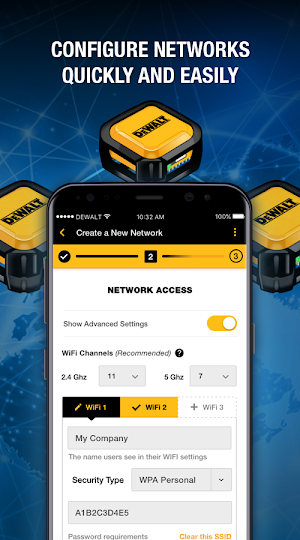
* Configure WiFi access
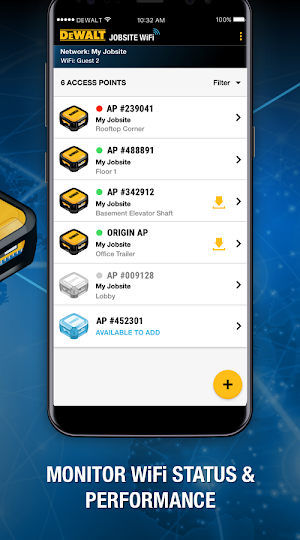
* Monitor your mesh
* Manage and optimize individual DEWALT WiFi Access Points
The DEWALT Jobsite WiFi system provides JOBSITE TOUGH™ connectivity that adapts to your evolving jobsite.
BUILT FOR CONSTRUCTION™
DEWALT® delivers products that are GUARANTEED TOUGH®, and that legacy continues with the DEWALT Jobsite WiFi system.
JOBSITE TOUGH
Born from the jobsite, the DEWALT Access Points are IP67 rated to help protect them from rugged conditions.
SIMPLE SETUP
With 4 easy steps, you're up and running in no time without the need for a technician.
ADAPTS TO THE JOBSITE
As the site changes, the Access Points adapt automatically. You don't need to do a thing.
Tough enough for the jobsite with simple setup and adaptability for construction, it's a solution that just works.
Learn more at wifi.dewalt.com
Have questions? Contact us at 1-800-4DEWALT and [email protected]
Or, visit our FAQs at dewalt.com/support/faqs
*DEWALT is not an ISP.
* Create a DEWALT account
* Register your DEWALT WiFi Access Points
* Create a new mesh network, or join an existing one
* Configure WiFi access
* Monitor your mesh
* Manage and optimize individual DEWALT WiFi Access Points
The DEWALT Jobsite WiFi system provides JOBSITE TOUGH™ connectivity that adapts to your evolving jobsite.
BUILT FOR CONSTRUCTION™
DEWALT® delivers products that are GUARANTEED TOUGH®, and that legacy continues with the DEWALT Jobsite WiFi system.
JOBSITE TOUGH
Born from the jobsite, the DEWALT Access Points are IP67 rated to help protect them from rugged conditions.
SIMPLE SETUP
With 4 easy steps, you're up and running in no time without the need for a technician.
ADAPTS TO THE JOBSITE
As the site changes, the Access Points adapt automatically. You don't need to do a thing.
Tough enough for the jobsite with simple setup and adaptability for construction, it's a solution that just works.
Learn more at wifi.dewalt.com
Have questions? Contact us at 1-800-4DEWALT and [email protected]
Or, visit our FAQs at dewalt.com/support/faqs
*DEWALT is not an ISP.
What’s new
Version 2.3.1 · Updated May 13, 2020
* Upgrades and Bug Fixes
User reviews

Still love it

It's making me feel like I'm gonna be receiving a job offer from them shorty!!!🎖🎖🎖..
Frequently asked questions
What can I do with the DEWALT Jobsite WiFi app?
You can create a DEWALT account, register your DEWALT WiFi Access Points, create or join a mesh network, configure WiFi access, monitor your mesh, and manage individual DEWALT WiFi Access Points.
What is the DEWALT Jobsite WiFi system designed for?
It is designed for construction sites, providing tough connectivity that adapts to the changing jobsite conditions.
Are the DEWALT Access Points durable?
Yes, they are IP67 rated, which means they are built to withstand rugged conditions on the jobsite.
Is the setup process complicated?
No, it is a simple setup with just 4 easy steps. You can get up and running without the need for a technician.
Does the DEWALT Jobsite WiFi system adapt to changes on the jobsite?
Yes, the Access Points automatically adapt to changes on the site, so you don't need to make any adjustments.
Where can I learn more about DEWALT Jobsite WiFi?
You can visit wifi.dewalt.com for more information.
How can I contact support for DEWALT WiFi?
You can contact us at 1-800-4DEWALT or email us at [email protected].
Where can I find FAQs about DEWALT Jobsite WiFi?
You can visit dewalt.com/support/faqs for frequently asked questions.
Alternatives to DEWALT WiFi
Looking for apps like DEWALT WiFi? Here are 6 similar Android apps on Google Play. The highest rated is Craftsman Auto Assist (4.6/5), and all 6 are free to download.
-
DEWALT Tool Connect 4.5
-
CRAFTSMAN myQ Garage Access 1.1
-
Craftsman Auto Assist 4.6
-
DEWALT® Site Manager 4.0
-
Black+Decker Home 2.4
-
Mac Tools 3.7
| App | Rating | Price | Installs | Last updated | Compare |
|---|---|---|---|---|---|
| DEWALT WiFi | 5.0 / 5 | Free | 500+ | May 13, 2020 | |
| DEWALT Tool Connect | 4.5 / 5 | Free | 100,000+ | Oct 20, 2020 | Compare |
| CRAFTSMAN myQ Garage Access | 1.1 / 5 | Free | 100,000+ | Jul 20, 2026 | Compare |
| Craftsman Auto Assist | 4.6 / 5 | Free | 10,000+ | Jul 6, 2022 | Compare |
| DEWALT® Site Manager | 4.0 / 5 | Free | 50,000+ | Sep 25, 2026 | Compare |
| Black+Decker Home | 2.4 / 5 | Free | 50,000+ | Sep 30, 2026 | Compare |
| Mac Tools | 3.7 / 5 | Free | 10,000+ | Sep 18, 2025 | Compare |
Compare DEWALT WiFi with the top alternatives: ratings, updates, ASO score and keyword gaps →
Similar apps on Google Play
- DEWALT Tool Connect
- CRAFTSMAN myQ Garage Access
- Craftsman Auto Assist
- DEWALT® Site Manager
- Black+Decker Home
- Mac Tools
- DEWALT Sound Systems
- Craftsman Club
- BLACK+DECKER
- ToolBox by SBD Labs
- Security HQ
- Stanley Smart Connect
- SLP Training Event
- STANLEY Nut Tool Supervisor
- B+D Mower
- LENOX 360
- MySTANLEY Express
- STANLEY Tool Supervisor
- Facom
- Proto
- ServiceNet
- Stanley Tech
- Tool Fair 2020
- Stanley Interactive
- CRC - Evans Field Service
- Pria By BLACK+DECKER
- STANLEY Video Viewer Plus
- InSitePro
- E-Access
- Stanley Nimbus Cloud Video
- Facom Lighting
- Mac Tools Pro Spot +
- STANLEY Video Viewer Lite
- STANLEY GUARD Response