

만능 돋보기 - 초강력 확대, 필터, 색 보정
Dev Loach Tools
When you need a magnifying glass, your smartphone becomes an all-purpose magnifying glass. From ultra-powerful 100-degree magnification and color correction to advanced filter creation and sharing features!
- Downloads
- 14.7K+
- on Google Play
- Price
- Free
- No in-app purchases
- Updated
- Sep 17
- 2026 · v1.2.0
Screenshots


About 만능 돋보기 - 초강력 확대, 필터, 색 보정
Do you have trouble seeing small print?
Medicine instructions, receipts, menus... those moments of inconvenience when you didn't have a magnifying glass—now, solve them with just your smartphone.
All-Purpose Magnifier is more than just a simple magnification app.
From real-time camera filters and color correction to saving presets—you can create a screen that is perfect for you.
[Key Features]
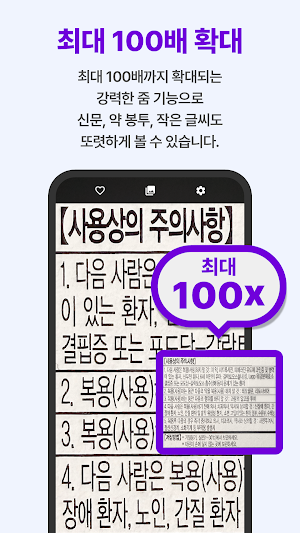
-- Powerful Zoom --
- Supports up to 100x zoom
- Easy adjustment with pinch zoom, sliders, and volume buttons
- Focus on your desired spot with a single tap
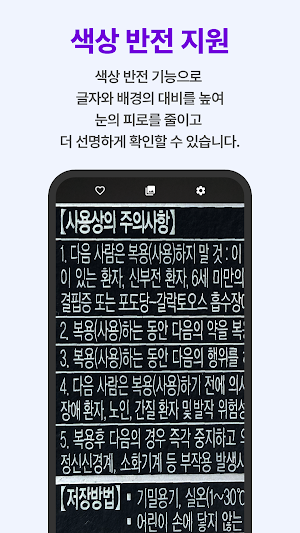
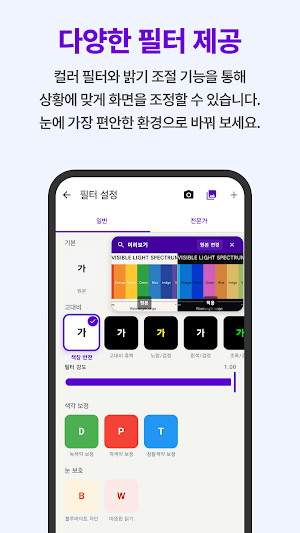
-- 11 Real-time Filters --
- High Contrast Filters: Invert, High Contrast, Black & White, Yellow Text, White Text, Green Text, Cyan Text
- Color Vision Correction Filters: Corrects Red-Green, Green-Red, and Blue-Yellow color blindness
- Eye Protection Filters: Blue Light Blocking, Warm Reading Mode
-- Custom Presets --
- Freely adjust brightness, contrast, saturation, and filter intensity
- Save frequently used settings as presets
- Share presets via link with family or friends
-- Freeze Frame --
- Freeze the screen to zoom in slowly for a detailed view
- Change filters and compare to the original while frozen
-- Expert Settings --
- Fine-tuning RGB gain, color temperature (3000–9000K), and hue rotation
- Blend between the original and the filter by adjusting filter intensity
-- Floating Button --
- Switch to other apps Launch directly via the top-of-screen button while using
- Located at the edge of the screen so it doesn't get in the way
-- Gallery --
- Capture and save photos with filters applied
- View saved photos directly in the gallery
[Recommended for]
- Those who have difficulty reading small text
- Those who find it inconvenient to carry a magnifying glass at all times
- Those with color vision deficiencies who have difficulty distinguishing colors
- Those who want to reduce eye strain when reading for long periods
- Those who want to zoom in on medication instructions, menus, and price lists
[Accessibility]
The Universal Magnifier is designed to allow people with low vision, color vision deficiencies, and the elderly to use it more comfortably in their daily lives. It provides a clearer and easier-to-distinguish screen through high-contrast filters and color correction features.
Required Permissions:
- Camera: Required for real-time zooming and capturing
- Notifications: Used for notifications when the floating button service launches
- Display over other apps: Required for the floating button function
Medicine instructions, receipts, menus... those moments of inconvenience when you didn't have a magnifying glass—now, solve them with just your smartphone.
All-Purpose Magnifier is more than just a simple magnification app.
From real-time camera filters and color correction to saving presets—you can create a screen that is perfect for you.
[Key Features]
-- Powerful Zoom --
- Supports up to 100x zoom
- Easy adjustment with pinch zoom, sliders, and volume buttons
- Focus on your desired spot with a single tap
-- 11 Real-time Filters --
- High Contrast Filters: Invert, High Contrast, Black & White, Yellow Text, White Text, Green Text, Cyan Text
- Color Vision Correction Filters: Corrects Red-Green, Green-Red, and Blue-Yellow color blindness
- Eye Protection Filters: Blue Light Blocking, Warm Reading Mode
-- Custom Presets --
- Freely adjust brightness, contrast, saturation, and filter intensity
- Save frequently used settings as presets
- Share presets via link with family or friends
-- Freeze Frame --
- Freeze the screen to zoom in slowly for a detailed view
- Change filters and compare to the original while frozen
-- Expert Settings --
- Fine-tuning RGB gain, color temperature (3000–9000K), and hue rotation
- Blend between the original and the filter by adjusting filter intensity
-- Floating Button --
- Switch to other apps Launch directly via the top-of-screen button while using
- Located at the edge of the screen so it doesn't get in the way
-- Gallery --
- Capture and save photos with filters applied
- View saved photos directly in the gallery
[Recommended for]
- Those who have difficulty reading small text
- Those who find it inconvenient to carry a magnifying glass at all times
- Those with color vision deficiencies who have difficulty distinguishing colors
- Those who want to reduce eye strain when reading for long periods
- Those who want to zoom in on medication instructions, menus, and price lists
[Accessibility]
The Universal Magnifier is designed to allow people with low vision, color vision deficiencies, and the elderly to use it more comfortably in their daily lives. It provides a clearer and easier-to-distinguish screen through high-contrast filters and color correction features.
Required Permissions:
- Camera: Required for real-time zooming and capturing
- Notifications: Used for notifications when the floating button service launches
- Display over other apps: Required for the floating button function
What’s new
Version 1.2.0 · Updated September 17, 2026
편의사항 업데이트가 있습니다.
Alternatives to 만능 돋보기 - 초강력 확대, 필터, 색 보정
Looking for apps like 만능 돋보기 - 초강력 확대, 필터, 색 보정? Here are 6 similar Android apps on Google Play. 5 of the 6 are free to download.
-
PDF Reader for All Documents
-
Secure Password Generator
-
Dexcel Arbitraje y Gestión P2P
-
Asset+
-
Ayurbill-Pettah
-
SamyRemote – Smart TV Remote
| App | Rating | Price | Installs | Last updated | Compare |
|---|---|---|---|---|---|
| 만능 돋보기 - 초강력 확대, 필터, 색 보정 | – | Free | 10,000+ | Sep 17, 2026 | |
| PDF Reader for All Documents | – | Free | 1,000+ | Apr 6, 2026 | Compare |
| Secure Password Generator | – | Free | 10+ | Aug 18, 2025 | Compare |
| Dexcel Arbitraje y Gestión P2P | – | Free | 50+ | Dec 14, 2025 | Compare |
| Asset+ | – | Free | 10+ | Aug 25, 2026 | Compare |
| Ayurbill-Pettah | – | Free | 5+ | Feb 24, 2026 | Compare |
| SamyRemote – Smart TV Remote | – | 2.99 USD | 10+ | Jan 6, 2026 | Compare |
Similar apps on Google Play
- PDF Reader for All Documents
- Secure Password Generator
- Dexcel Arbitraje y Gestión P2P
- Asset+
- Ayurbill-Pettah
- SamyRemote – Smart TV Remote
- Mein grüüün
- Findify: Apartment Finder
- Flash Alert
- FB2 Reader: Classic Ebook Pro
- MLS APP
- PDF Converter - JPG to PDF
- India Bayer Rewards Plus
- WardScope Mobile
- Trade It
- Unit Converter
- QR Code Scanner Pro
- IMJ
- Universidade Friedman
- AA Home v1
- Iassa Sip
- X-Rayl Scanner
- Flashlight
- Simple Mahjong Calculator
- Location Reminders: GPS Alerts