

만능 녹음기 - 스마트 하고 완벽한 기록
Dev Loach Tools
High-quality voice recorder - Scheduled recording, noise detection, cloud backup, security lock, audio editing
- Downloads
- 189K+
- on Google Play
- Price
- Free
- No in-app purchases
- Updated
- Sep 18
- 2026 · v1.1.9
Screenshots




About 만능 녹음기 - 스마트 하고 완벽한 기록
Are you looking for a powerful and intuitive recording app? Record every sound from meetings, lectures, interviews, and music practice without missing a beat. Going beyond a simple voice recorder, we’ve packed all the features you need for recording into one app—from scheduled recording to noise-activated automatic recording, cloud backup, and security locks.
━━━━━━━━━━━━━━━━━━━━━
◆ High-Quality Audio Recording
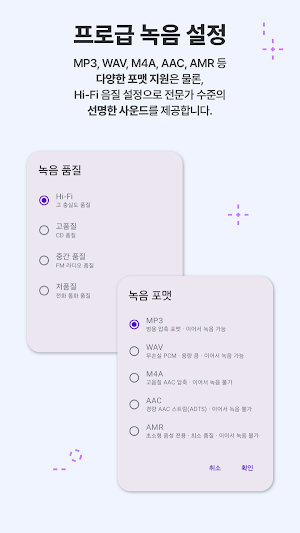
Provides optimal recording for any situation with various audio formats and quality settings. • Supports 5 audio formats including MP3, M4A, WAV, AAC, and AMR
• 4 quality presets ranging from Hi-Fi (96kHz/320kbps) to Low Capacity (16kHz/64kbps)
• Detailed custom settings for sample rate (8kHz–96kHz), bitrate (32–320kbps), and mono/stereo
• Real-time waveform visualization during recording to check recording status at a glance
• Pause and resume recording — cleanly record only the parts you need
• Displays remaining recording time based on storage space
━━━━━━━━━━━━━━━━━━━━━━
◆ Bookmarks during recording
Don't miss important moments during long recordings.
• You can add bookmarks and leave notes at any point you want during recording
• Jump directly to your desired point in the bookmark list during playback
• Manage recordings systematically with bookmark editing and deletion functions
━━━━━━━━━━━━━━━━━━━━━
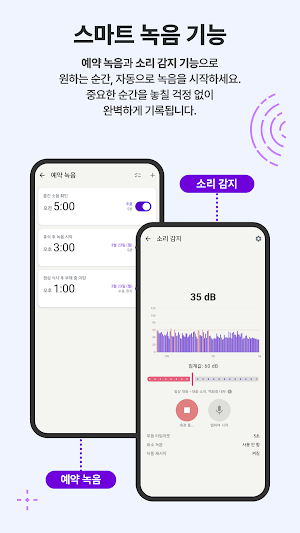
◆ Scheduled Recording
Schedule important meetings, classes, or unmissable moments in advance.
• Start recording automatically by specifying a date and time
• Record only as much as you want by setting the recording duration (in minutes)
• Repeat scheduling feature — Automatically record on specific days of the week (e.g., meetings every Monday, Wednesday, and Friday)
• Manage schedule status: Check statuses at a glance: Pending, Recording, Completed, Canceled, and Missed
• Easily distinguish scheduled recordings with custom titles
━━━━━━━━━━━━━━━━━━━━━━
◆ Noise Detection Automatic Recording (Monitoring)
Starts recording automatically when sound is detected.
• Real-time decibel (dB) monitoring and waveform visualization
• Automatic recording starts when user-set thresholds (dB) are exceeded
• Automatic stop upon detection of silence — prevents unnecessary recording
• Silence timeout (3 sec to 30 sec) and minimum recording time settings
• Option to automatically restart monitoring after recording is complete
• Suitable for nighttime noise detection, detecting abnormal sounds during sleep, office recording, etc.
━━━━━━━━━━━━━━━━━━━━━━
◆ Audio Trimming & Editing
Precisely cut out only the necessary parts from your recording files.
• Waveform-based visual trimming — intuitively adjust start and end points
• Precise editing in milliseconds using zoom in/out
• Immediately check the result with trimming previews
• Choose to keep the original or overwrite
• Bookmarks are displayed on the trimming timeline for convenient section selection
━━━━━━━━━━━━━━━━━━━━━
◆ Recording File Management
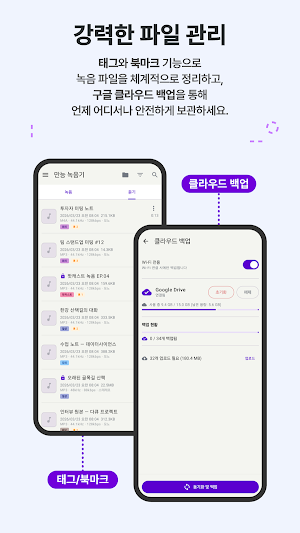
You can systematically manage numerous recording files. • Sort and search functions by name, date, and size
• Custom tags — Classify and filter recordings using color-coded tags
• Quickly find recordings within a specific period using date range filters
• Rename recordings and edit metadata (artist, album)
• Insert cover images — Add images to recordings from gallery or camera
• Perform bulk operations such as batch deletion and tagging with multi-selection
• Easily transfer recording files to other apps using the sharing function
━━━━━━━━━━━━━━━━━━━━━
◆ Security & Privacy
Securely protect your sensitive recording files. • Individual Record Lock — Selectively protect only important files
• Supports 3 authentication methods: PIN, password, and biometric authentication (fingerprint/face)
• Lock the recording list itself — Requires authentication upon entering the app
• Automatic lock option for new recordings
• Authentication required even when deleting locked files — Prevents accidental deletion
━━━━━━━━━━━━━━━━━━━━━━
◆ Cloud Backup
Keep your valuable recordings safe in the cloud.
• Supports 3 major cloud services: Google Drive, Dropbox, and OneDrive
• Automatic backup option after recording is complete
• Save mobile data with Wi-Fi-only synchronization
• Selective Upload — Back up only the files you want
• Real-time upload status check
• Crash resolution and automatic retries
━━━━━━━━━━━━━━━━━━━━━
◆ Trash & Recovery
Rest assured even if you accidentally delete files.
• Deleted recordings are stored in the Trash — can be restored at any time
• Automatic permanent deletion based on retention period settings
• Search and sort functions within the Trash
• Supports individual or batch restoration/permanent deletion
━━━━━━━━━━━━━━━━━━━━━━
◆ Floating Button
Start recording quickly while using other apps.
• Floating recording button above the screen
• Start/stop recording with a single touch from any app
• Check recording status in real-time
━━━━━━━━━━━━━━━━━━━━━━
◆ Playback Function
Listen to your recorded files conveniently.
• Playback with real-time waveform visualization
• Adjust playback speed — listen fast or slow
• Skip 5 seconds forward/backward
• Adjust volume
• Go directly to bookmarked points
━━━━━━━━━━━━━━━━━━━━━━
◆ Settings & Customization
Create your own recording environment. • Dark Mode / Light Mode / System-linked Themes
• Multilingual support (Korean, English)
• Automatic pause option for incoming calls
• Prevent screen from turning off during recording
• Settings for automatic recording file name generation rules (including date/time format)
• Individual file name prefix settings for manual recording, scheduled recording, and noise-detected recording
• Setting whether to display name input popup upon saving
• Input device (microphone) selection
━━━━━━━━━━━━━━━━━━━━━━
◆ FAQ & Help
Check the in-app FAQ for any questions you may have while using the app. ━━━━━━━━━━━━━━━━━━━━━━
Recommended for:
• Office workers and students who want to record every meeting, lecture, and seminar without missing anything
• Musicians who want to record and compare their music practice or vocal training
• Journalists and content creators who want to safely store interviews and coverage
• Those who want to record snoring or sleep talking while sleeping
• Those who want to monitor nighttime noise or environmental sounds
• Those who want to systematically classify recording files and back them up to the cloud
Download now and experience everything there is to record.
━━━━━━━━━━━━━━━━━━━━━
◆ High-Quality Audio Recording
Provides optimal recording for any situation with various audio formats and quality settings. • Supports 5 audio formats including MP3, M4A, WAV, AAC, and AMR
• 4 quality presets ranging from Hi-Fi (96kHz/320kbps) to Low Capacity (16kHz/64kbps)
• Detailed custom settings for sample rate (8kHz–96kHz), bitrate (32–320kbps), and mono/stereo
• Real-time waveform visualization during recording to check recording status at a glance
• Pause and resume recording — cleanly record only the parts you need
• Displays remaining recording time based on storage space
━━━━━━━━━━━━━━━━━━━━━━
◆ Bookmarks during recording
Don't miss important moments during long recordings.
• You can add bookmarks and leave notes at any point you want during recording
• Jump directly to your desired point in the bookmark list during playback
• Manage recordings systematically with bookmark editing and deletion functions
━━━━━━━━━━━━━━━━━━━━━
◆ Scheduled Recording
Schedule important meetings, classes, or unmissable moments in advance.
• Start recording automatically by specifying a date and time
• Record only as much as you want by setting the recording duration (in minutes)
• Repeat scheduling feature — Automatically record on specific days of the week (e.g., meetings every Monday, Wednesday, and Friday)
• Manage schedule status: Check statuses at a glance: Pending, Recording, Completed, Canceled, and Missed
• Easily distinguish scheduled recordings with custom titles
━━━━━━━━━━━━━━━━━━━━━━
◆ Noise Detection Automatic Recording (Monitoring)
Starts recording automatically when sound is detected.
• Real-time decibel (dB) monitoring and waveform visualization
• Automatic recording starts when user-set thresholds (dB) are exceeded
• Automatic stop upon detection of silence — prevents unnecessary recording
• Silence timeout (3 sec to 30 sec) and minimum recording time settings
• Option to automatically restart monitoring after recording is complete
• Suitable for nighttime noise detection, detecting abnormal sounds during sleep, office recording, etc.
━━━━━━━━━━━━━━━━━━━━━━
◆ Audio Trimming & Editing
Precisely cut out only the necessary parts from your recording files.
• Waveform-based visual trimming — intuitively adjust start and end points
• Precise editing in milliseconds using zoom in/out
• Immediately check the result with trimming previews
• Choose to keep the original or overwrite
• Bookmarks are displayed on the trimming timeline for convenient section selection
━━━━━━━━━━━━━━━━━━━━━
◆ Recording File Management
You can systematically manage numerous recording files. • Sort and search functions by name, date, and size
• Custom tags — Classify and filter recordings using color-coded tags
• Quickly find recordings within a specific period using date range filters
• Rename recordings and edit metadata (artist, album)
• Insert cover images — Add images to recordings from gallery or camera
• Perform bulk operations such as batch deletion and tagging with multi-selection
• Easily transfer recording files to other apps using the sharing function
━━━━━━━━━━━━━━━━━━━━━
◆ Security & Privacy
Securely protect your sensitive recording files. • Individual Record Lock — Selectively protect only important files
• Supports 3 authentication methods: PIN, password, and biometric authentication (fingerprint/face)
• Lock the recording list itself — Requires authentication upon entering the app
• Automatic lock option for new recordings
• Authentication required even when deleting locked files — Prevents accidental deletion
━━━━━━━━━━━━━━━━━━━━━━
◆ Cloud Backup
Keep your valuable recordings safe in the cloud.
• Supports 3 major cloud services: Google Drive, Dropbox, and OneDrive
• Automatic backup option after recording is complete
• Save mobile data with Wi-Fi-only synchronization
• Selective Upload — Back up only the files you want
• Real-time upload status check
• Crash resolution and automatic retries
━━━━━━━━━━━━━━━━━━━━━
◆ Trash & Recovery
Rest assured even if you accidentally delete files.
• Deleted recordings are stored in the Trash — can be restored at any time
• Automatic permanent deletion based on retention period settings
• Search and sort functions within the Trash
• Supports individual or batch restoration/permanent deletion
━━━━━━━━━━━━━━━━━━━━━━
◆ Floating Button
Start recording quickly while using other apps.
• Floating recording button above the screen
• Start/stop recording with a single touch from any app
• Check recording status in real-time
━━━━━━━━━━━━━━━━━━━━━━
◆ Playback Function
Listen to your recorded files conveniently.
• Playback with real-time waveform visualization
• Adjust playback speed — listen fast or slow
• Skip 5 seconds forward/backward
• Adjust volume
• Go directly to bookmarked points
━━━━━━━━━━━━━━━━━━━━━━
◆ Settings & Customization
Create your own recording environment. • Dark Mode / Light Mode / System-linked Themes
• Multilingual support (Korean, English)
• Automatic pause option for incoming calls
• Prevent screen from turning off during recording
• Settings for automatic recording file name generation rules (including date/time format)
• Individual file name prefix settings for manual recording, scheduled recording, and noise-detected recording
• Setting whether to display name input popup upon saving
• Input device (microphone) selection
━━━━━━━━━━━━━━━━━━━━━━
◆ FAQ & Help
Check the in-app FAQ for any questions you may have while using the app. ━━━━━━━━━━━━━━━━━━━━━━
Recommended for:
• Office workers and students who want to record every meeting, lecture, and seminar without missing anything
• Musicians who want to record and compare their music practice or vocal training
• Journalists and content creators who want to safely store interviews and coverage
• Those who want to record snoring or sleep talking while sleeping
• Those who want to monitor nighttime noise or environmental sounds
• Those who want to systematically classify recording files and back them up to the cloud
Download now and experience everything there is to record.
What’s new
Version 1.1.9 · Updated September 18, 2026
편의사항 업데이트가 있습니다.
Alternatives to 만능 녹음기 - 스마트 하고 완벽한 기록
Looking for apps like 만능 녹음기 - 스마트 하고 완벽한 기록? Here are 6 similar Android apps on Google Play. The highest rated is Bise Result Check Online (4.0/5), and all 6 are free to download.
-
Burned-in Subtitle Extractor
-
Bel InfoNet
-
ledholo. 2.0
-
Trusty Tools
-
Photo Restore – Lost Recovery
-
Bise Result Check Online 4.0
| App | Rating | Price | Installs | Last updated | Compare |
|---|---|---|---|---|---|
| 만능 녹음기 - 스마트 하고 완벽한 기록 | – | Free | 100,000+ | Sep 18, 2026 | |
| Burned-in Subtitle Extractor | – | Free | 1,000+ | Sep 4, 2026 | Compare |
| Bel InfoNet | – | Free | 1,000+ | – | Compare |
| ledholo. 2.0 | – | Free | 100+ | Sep 23, 2026 | Compare |
| Trusty Tools | – | Free | 50+ | Sep 2, 2025 | Compare |
| Photo Restore – Lost Recovery | – | Free | 500,000+ | Mar 11, 2026 | Compare |
| Bise Result Check Online | 4.0 / 5 | Free | 100,000+ | Sep 28, 2026 | Compare |
Similar apps on Google Play
- Burned-in Subtitle Extractor
- Bel InfoNet
- ledholo. 2.0
- Trusty Tools
- Photo Restore – Lost Recovery
- Bise Result Check Online
- GPS Shipping Partner(SPA)
- AirAsturias
- Story Saver
- Vetra
- Big Fishing: Bananza
- Chemical-molecular-calculation
- 国学雅韵
- Darkiiee : The Private Browser
- eSIM Manager
- Vacuum Analyzer AD70V
- TraceX Guard Mobile Security
- eSOMS Maintenance
- Alarm Fenix Mobile
- Student Id card maker
- X MOD SKIN - MOD SKIN MLBB
- UniSearch: AI Image Search
- MRO Customer
- A00s Mobile
- ARIEL DMR - Hotel Analytics