
Dual Camera: Front & Back
Photography In-app purchases Contains ads
Front & back together. Dual PiP, split, privacy covers — photos & videos
- Rating
- 4.9
- 98 ratings
- Downloads
- 8K+
- on Google Play
- Price
- Free
- In-app purchases
- Updated
- Oct 22
- 2026 · v2.22
Screenshots
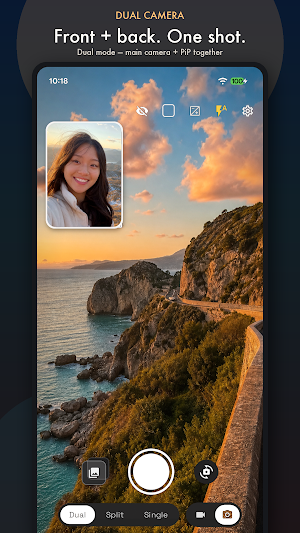
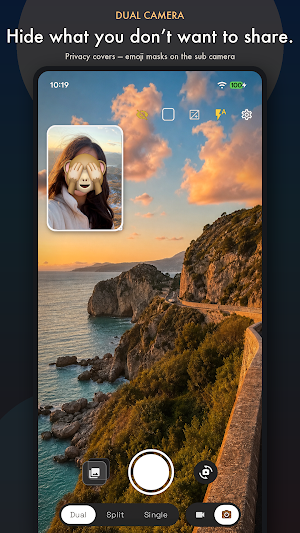
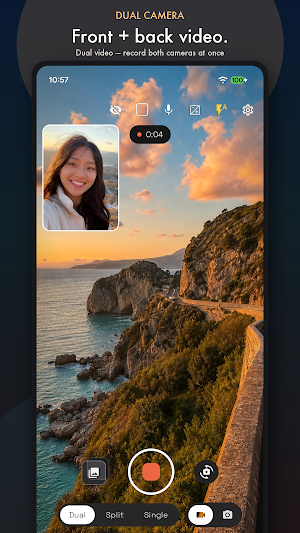
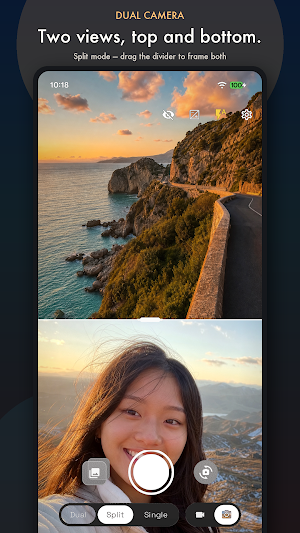


About Dual Camera: Front & Back
Capture with your front and back cameras at the same time.
Dual Camera lets you preview and shoot both cameras together — then saves a ready-to-share dual photo or video in one tap. Perfect for BeReal-style moments, travel selfies with the view behind you, reactions, and dual-camera vlogs. Hide faces, plates, or anything else with live privacy covers before you share.
◆ WHY DUAL CAMERA
• True simultaneous front & back capture — no flipping, no stitching later
• Live dual preview while you shoot
• One-tap dual photos and dual videos
• Privacy covers while you shoot — baked into the saved photo or video
• Privacy-first: photos and videos stay on your phone — no cloud upload. Optional Premium removes ads
◆ SHOOT YOUR WAY
• Dual mode — full-screen main camera with a draggable picture-in-picture (PiP) overlay
• Split mode — top/bottom split with an adjustable divider
• Single mode — classic one-camera shooting when you need it
• Swap front and back instantly
• Photo and Video modes
◆ PRIVACY COVERS
• Cover any spot on the live preview before you capture or while you record
• Choose a black circle, rounded rectangle (great for plates), or emoji sticker
• Tap to place, drag to move, pinch to resize
• What you see is what you save — covers are baked into photos and videos
• Ideal for faces, kids, license plates, screens, and other details you’d rather not share
◆ MAKE IT YOURS
• Customize PiP frames: Rounded, Soft, Square, Circle, or Thick
• Drag and resize the PiP window
• Aspect ratios: Full, 16:9, 4:3, and 1:1
• Pinch to zoom, tap to focus
• Volume keys for zoom or shutter
• Flash: Auto, On, or Off
• Mute the mic while recording video
◆ CREATOR CONTROLS
• Resolutions up to 4K (device-dependent)
• Frame rates: Auto, 30, 24, or 10 fps
• Optional Ultra HDR photos and HLG HDR video in Single mode
• Video stabilization
• Premium can also save separate front and back files alongside the composite
◆ BUILT-IN LIBRARY
Browse, play, share, and delete your dual camera photos and videos from the in-app gallery — or open them in your system gallery.
◆ DEVICE NOTES
Dual and Split modes need a phone that supports Android Concurrent Camera (many recent Pixel, Galaxy, Xperia, and other flagship devices). On other phones, Single mode is available.
Whether you’re capturing a dual selfie and the scenery, a split-screen moment with someone, or a BeReal-style front-and-back video — Dual Camera keeps both sides of the story in one shot, with privacy covers when you need them.
Dual Camera lets you preview and shoot both cameras together — then saves a ready-to-share dual photo or video in one tap. Perfect for BeReal-style moments, travel selfies with the view behind you, reactions, and dual-camera vlogs. Hide faces, plates, or anything else with live privacy covers before you share.
◆ WHY DUAL CAMERA
• True simultaneous front & back capture — no flipping, no stitching later
• Live dual preview while you shoot
• One-tap dual photos and dual videos
• Privacy covers while you shoot — baked into the saved photo or video
• Privacy-first: photos and videos stay on your phone — no cloud upload. Optional Premium removes ads
◆ SHOOT YOUR WAY
• Dual mode — full-screen main camera with a draggable picture-in-picture (PiP) overlay
• Split mode — top/bottom split with an adjustable divider
• Single mode — classic one-camera shooting when you need it
• Swap front and back instantly
• Photo and Video modes
◆ PRIVACY COVERS
• Cover any spot on the live preview before you capture or while you record
• Choose a black circle, rounded rectangle (great for plates), or emoji sticker
• Tap to place, drag to move, pinch to resize
• What you see is what you save — covers are baked into photos and videos
• Ideal for faces, kids, license plates, screens, and other details you’d rather not share
◆ MAKE IT YOURS
• Customize PiP frames: Rounded, Soft, Square, Circle, or Thick
• Drag and resize the PiP window
• Aspect ratios: Full, 16:9, 4:3, and 1:1
• Pinch to zoom, tap to focus
• Volume keys for zoom or shutter
• Flash: Auto, On, or Off
• Mute the mic while recording video
◆ CREATOR CONTROLS
• Resolutions up to 4K (device-dependent)
• Frame rates: Auto, 30, 24, or 10 fps
• Optional Ultra HDR photos and HLG HDR video in Single mode
• Video stabilization
• Premium can also save separate front and back files alongside the composite
◆ BUILT-IN LIBRARY
Browse, play, share, and delete your dual camera photos and videos from the in-app gallery — or open them in your system gallery.
◆ DEVICE NOTES
Dual and Split modes need a phone that supports Android Concurrent Camera (many recent Pixel, Galaxy, Xperia, and other flagship devices). On other phones, Single mode is available.
Whether you’re capturing a dual selfie and the scenery, a split-screen moment with someone, or a BeReal-style front-and-back video — Dual Camera keeps both sides of the story in one shot, with privacy covers when you need them.
What’s new
Version 2.22 · Updated October 22, 2026
• Added Smart Take — the shutter fires automatically when everyone looks ready • On foldables, you can show a cover screen preview • Improved shooting controls and stability
Alternatives to Dual Camera: Front & Back
Looking for apps like Dual Camera: Front & Back? Here are 6 similar Android apps on Google Play. The highest rated is HD Camera (4.6/5), and 3 of the 6 are free to download.
-
mcpro24fps manual video camera 4.5
-
AGC ToolKit - Watermark LUT 4.6
-
HD Camera 4.6
-
PicMaster - AI Photo Editor 4.5
-
Litchi for DJI Drones 4.5
-
Chaos Audio: Effects & Amp AI 4.2
| App | Rating | Price | Installs | Last updated | Compare |
|---|---|---|---|---|---|
| Dual Camera: Front & Back | 4.9 / 5 | Free | 5,000+ | Oct 22, 2026 | |
| mcpro24fps manual video camera | 4.6 / 5 | 19.99 USD | 10,000+ | Nov 2, 2026 | Compare |
| AGC ToolKit - Watermark LUT | 4.6 / 5 | Free | 100,000+ | Aug 29, 2026 | Compare |
| HD Camera | 4.6 / 5 | Free | 5,000,000+ | – | Compare |
| PicMaster - AI Photo Editor | 4.5 / 5 | 6.49 USD | 1,000+ | Aug 28, 2025 | Compare |
| Litchi for DJI Drones | 4.5 / 5 | 26.99 USD | 100,000+ | Apr 7, 2026 | Compare |
| Chaos Audio: Effects & Amp AI | 4.2 / 5 | Free | 1,000+ | Sep 25, 2026 | Compare |
Similar apps on Google Play
- mcpro24fps manual video camera
- AGC ToolKit - Watermark LUT
- HD Camera
- PicMaster - AI Photo Editor
- Litchi for DJI Drones
- Chaos Audio: Effects & Amp AI
- Framelapse 2 Time Lapse Camera
- Camera - HD Camera for Android
- PULSEpx - Photography
- BlackVue
- Manual Camera DSLR (Lite)
- Cameringo Lite. Filters Camera
- Camera FV-5 Lite
- SelfieCity
- IPC360 Home
- PhotoSpot: For Travel Planning
- POV – Disposable Camera Events
- Solocator - GPS Field Camera
- Contours: Ski Snowboard Tour
- ProCam X - Lite :HD Camera Pro
- Loom – Screen and Cam Recorder
- SPYPOINT
- Bartlett Arborist Supply