

Ampere Check
Daniyar Nurgaliyev Tools Contains ads
This application checks your Battery charge status.
- Downloads
- 1K+
- on Google Play
- Price
- Free
- No in-app purchases
- Updated
- Feb 10
- 2019 · v1.3
Screenshots


About Ampere Check
Ampere check provides the data of your battary status:
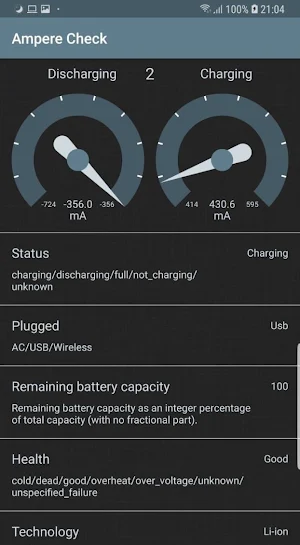
- Charge status: charging, discharging, full, not_charging, unknown;
- Plugged status: power source is an AC charger, USB port, wireless;
- Battery Health cold, dead, good, overheat, over_voltage, unknown, unspecified_failure;
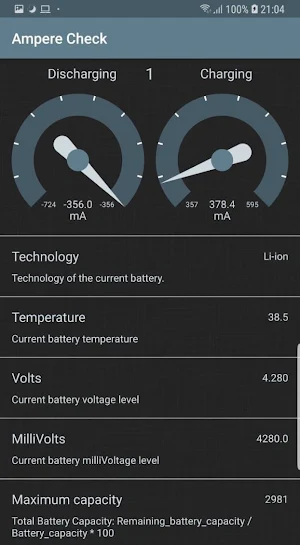
- The technology of the current battery;
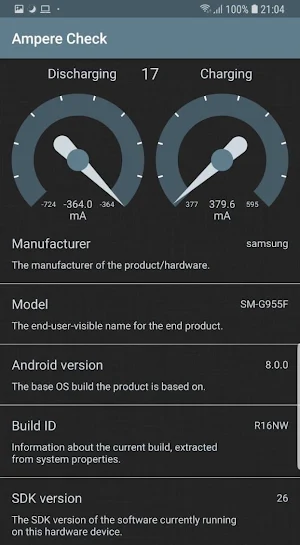
- Model type: the end-user-visible name for the end product;
- Android version: the base OS build the product is based on;
- Build ID: Information about the current build, extracted from system properties;
- MilliVolts and Volts: Current battery milliVoltage and voltage level;
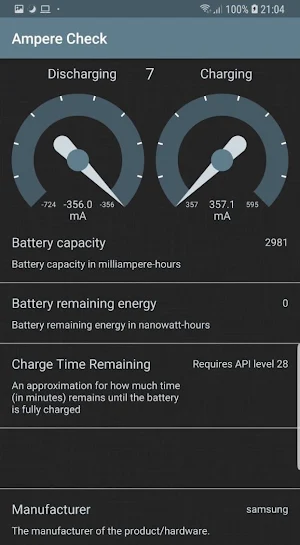
- Battery remaining energy in nanowatt-hours;
- Battery capacity in milliampere-hours;
- Remaining battery capacity as an integer percentage of total capacity (with no fractional part);
- The manufacturer of the product/hardware;
- Current battery temperature;
- The SDK version of the software currently running on this hardware device;
- An approximation for how much time (in minutes) remains until the battery is fully charged;
- Maximum battery capacity;
- Total Battery Capacity which is calculated as a Remaining_battery_capacity / Battery_capacity * 100
The application using BatteryManager class, which contains strings and constants used for values in the Intent.ACTION_BATTERY_CHANGED Intent, and provides a method for querying battery and charging properties.
The Charging speedometer changes when the device's battery has started charging (or has reached full charge and the device is on power). This is a good time to do calculate ampere check, as that it would like to avoid doing while on battery (that is to avoid draining the user's battery due to things they don't care enough about).
When the device's battery is discharging, this application avoids doing extraneous work that would cause it to discharge faster.
Positive values in amperemeters indicate net current entering the battery from a charge source, negative values indicate net current discharging from the battery.
- Charge status: charging, discharging, full, not_charging, unknown;
- Plugged status: power source is an AC charger, USB port, wireless;
- Battery Health cold, dead, good, overheat, over_voltage, unknown, unspecified_failure;
- The technology of the current battery;
- Model type: the end-user-visible name for the end product;
- Android version: the base OS build the product is based on;
- Build ID: Information about the current build, extracted from system properties;
- MilliVolts and Volts: Current battery milliVoltage and voltage level;
- Battery remaining energy in nanowatt-hours;
- Battery capacity in milliampere-hours;
- Remaining battery capacity as an integer percentage of total capacity (with no fractional part);
- The manufacturer of the product/hardware;
- Current battery temperature;
- The SDK version of the software currently running on this hardware device;
- An approximation for how much time (in minutes) remains until the battery is fully charged;
- Maximum battery capacity;
- Total Battery Capacity which is calculated as a Remaining_battery_capacity / Battery_capacity * 100
The application using BatteryManager class, which contains strings and constants used for values in the Intent.ACTION_BATTERY_CHANGED Intent, and provides a method for querying battery and charging properties.
The Charging speedometer changes when the device's battery has started charging (or has reached full charge and the device is on power). This is a good time to do calculate ampere check, as that it would like to avoid doing while on battery (that is to avoid draining the user's battery due to things they don't care enough about).
When the device's battery is discharging, this application avoids doing extraneous work that would cause it to discharge faster.
Positive values in amperemeters indicate net current entering the battery from a charge source, negative values indicate net current discharging from the battery.
What’s new
Version 1.3 · Updated February 10, 2019
Fixed the bug with the Min Value of mA in Charging and Discharging mode
Alternatives to Ampere Check
Looking for apps like Ampere Check? Here are 6 similar Android apps on Google Play. All of them are free to download.
-
Time Difference Calculator
-
Қазақтың салт-дәстүрлері
-
Жаңылтпаштар жинағы
-
Random Number Generator
-
Казахские сказки
-
Мақал-Мәтелдер жинағы
| App | Rating | Price | Installs | Last updated | Compare |
|---|---|---|---|---|---|
| Ampere Check | – | Free | 1,000+ | Feb 10, 2019 | |
| Time Difference Calculator | – | Free | 1,000+ | Feb 23, 2019 | Compare |
| Қазақтың салт-дәстүрлері | – | Free | 10,000+ | Jun 30, 2026 | Compare |
| Жаңылтпаштар жинағы | – | Free | 5,000+ | Jun 27, 2018 | Compare |
| Random Number Generator | – | Free | 1,000+ | Jan 30, 2018 | Compare |
| Казахские сказки | – | Free | 1,000+ | Nov 30, 2017 | Compare |
| Мақал-Мәтелдер жинағы | – | Free | 50,000+ | Aug 9, 2026 | Compare |
Compare Ampere Check with the top alternatives: ratings, updates, ASO score and keyword gaps →