

NDCC Bank Mobile
The Nilgiris District Central Cooperative Bank Finance
NDCC BANK MOBILE BANKING
- Downloads
- 25.1K+
- on Google Play
- Price
- Free
- No in-app purchases
- Updated
- Mar 19
- 2026 · v1.2.4
Screenshots


About NDCC Bank Mobile
NDCC Bank Mobile
The Official Mobile Banking App of The Nilgiris District Central Co-operative Bank Ltd.
NDCC Bank Mobile allows you to access your account using your registered Mobile number.
Features:
NDCC Bank Mobile enables you to access the following services
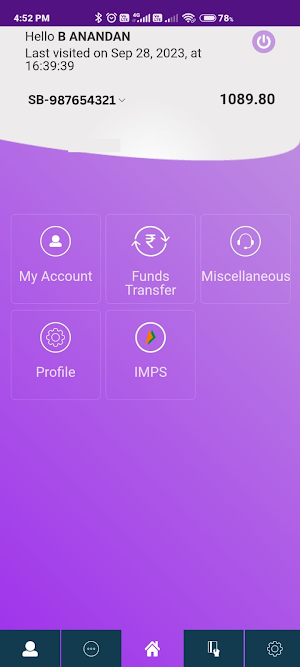
* Check Account Balance
* View and transfer from all your accounts including loans and deposits.
* View Your transaction History
* Funds transfer – Own Account
* Funds transfer – Transfer with in Bank
* Funds transfer - Transfer to Other Bank Account -NEFT
* Immediate Payment Service (IMPS)
How to Activate Mobile Banking Application
1. Download the Mobile Banking Application from Google Play store. Please don’t download from any other websites. However, for user id and password you will have to register for the service with your nearest bank branch.
Install NDCCB Mobile Banking app
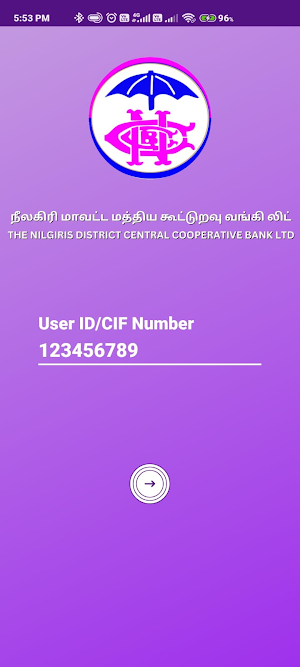
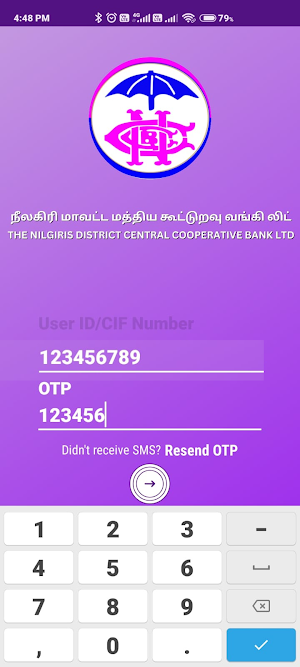
2. Enter the USER ID whereby NDCCB Mobile send the OTP message to your registered mobile device and validate automatically.
3. Once successfully validated you will be asked to enter 6 digits MPIN. Please enter 6 digits MPIN of your choice and you will be activated for Mobile Banking Services.
4. For fund transfer we shall deliver OTP on your Registered Mobile Device. Enter the OTP on the screen when asked to proceed further.
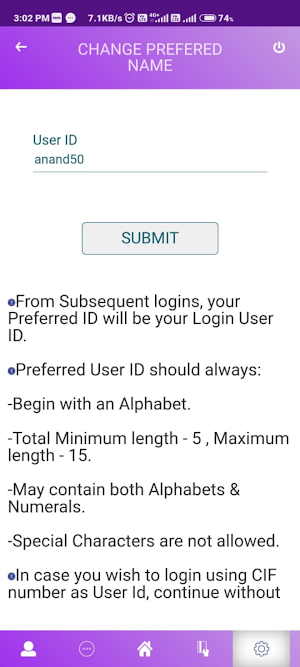
5. New update: Change Username instead of CIF Number
Requirements:
Before you download the app, please ensure the following:
1. You have registered your account for Mobile Banking Services in the nearby branch.
2. You have downloaded the NDCCB Mobile App in same device which has registered mobile number
Security Advice
NDCC Bank will never ask you to provide your User ID, MPIN and OTP (One Time Password). Please be aware of such Phishing by fraudulent. Secure your app by changing the MPIN periodically using the Change MPIN feature. By downloading the NDCC Bank Mobile app you are agreeing to and providing consent to have read and understood the Terms & Conditions of The Nilgiris District Central Co-operative Bank Ltd which is published in the Bank website “https://nilgirisdccb.net”
The Official Mobile Banking App of The Nilgiris District Central Co-operative Bank Ltd.
NDCC Bank Mobile allows you to access your account using your registered Mobile number.
Features:
NDCC Bank Mobile enables you to access the following services
* Check Account Balance
* View and transfer from all your accounts including loans and deposits.
* View Your transaction History
* Funds transfer – Own Account
* Funds transfer – Transfer with in Bank
* Funds transfer - Transfer to Other Bank Account -NEFT
* Immediate Payment Service (IMPS)
How to Activate Mobile Banking Application
1. Download the Mobile Banking Application from Google Play store. Please don’t download from any other websites. However, for user id and password you will have to register for the service with your nearest bank branch.
Install NDCCB Mobile Banking app
2. Enter the USER ID whereby NDCCB Mobile send the OTP message to your registered mobile device and validate automatically.
3. Once successfully validated you will be asked to enter 6 digits MPIN. Please enter 6 digits MPIN of your choice and you will be activated for Mobile Banking Services.
4. For fund transfer we shall deliver OTP on your Registered Mobile Device. Enter the OTP on the screen when asked to proceed further.
5. New update: Change Username instead of CIF Number
Requirements:
Before you download the app, please ensure the following:
1. You have registered your account for Mobile Banking Services in the nearby branch.
2. You have downloaded the NDCCB Mobile App in same device which has registered mobile number
Security Advice
NDCC Bank will never ask you to provide your User ID, MPIN and OTP (One Time Password). Please be aware of such Phishing by fraudulent. Secure your app by changing the MPIN periodically using the Change MPIN feature. By downloading the NDCC Bank Mobile app you are agreeing to and providing consent to have read and understood the Terms & Conditions of The Nilgiris District Central Co-operative Bank Ltd which is published in the Bank website “https://nilgirisdccb.net”
What’s new
Version 1.2.4 · Updated March 19, 2026
New Updated version
User reviews

Excellent...

easy to use

nalgonda district cooperative centeral bank Ltd super

Good

Good 👍

Good
Alternatives to NDCC Bank Mobile
Looking for apps like NDCC Bank Mobile? Here are 6 similar Android apps on Google Play. All of them are free to download.





| App | Rating | Price | Installs | Last updated | Compare |
|---|---|---|---|---|---|
| NDCC Bank Mobile | – | Free | 10,000+ | Mar 19, 2026 | |
| Shahy TopUp | – | Free | 1,000+ | Mar 16, 2026 | Compare |
| LendJet | – | Free | 100,000+ | Apr 14, 2026 | Compare |
| Lwili Pay | – | Free | 10,000+ | Sep 28, 2026 | Compare |
| MarketSense | – | Free | 1,000+ | Dec 22, 2025 | Compare |
| Warangal DCC Bank | – | Free | 10,000+ | Feb 25, 2026 | Compare |
| Lendocredit Quick Loans | – | Free | 50,000+ | – | Compare |
Compare NDCC Bank Mobile with the top alternatives: ratings, updates, ASO score and keyword gaps →
Similar apps on Google Play
- Shahy TopUp
- LendJet
- Lwili Pay
- MarketSense
- Warangal DCC Bank
- Lendocredit Quick Loans
- PAP Biznes
- Neril.net
- IFAC Portal
- MyRMA
- SITANGKAS
- APH Financial
- Onsei Wallet
- ИПБ-Бизнес
- Invescore
- ImslOffice
- Rushere MobileApp
- MadaliCredit-CashLoan For OFWS
- 1Legacy
- Renalto
- Budget Tracker - Money Planner
- clevercircles
- novia: tu relación financiera
- appLojas
- Great Eastern Corporate MY