

DropShare: File Sharing
Eagle518 Productivity In-app purchases Contains ads
Fast file transfer with web access, WebDAV, and FTP/SFTP support
- Downloads
- 62+
- on Google Play
- Price
- Free
- In-app purchases
- Updated
- Aug 9
- 2026 · v1.0.18
Screenshots


About DropShare: File Sharing
🌟 DropShare - Chat-Based File & Text Sharing Tool
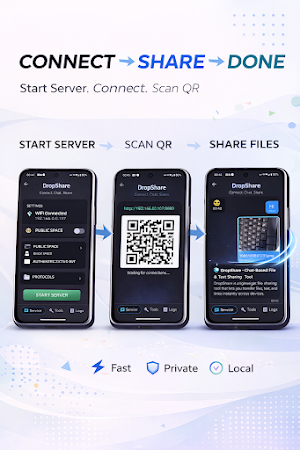
DropShare is a lightweight file sharing tool that lets you transfer files, text, and links instantly across devices.
It combines a simple chat-based interface with browser access and powerful file transfer protocols.
🚀 Key Features
• 💬 Chat-based sharing
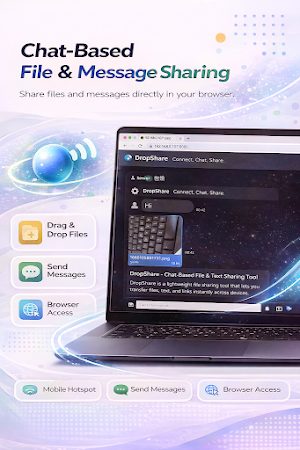
Send files and messages like chatting with a friend
• 🌐 Browser access
No installation required on the receiving side. Open a link in any browser to access shared files.
• ⚡ Multiple transfer protocols
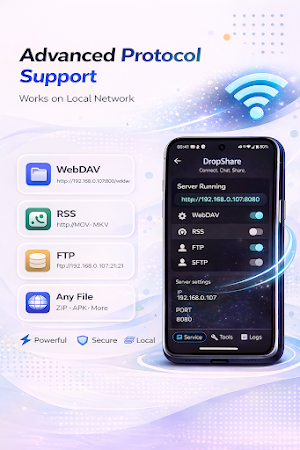
HTTP, WebDAV, FTP, and SFTP support for flexible local file access and local network sharing.
• 📁 File & text sharing
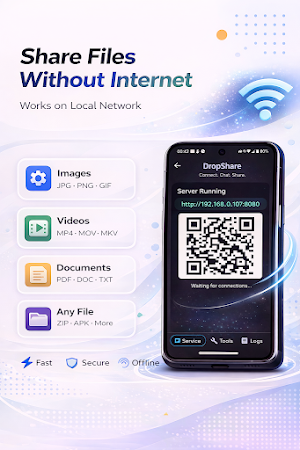
Transfer documents, images, videos, links, and text across phones, tablets, laptops, and desktops.
• 🔗 Instant access links
Create simple URLs for quick browser-based sharing.
• 🧩 Lightweight and fast
No heavy setup, no required cloud storage, and no account needed for basic local sharing.
🔧 Advanced Capabilities
DropShare supports multiple local file access methods:
• HTTP File Server
• WebDAV access
• FTP server
• SFTP server
This makes DropShare useful for everyday sharing, local network transfer, browser-based access, and developer workflows.
🎯 Use Cases
• Share files between phone and PC
• Transfer files over a local network
• Open shared files directly in a browser
• Share files without cloud storage
• Access files via HTTP, WebDAV, FTP, or SFTP
• Use your phone as a lightweight personal file server
💡 Why DropShare?
DropShare makes file transfer feel as easy as chatting.
It keeps sharing simple with a conversation-style interface, while still offering browser access and advanced protocols for users who need more control.
🧠 Summary
DropShare combines chat-based sharing, browser access, and powerful file transfer protocols including HTTP, WebDAV, FTP, and SFTP.
Simple for everyday sharing. Flexible for advanced local network workflows.
DropShare is a lightweight file sharing tool that lets you transfer files, text, and links instantly across devices.
It combines a simple chat-based interface with browser access and powerful file transfer protocols.
🚀 Key Features
• 💬 Chat-based sharing
Send files and messages like chatting with a friend
• 🌐 Browser access
No installation required on the receiving side. Open a link in any browser to access shared files.
• ⚡ Multiple transfer protocols
HTTP, WebDAV, FTP, and SFTP support for flexible local file access and local network sharing.
• 📁 File & text sharing
Transfer documents, images, videos, links, and text across phones, tablets, laptops, and desktops.
• 🔗 Instant access links
Create simple URLs for quick browser-based sharing.
• 🧩 Lightweight and fast
No heavy setup, no required cloud storage, and no account needed for basic local sharing.
🔧 Advanced Capabilities
DropShare supports multiple local file access methods:
• HTTP File Server
• WebDAV access
• FTP server
• SFTP server
This makes DropShare useful for everyday sharing, local network transfer, browser-based access, and developer workflows.
🎯 Use Cases
• Share files between phone and PC
• Transfer files over a local network
• Open shared files directly in a browser
• Share files without cloud storage
• Access files via HTTP, WebDAV, FTP, or SFTP
• Use your phone as a lightweight personal file server
💡 Why DropShare?
DropShare makes file transfer feel as easy as chatting.
It keeps sharing simple with a conversation-style interface, while still offering browser access and advanced protocols for users who need more control.
🧠 Summary
DropShare combines chat-based sharing, browser access, and powerful file transfer protocols including HTTP, WebDAV, FTP, and SFTP.
Simple for everyday sharing. Flexible for advanced local network workflows.
What’s new
Version 1.0.18 · Updated August 9, 2026
• Updated for Android 16 target support • Updated Google Play Billing Library to version 8 • Fixed chat refresh after files are sent from the web client • Improved GMS release stability
Alternatives to DropShare: File Sharing
Looking for apps like DropShare: File Sharing? Here are 3 similar Android apps on Google Play. The highest rated is WeTransfer : File Transfer (4.8/5), and all 3 are free to download.



| App | Rating | Price | Installs | Last updated | Compare |
|---|---|---|---|---|---|
| DropShare: File Sharing | – | Free | 50+ | Aug 9, 2026 | |
| Autosync - File Sync & Backup | 4.6 / 5 | Free | 100,000+ | Oct 14, 2026 | Compare |
| WeTransfer : File Transfer | 4.8 / 5 | Free | 10,000,000+ | Sep 25, 2026 | Compare |
| File Sharing - InShare | 4.6 / 5 | Free | 100,000,000+ | Sep 22, 2026 | Compare |