
Amherst College Safety
Amherst College Education
Amherst College Safety is the safety app of Amherst College
- Downloads
- 216+
- on Google Play
- Price
- Free
- No in-app purchases
- Updated
- Apr 28
- 2025 · v1.7
Screenshots


About Amherst College Safety
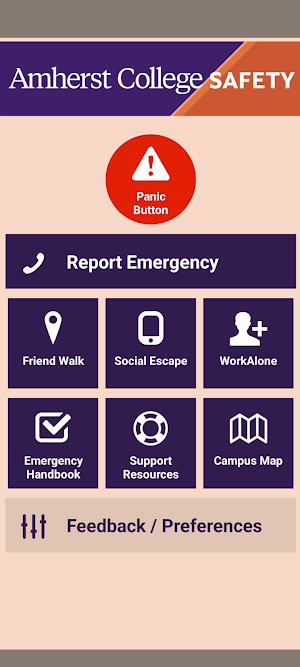
Amherst College Safety is designed to provide students, faculty, staff and visitors with important safety resources.
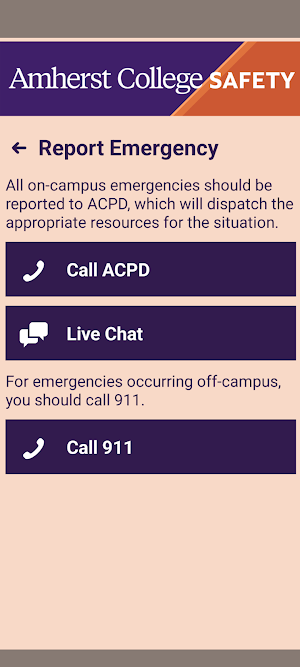
- Report Emergency: Contact ACPD for an emergency occurring on-campus by placing a phone call or chatting/texting with a dispatcher.
- Panic Button: Silently summon emergency resources to your location without having to place a phone call. Always follow up with a phone call to ACPD as soon as it is safe to do so.
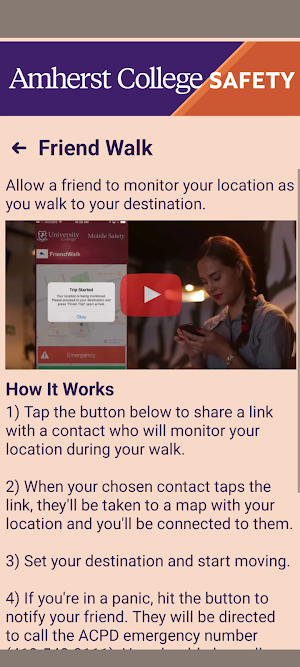
- Friend Walk: Allow a friend to track your progress walking across campus and to alert emergency resources if you stop or stray from your intended route without explanation.
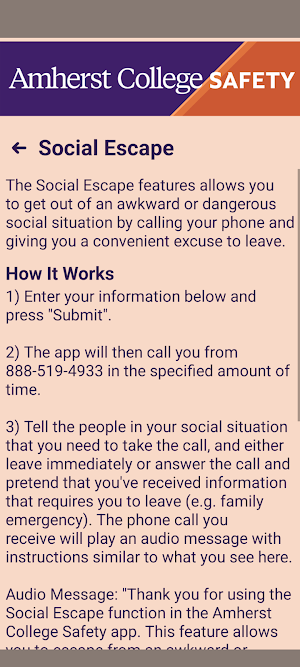
- Social Escape: Schedule a phone call to interrupt a potentially awkward or dangerous situation, giving you an opportunity to leave without suspicion.
- WorkAlone: Schedule regular check-ins for times that you are working alone on campus. If you miss a check-in, a notification will be made to your designated emergency contact.
- Emergency Handbook: Learn how to respond to a variety of emergency situations.
- AC Alerts: Receive emergency alerts sent to the campus community.
- Campus Map: Navigate the Amherst College campus.
This app is not intended to replace calling 413-542-2111 (on-campus) or 911 (off-campus) to request emergency assistance.
- Report Emergency: Contact ACPD for an emergency occurring on-campus by placing a phone call or chatting/texting with a dispatcher.
- Panic Button: Silently summon emergency resources to your location without having to place a phone call. Always follow up with a phone call to ACPD as soon as it is safe to do so.
- Friend Walk: Allow a friend to track your progress walking across campus and to alert emergency resources if you stop or stray from your intended route without explanation.
- Social Escape: Schedule a phone call to interrupt a potentially awkward or dangerous situation, giving you an opportunity to leave without suspicion.
- WorkAlone: Schedule regular check-ins for times that you are working alone on campus. If you miss a check-in, a notification will be made to your designated emergency contact.
- Emergency Handbook: Learn how to respond to a variety of emergency situations.
- AC Alerts: Receive emergency alerts sent to the campus community.
- Campus Map: Navigate the Amherst College campus.
This app is not intended to replace calling 413-542-2111 (on-campus) or 911 (off-campus) to request emergency assistance.
What’s new
Version 1.7 · Updated April 28, 2025
Update to comply with Google Photo/Video policy
Alternatives to Amherst College Safety
Looking for apps like Amherst College Safety? Here are 6 similar Android apps on Google Play. All of them are free to download.
-
השומרונים
-
日本語動詞活用フラッシュカードV2
-
Learn Hebrew: Aleph Bet
-
Snap Words Learn English
-
Cybron | Learn Cybersecurity
-
TVET NCV Graphic Design
| App | Rating | Price | Installs | Last updated | Compare |
|---|---|---|---|---|---|
| Amherst College Safety | – | Free | 100+ | Apr 28, 2025 | |
| השומרונים | – | Free | 50+ | – | Compare |
| 日本語動詞活用フラッシュカードV2 | – | Free | 500+ | – | Compare |
| Learn Hebrew: Aleph Bet | – | Free | 10+ | – | Compare |
| Snap Words Learn English | – | Free | 10+ | Jun 22, 2026 | Compare |
| Cybron | Learn Cybersecurity | – | Free | 100+ | – | Compare |
| TVET NCV Graphic Design | – | Free | 10+ | Jun 14, 2026 | Compare |
Similar apps on Google Play
- השומרונים
- 日本語動詞活用フラッシュカードV2
- Learn Hebrew: Aleph Bet
- Snap Words Learn English
- Cybron | Learn Cybersecurity
- TVET NCV Graphic Design
- Ben Măng - Tiếng Anh cùng con
- BLX 600 Câu - Ôn Thi GPLX
- Mersal's English
- AGACNP Mastery ANCC AANP Prep
- SHUUR
- Quran Santri
- TVET NCV Hospitality Generics
- 生字快查 - 手寫就能查國字部首、注音、筆畫、釋義
- BairePorbo – Study Abroad
- Shree Gauri Shankar School
- FiftyFour: Biblical Learning
- مذكرات الثانوية العامه
- MovieTalk
- Klein Vaarbewijs 2 Examen
- E-Sign Driving Test
- 日本語形容詞活用(現在・過去・否定・過去否定)
- My Chhota School
- Emkalvi
- Bix Learn