
CSV Viewer – CSV Editor
Happyseasonapps Productivity
CSV File Viewer, Reader, opener, and Editor, CSV to PDF Converter.
- Downloads
- 500+
- on Google Play
- Price
- Free
- No in-app purchases
- Updated
- Oct 2
- 2024 · v1.4
Screenshots


About CSV Viewer – CSV Editor
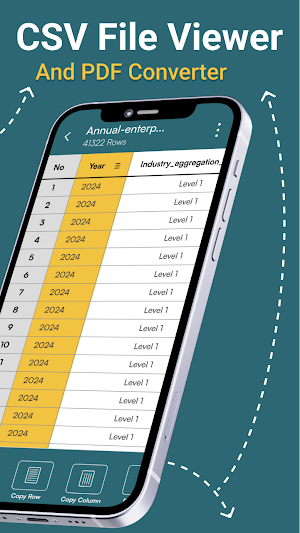
A CSV Viewer – CSV Editoris a software tool that allows users to open, view, edit and interact with data stored in CSV (Comma-Separated Values) format. CSV Reader App displays the data in a table format, making it easy to read, search, and analyze. Users can typically sort columns, filter rows, and perform basic data manipulations within the CSV File Viewer app.
CSV Viewer – CSV Editor App is equipped with a variety of useful features designed to enhance the user experience: CSV file viewer, CSV File Opener, CSV File Editor, CSV File Reader, and CSV to PDF Converter.
A CSV (Comma-Separated Values) File is a plain text file that stores tabular data in a simple, structured format. Each line in a CSV file corresponds to a row in the table, and each value within the line is separated by a comma, representing the columns. CSV files are commonly used for data exchange between different applications because they are easy to generate, read, and process.
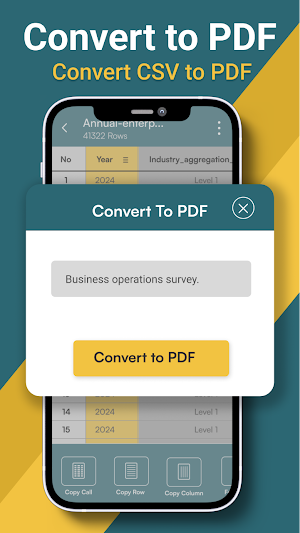
CSV to PDF converter is a software application that convert CSV to PDF documents. This conversion preserves the tabular structure of the data while providing a more versatile and widely accepted format for sharing, printing, and archiving CSV files. The CSV Viewer- CSV Editor ensures that the data remains intact and readable in the resulting PDF file.
Main Features of CSV Viewer – CSV Editor
Copy Cell:Easily copy the content of individual cells for use in other applications.
Copy Row:Copy entire rows of data with a single action.
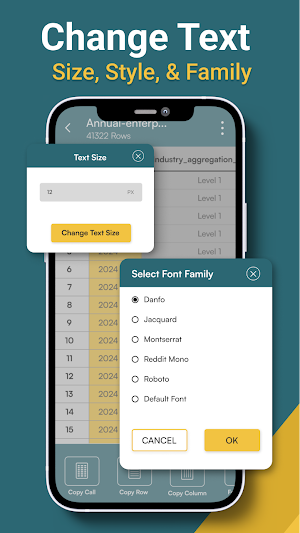
Font Style & Font Family Selection: Customize the appearance of your data by choosing from a variety of font styles and families.
Change Line Numbers: Adjust the line numbers to better navigate through large datasets.
Scroll to Top/Bottom/Position: Quickly navigate to the top, bottom, or a specific position within the file.
Change Text Size: Increase or decrease the text size for better readability.
Customize Text Alignment: Align text to your preference for better organization and presentation of data.
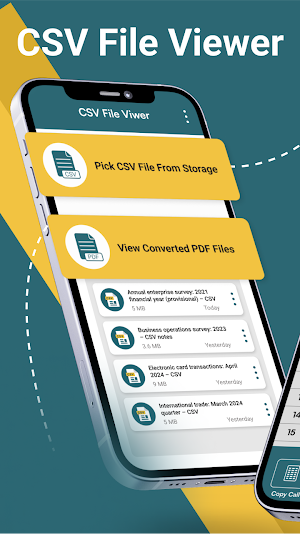
CSV File Opener: Pick CSV files, open and edit it.
Small/Large CSV File Viewer: view large CSV Files and small CSV Spreadsheets.
View all converted CSV PDF files
View all recent CSV spreadsheets files.
Rename, share and delete CSV PDF spreadsheets.
CSV Viewer – CSV Editor App is equipped with a variety of useful features designed to enhance the user experience: CSV file viewer, CSV File Opener, CSV File Editor, CSV File Reader, and CSV to PDF Converter.
A CSV (Comma-Separated Values) File is a plain text file that stores tabular data in a simple, structured format. Each line in a CSV file corresponds to a row in the table, and each value within the line is separated by a comma, representing the columns. CSV files are commonly used for data exchange between different applications because they are easy to generate, read, and process.
CSV to PDF converter is a software application that convert CSV to PDF documents. This conversion preserves the tabular structure of the data while providing a more versatile and widely accepted format for sharing, printing, and archiving CSV files. The CSV Viewer- CSV Editor ensures that the data remains intact and readable in the resulting PDF file.
Main Features of CSV Viewer – CSV Editor
Copy Cell:Easily copy the content of individual cells for use in other applications.
Copy Row:Copy entire rows of data with a single action.
Font Style & Font Family Selection: Customize the appearance of your data by choosing from a variety of font styles and families.
Change Line Numbers: Adjust the line numbers to better navigate through large datasets.
Scroll to Top/Bottom/Position: Quickly navigate to the top, bottom, or a specific position within the file.
Change Text Size: Increase or decrease the text size for better readability.
Customize Text Alignment: Align text to your preference for better organization and presentation of data.
CSV File Opener: Pick CSV files, open and edit it.
Small/Large CSV File Viewer: view large CSV Files and small CSV Spreadsheets.
View all converted CSV PDF files
View all recent CSV spreadsheets files.
Rename, share and delete CSV PDF spreadsheets.
User reviews

Nice app

Nice app

Nice app
Alternatives to CSV Viewer – CSV Editor
Looking for apps like CSV Viewer – CSV Editor? Here are 5 similar Android apps on Google Play. The highest rated is OffScreen Video Recorder (3.8/5), and all 5 are free to download.
-
OffScreen Video Recorder 3.8
-
Bin File Opener
-
Translate On Screen
-
CSV File Viewer & Reader
-
Bin File Opener & Viewer
| App | Rating | Price | Installs | Last updated | Compare |
|---|---|---|---|---|---|
| CSV Viewer – CSV Editor | – | Free | 500+ | Oct 2, 2024 | |
| OffScreen Video Recorder | 3.8 / 5 | Free | 1,000,000+ | – | Compare |
| Bin File Opener | – | Free | 1,000+ | Aug 9, 2024 | Compare |
| Translate On Screen | – | Free | 1,000+ | Jul 10, 2024 | Compare |
| CSV File Viewer & Reader | – | Free | 10+ | May 22, 2023 | Compare |
| Bin File Opener & Viewer | – | Free | 100+ | May 31, 2023 | Compare |