
Crabby Shell SSH
StephenTaylor.com Business In-app purchases
Secure SSH, Mosh & Telnet terminal with tunnels, keys & local shell
- Downloads
- 64+
- on Google Play
- Price
- Free
- In-app purchases
- Updated
- Jul 28
- 2026 · v1.0.6
Screenshots
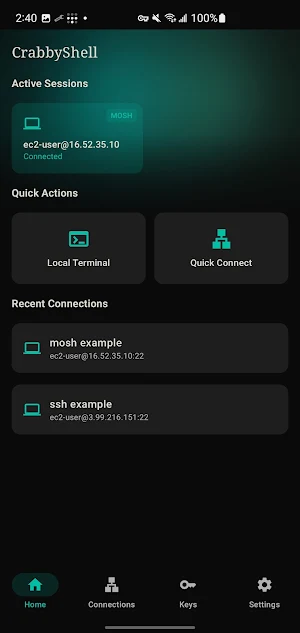
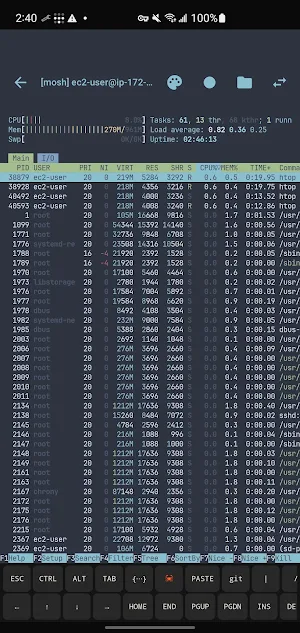
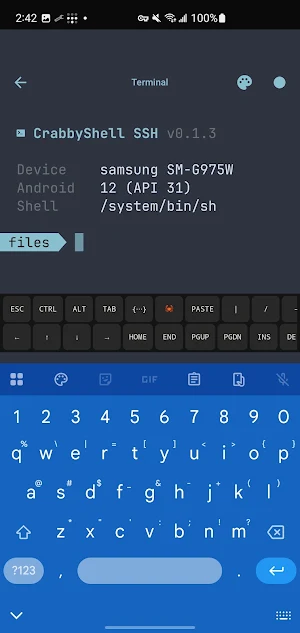


About Crabby Shell SSH
CrabbyShell SSH is a modern, fast terminal client built for Android. Connect to your servers over SSH, Mosh, or Telnet, talk to hardware over Serial (USB or Bluetooth), or launch a local shell — all from one app.
Designed for developers, sysadmins, and IT professionals who need reliable remote access on the go.
SSH Client
• Connect with password, SSH key, or keyboard-interactive (2FA / one-time passwords)
• Ed25519, ECDSA, and RSA key support
• Jump hosts (ProxyJump) to reach servers behind a bastion
• Manage multiple saved connections, identities, and groups
• Host key verification to guard against man-in-the-middle attacks
• Persistent sessions that survive app switching
• Session tabs, plus split-screen panes on tablets
Mosh — Mobile Shell
• Roam between Wi-Fi and mobile data without dropping your session
• Instant local echo for a responsive feel on high-latency links
• The best way to use a terminal on mobile
SFTP File Transfer
• Browse, upload, download, rename, and delete remote files
• Change permissions (chmod), create folders, sort by name, size, date, or type
• Plugs into the Android file picker, so any app can open your remote files
Serial Terminal
• Talk to microcontrollers and embedded devices over USB (OTG) or Bluetooth (Classic + BLE)
• Configurable baud rate, data bits, parity, and line endings
• AT-command friendly, with local echo and auto-reconnect
Port Forwarding & SSH Tunnels
• Local, remote, and dynamic (SOCKS) forwarding
• Monitor active tunnels at a glance
• Secure access to databases, web apps, and internal services
Home-Screen Widgets
• Monitor server stats from your launcher — CPU, memory, disk, uptime, and more
• Gauge, multi-gauge, and sparkline visualizations
• A built-in library of ready-made monitoring commands
Automation & Snippets
• Save reusable command snippets and run them with a tap
• Auto-run a snippet the moment you connect
• Start from a built-in library of 100+ ready-made commands, organized by category
• Launch sessions from Tasker for full workflow automation
Local Terminal
• A full on-device shell with no remote connection required
• Run commands, scripts, and tools directly on your Android device
Built for Mobile
• Clean Material Design interface with customizable color themes
• Extended keyboard row for control keys and special characters, with tmux-friendly shortcuts
• Text selection, copy, and paste
• Horizontal scroll for wide terminal output
• Quick connect for one-off sessions, saved profiles for the rest
• Available in 8 languages
Secure by Design
• Keys and credentials encrypted with the Android Keystore (AES-256-GCM)
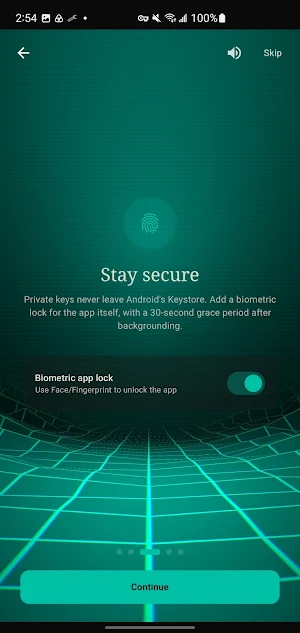
• Optional app lock with biometric unlock
• Encrypted backups you control — restore or sync through your own cloud storage
• No cloud accounts required — your data stays on your device
Easy Migration
• Import your existing hosts from an OpenSSH ~/.ssh/config
• Discover SSH servers on your local network
• Import your Tailscale peers
• Wake sleeping machines with Wake-on-LAN
Whether you manage Linux servers, cloud VPS instances, Raspberry Pi projects, or home lab infrastructure, CrabbyShell SSH puts a fast, reliable secure shell client right in your pocket.
Looking for a modern replacement for JuiceSSH, ConnectBot, or PuTTY on Android? CrabbyShell SSH is built from the ground up for today's mobile workflows.
Designed for developers, sysadmins, and IT professionals who need reliable remote access on the go.
SSH Client
• Connect with password, SSH key, or keyboard-interactive (2FA / one-time passwords)
• Ed25519, ECDSA, and RSA key support
• Jump hosts (ProxyJump) to reach servers behind a bastion
• Manage multiple saved connections, identities, and groups
• Host key verification to guard against man-in-the-middle attacks
• Persistent sessions that survive app switching
• Session tabs, plus split-screen panes on tablets
Mosh — Mobile Shell
• Roam between Wi-Fi and mobile data without dropping your session
• Instant local echo for a responsive feel on high-latency links
• The best way to use a terminal on mobile
SFTP File Transfer
• Browse, upload, download, rename, and delete remote files
• Change permissions (chmod), create folders, sort by name, size, date, or type
• Plugs into the Android file picker, so any app can open your remote files
Serial Terminal
• Talk to microcontrollers and embedded devices over USB (OTG) or Bluetooth (Classic + BLE)
• Configurable baud rate, data bits, parity, and line endings
• AT-command friendly, with local echo and auto-reconnect
Port Forwarding & SSH Tunnels
• Local, remote, and dynamic (SOCKS) forwarding
• Monitor active tunnels at a glance
• Secure access to databases, web apps, and internal services
Home-Screen Widgets
• Monitor server stats from your launcher — CPU, memory, disk, uptime, and more
• Gauge, multi-gauge, and sparkline visualizations
• A built-in library of ready-made monitoring commands
Automation & Snippets
• Save reusable command snippets and run them with a tap
• Auto-run a snippet the moment you connect
• Start from a built-in library of 100+ ready-made commands, organized by category
• Launch sessions from Tasker for full workflow automation
Local Terminal
• A full on-device shell with no remote connection required
• Run commands, scripts, and tools directly on your Android device
Built for Mobile
• Clean Material Design interface with customizable color themes
• Extended keyboard row for control keys and special characters, with tmux-friendly shortcuts
• Text selection, copy, and paste
• Horizontal scroll for wide terminal output
• Quick connect for one-off sessions, saved profiles for the rest
• Available in 8 languages
Secure by Design
• Keys and credentials encrypted with the Android Keystore (AES-256-GCM)
• Optional app lock with biometric unlock
• Encrypted backups you control — restore or sync through your own cloud storage
• No cloud accounts required — your data stays on your device
Easy Migration
• Import your existing hosts from an OpenSSH ~/.ssh/config
• Discover SSH servers on your local network
• Import your Tailscale peers
• Wake sleeping machines with Wake-on-LAN
Whether you manage Linux servers, cloud VPS instances, Raspberry Pi projects, or home lab infrastructure, CrabbyShell SSH puts a fast, reliable secure shell client right in your pocket.
Looking for a modern replacement for JuiceSSH, ConnectBot, or PuTTY on Android? CrabbyShell SSH is built from the ground up for today's mobile workflows.
What’s new
Version 1.0.6 · Updated July 28, 2026
Stability fixes
Alternatives to Crabby Shell SSH
Looking for apps like Crabby Shell SSH? Here are 5 similar Android apps on Google Play. The highest rated is Zerion: Crypto Wallet (4.4/5), and all 5 are free to download.
-
David Lloyd Clubs 3.8
-
RepairSolutionsPRO 3.8
-
Zerion: Crypto Wallet 4.4
-
SE ATI TEAS & HESI Prep 2025 4.0
-
Coast: Native Work Order CMMS 4.4
| App | Rating | Price | Installs | Last updated | Compare |
|---|---|---|---|---|---|
| Crabby Shell SSH | – | Free | 50+ | Jul 28, 2026 | |
| David Lloyd Clubs | 3.8 / 5 | Free | 500,000+ | Oct 13, 2026 | Compare |
| RepairSolutionsPRO | 3.8 / 5 | Free | 50,000+ | Aug 18, 2026 | Compare |
| Zerion: Crypto Wallet | 4.4 / 5 | Free | 500,000+ | – | Compare |
| SE ATI TEAS & HESI Prep 2025 | 4.0 / 5 | Free | 500+ | Mar 5, 2024 | Compare |
| Coast: Native Work Order CMMS | 4.4 / 5 | Free | 50,000+ | Oct 26, 2026 | Compare |
Compare Crabby Shell SSH with the top alternatives: ratings, updates, ASO score and keyword gaps →