
Privacy Display Guard
Green Finger Tools Contains ads
Protect your private chats! Block prying eyes with a resizable privacy shield.
- Downloads
- 1K+
- on Google Play
- Price
- Free
- No in-app purchases
- Updated
- Jul 18
- 2026 · v1.15
Screenshots
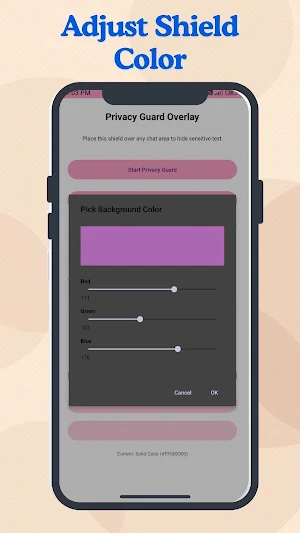

About Privacy Display Guard
Privacy Display Guard is a unique privacy tool that places a customizable shield over your screen, letting you hide sensitive chat content from people looking over your shoulder. Whether you’re in public transport, a café, or any crowded place, this app ensures your messages remain private.
🔒 Key Features
Movable & Resizable Shield
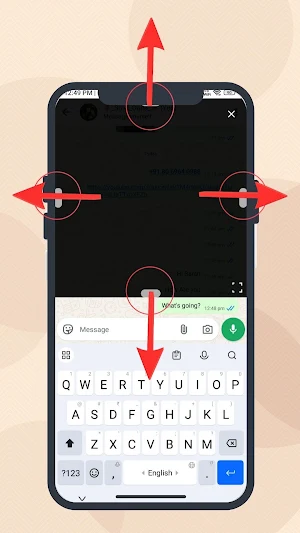
Drag anywhere on the screen to reposition the shield. Use the four side handles or the corner handle to resize it exactly over the chat area you want to hide. It stays on top of all apps until you close it.
Touch‑Through Mode
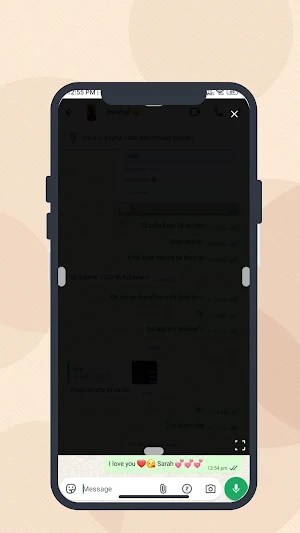
When enabled, you can interact with the app underneath the shield without closing it – perfect for typing or scrolling while the shield stays in place.
Adjustable Opacity
Fine‑tune the shield’s transparency to balance privacy with visibility. Set it to a solid block or a semi‑transparent layer as you prefer.
Custom Background
Choose between a solid color or an image/GIF from your gallery as the shield background. Pick any color with our built‑in RGB color picker. For images, you can set a separate “excess color” for areas the image doesn’t cover – giving you complete visual control.
One‑Tap Start/Stop
Activate the shield from the main screen with a single button. A persistent notification lets you stop it anytime – no need to return to the app.
Full Privacy
The app does not collect, store, or share any personal data. All settings (position, size, opacity, background choice) are stored locally on your device. No analytics, no trackers, no third‑party services.
🚀 How It Works
1. Launch the app and grant the required overlay permission.
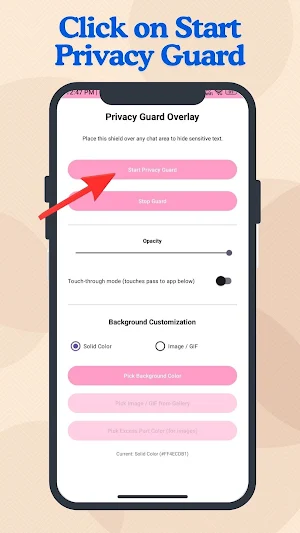
2. Tap “Start Privacy Guard” – a shield appears on your screen.
3. Drag the shield over your chat box, resize it as needed.
4. Optionally adjust opacity, enable touch‑through, or change the background.
5. Tap the ✕ button on the shield or use the notification to turn it off.
🔒 Key Features
Movable & Resizable Shield
Drag anywhere on the screen to reposition the shield. Use the four side handles or the corner handle to resize it exactly over the chat area you want to hide. It stays on top of all apps until you close it.
Touch‑Through Mode
When enabled, you can interact with the app underneath the shield without closing it – perfect for typing or scrolling while the shield stays in place.
Adjustable Opacity
Fine‑tune the shield’s transparency to balance privacy with visibility. Set it to a solid block or a semi‑transparent layer as you prefer.
Custom Background
Choose between a solid color or an image/GIF from your gallery as the shield background. Pick any color with our built‑in RGB color picker. For images, you can set a separate “excess color” for areas the image doesn’t cover – giving you complete visual control.
One‑Tap Start/Stop
Activate the shield from the main screen with a single button. A persistent notification lets you stop it anytime – no need to return to the app.
Full Privacy
The app does not collect, store, or share any personal data. All settings (position, size, opacity, background choice) are stored locally on your device. No analytics, no trackers, no third‑party services.
🚀 How It Works
1. Launch the app and grant the required overlay permission.
2. Tap “Start Privacy Guard” – a shield appears on your screen.
3. Drag the shield over your chat box, resize it as needed.
4. Optionally adjust opacity, enable touch‑through, or change the background.
5. Tap the ✕ button on the shield or use the notification to turn it off.
User reviews

This app works fine. Best app.

Best Apps ever I use, very useful app.

Bhai Yah Actually Mein Bahut Jyada Useful Hai Kyunki Aaj Main Mere Mummy Ke Pass Baitha Hua Tha 🤣 Aur Maine Yah Wala App Use Kar Raha Tha Aur Guess What Meri Mummy Dekhi Nahin Paye ki Mai Kya Kar Raha Hun wo Site se Dekh Rahi Thi Wo Samajh Rahi Hai Ki Phone Ka Screen Lock Hai Aur Main Kuchh Nahin Kar Raha Hun Iss A...
Alternatives to Privacy Display Guard
Looking for apps like Privacy Display Guard? Here are 6 similar Android apps on Google Play. The highest rated is Security Toolkit (4.4/5), and all 6 are free to download.





| App | Rating | Price | Installs | Last updated | Compare |
|---|---|---|---|---|---|
| Privacy Display Guard | – | Free | 1,000+ | Jul 18, 2026 | |
| APATOKEN | – | Free | 10,000+ | Sep 17, 2026 | Compare |
| Win Lotto Master | – | Free | 500+ | Apr 21, 2026 | Compare |
| WM Mobile Chef | – | Free | 100+ | Dec 1, 2025 | Compare |
| Dịch vụ công Sóc Trăng-Cán bộ | – | Free | 100+ | – | Compare |
| Solidus | – | Free | 10+ | Sep 4, 2026 | Compare |
| Security Toolkit | 4.4 / 5 | Free | 100,000+ | Aug 12, 2026 | Compare |
Similar apps on Google Play
- APATOKEN
- Win Lotto Master
- WM Mobile Chef
- Dịch vụ công Sóc Trăng-Cán bộ
- Solidus
- Security Toolkit
- Call Guard
- Network Meter Pro
- ClariFi Pro
- RBX Calculator – Robox Counter
- Flashlight & Flash Alert
- Receipt Ledger
- LOEWE TV IR Remote App
- Ultra Admin
- Text Repeater- repeat text 10k
- Photos to PDF Maker & Convert
- NotesAI: AI note app
- CountScore - Score Tracker
- Naiti - Your sleep, your sound
- Autoskopo: AI OBD2 Scanner
- Voice Recorder Pro
- CALCHIS
- PresentationPartner
- WhatSat – Satellite Tracker
- Smart Projector Control App