
ScreenTronic
CONTROLtronic GmbH Lifestyle
ScreenTronic® App - the smart blind control!
- Downloads
- 100+
- on Google Play
- Price
- Free
- No in-app purchases
- Updated
- Sep 16
- 2024 · v2.12
Screenshots


About ScreenTronic
ScreenTronic
by CONTROLtronic GmbH
ScreenTronic® App - the smart blind control!
Control your blinds easily, intuitively and in real-time with the ScreenTronic® App. Whether you control the blinds in a complex office building, hotel room, hospital, conservatory or private home - the usability is extremely simple as long as you use the ScreenTronic® blind controls ST2134 with LAN interface. Blind control via graphical user interface as well as their configuration are both done completely within the ScreenTronic® App.
Imagine you are lying in bed and after waking up you can simply raise the blinds and enjoy the view without having to leave the warm bed! Or think about the possibility of operating and controlling your blinds yourself from your holiday resort to prevent burglary!
Advantages:
• Remote control: The app is the smart replacement for a radio remote control.
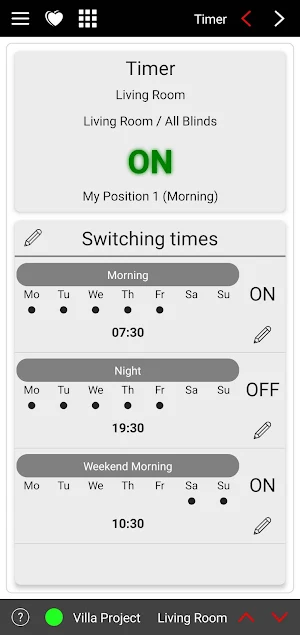
• Timer: Time-controlled blind positions.
• Types: Sun protection, privacy protection, shading, shutter, roller blind, venetian blind and awning.
• Comfort: The entire configuration and operation of the blinds is simple and completely handled within the app.
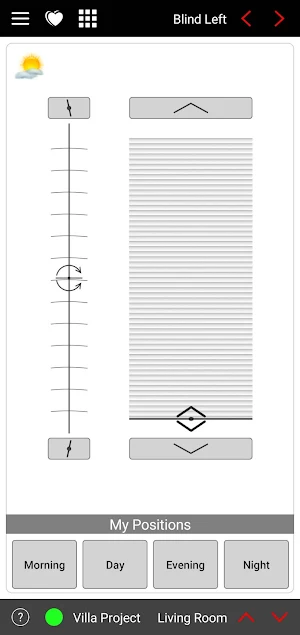
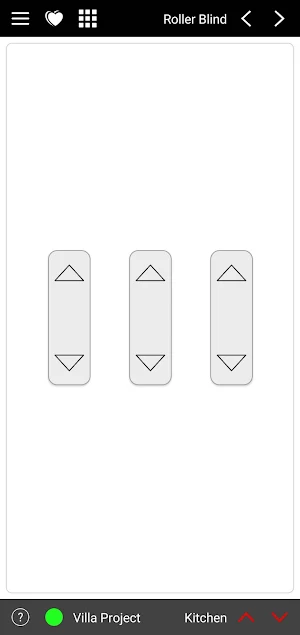
• Control: Different blind control elements and their structure can be created by yourself. Blinds are controlled either via graphical representation for height and angle (value-driven) or command buttons to start, stop and step adjustment (event-driven).
• Real-time: Display and update of the blind position (height and angle) in the user interface via status feedback from the system.
• Favorites: For quick access individual control groups can be defined as favorites.
• Comfort positions: Program your preferred blind positions as preconfigured positions for height and angle (up to 5 comfort positions per control group).
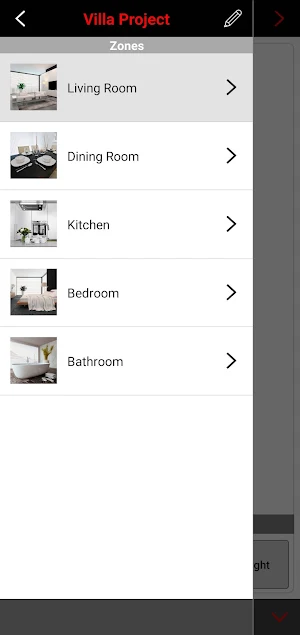
• Projects, zones and control groups: There is no limitation on the number of projects, zones and control groups so the blind control structure is infinite.
• Operation: Quick and easy switching between zones and control groups by swiping the display.
• Overview: The project control structure can be documented clearly as site-map which is convertible in PDF as well as exportable.
• Replicability: All projects can be exported and imported for backup and transfer to other devices.
• Communication: Direct with CT Smart Control of the ST2134 ScreenTronic® blind controls with LAN interface.
• Communication: Via KNX standard with KNX tunneling or KNX routing to all common KNX IP interfaces and KNX IP routers (license necessary).
• Voice control with Alexa
ScreenTronic®: one app - one function: perfect blind control!
by CONTROLtronic GmbH
ScreenTronic® App - the smart blind control!
Control your blinds easily, intuitively and in real-time with the ScreenTronic® App. Whether you control the blinds in a complex office building, hotel room, hospital, conservatory or private home - the usability is extremely simple as long as you use the ScreenTronic® blind controls ST2134 with LAN interface. Blind control via graphical user interface as well as their configuration are both done completely within the ScreenTronic® App.
Imagine you are lying in bed and after waking up you can simply raise the blinds and enjoy the view without having to leave the warm bed! Or think about the possibility of operating and controlling your blinds yourself from your holiday resort to prevent burglary!
Advantages:
• Remote control: The app is the smart replacement for a radio remote control.
• Timer: Time-controlled blind positions.
• Types: Sun protection, privacy protection, shading, shutter, roller blind, venetian blind and awning.
• Comfort: The entire configuration and operation of the blinds is simple and completely handled within the app.
• Control: Different blind control elements and their structure can be created by yourself. Blinds are controlled either via graphical representation for height and angle (value-driven) or command buttons to start, stop and step adjustment (event-driven).
• Real-time: Display and update of the blind position (height and angle) in the user interface via status feedback from the system.
• Favorites: For quick access individual control groups can be defined as favorites.
• Comfort positions: Program your preferred blind positions as preconfigured positions for height and angle (up to 5 comfort positions per control group).
• Projects, zones and control groups: There is no limitation on the number of projects, zones and control groups so the blind control structure is infinite.
• Operation: Quick and easy switching between zones and control groups by swiping the display.
• Overview: The project control structure can be documented clearly as site-map which is convertible in PDF as well as exportable.
• Replicability: All projects can be exported and imported for backup and transfer to other devices.
• Communication: Direct with CT Smart Control of the ST2134 ScreenTronic® blind controls with LAN interface.
• Communication: Via KNX standard with KNX tunneling or KNX routing to all common KNX IP interfaces and KNX IP routers (license necessary).
• Voice control with Alexa
ScreenTronic®: one app - one function: perfect blind control!
What’s new
Version 2.12 · Updated September 16, 2024
• General optimizations and improvements
Alternatives to ScreenTronic
Looking for apps like ScreenTronic? Here are 6 similar Android apps on Google Play. All of them are free to download.
-
Trillium Residential Community
-
트레바리 - 읽고, 쓰고, 대화하고, 친해져요!
-
Quadrangular Pajuçara
-
The Church at Azle
-
The IBC Club
-
Community Bible Church CBC App
| App | Rating | Price | Installs | Last updated | Compare |
|---|---|---|---|---|---|
| ScreenTronic | – | Free | 100+ | Sep 16, 2024 | |
| Trillium Residential Community | – | Free | 500+ | Apr 30, 2026 | Compare |
| 트레바리 - 읽고, 쓰고, 대화하고, 친해져요! | – | Free | 10,000+ | Sep 29, 2026 | Compare |
| Quadrangular Pajuçara | – | Free | 50+ | Oct 6, 2025 | Compare |
| The Church at Azle | – | Free | 1,000+ | Oct 16, 2026 | Compare |
| The IBC Club | – | Free | 50+ | Oct 24, 2026 | Compare |
| Community Bible Church CBC App | – | Free | 5,000+ | Apr 6, 2026 | Compare |
Compare ScreenTronic with the top alternatives: ratings, updates, ASO score and keyword gaps →
Similar apps on Google Play
- Trillium Residential Community
- 트레바리 - 읽고, 쓰고, 대화하고, 친해져요!
- Quadrangular Pajuçara
- The Church at Azle
- The IBC Club
- Community Bible Church CBC App
- metroKEY
- Crux Legacy
- Rockland CC
- Winkler's Grove Baptist Church
- PHMBC
- Deepfly Connected
- Amarama
- ISS SSM Var
- Bienes Adjudicados CR
- Escape with Rachel Closson
- Scolopi V2.0
- Yellow Groove
- IB7 Online
- Pymble Golf Club
- TC GLOBAL
- Sri Lakshmi Jewellery
- Canyon View Vineyard Church
- BCCMESA
- swtEnergie+