
DocScanSign - PDF Tools
ContractMindAI Productivity
AI, PDF editor, eSign tool & document scanner. 100% offline. No account needed
- Downloads
- 130+
- on Google Play
- Price
- Free
- No in-app purchases
- Updated
- Sep 28
- 2026 · v2.0.1
Screenshots


About DocScanSign - PDF Tools
Completely free. No account required. Works offline.
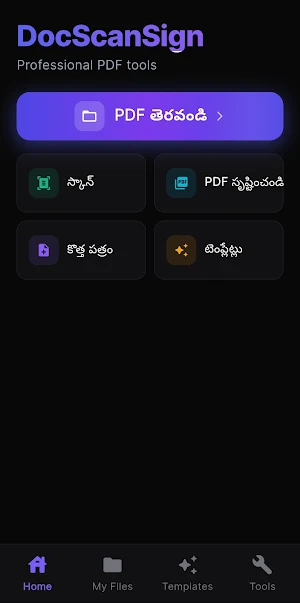
**DocScanSign** is the complete PDF toolkit you need for everyday documents. Scan documents, sign PDFs, add annotations, merge files, and **use offline AI to summarize documents and find important information** — all without an account, cloud uploads, or an internet connection.
**100% Private. 100% Free. Forever.**
## 🤖 Offline AI Document Intelligence
Analyze your documents with AI without uploading them to the cloud.
* **AI Summarization** – Summarize lengthy PDFs into concise, easy-to-read summaries
* **Key Points** – Quickly identify the most important points in a document
* **Smart Document Classification** – Automatically identify documents such as Invoices, Contracts, NDAs, Receipts, and more
* **Entity Extraction** – Find names, dates, amounts, email addresses, and other important details
* **Important Clauses** – Identify important clauses and sections in contracts and legal documents
* **Document Search** – Quickly find information anywhere in your PDF
* **AI-Powered Document Insights** – Understand the key information in a document faster
* **Fully Offline AI** – AI processing happens directly on your device
### 🔒 Your AI Data Stays Private
Your PDFs and their text never need to be sent to cloud servers for AI processing.
**Your Document → Your Device → Your AI**
## 📝 PDF Editing & Annotation
* **eSignatures** – Draw, type, or upload your signature
* **Highlight, Underline & Strikethrough** – Mark important information
* **Freehand Drawing** – Draw with 8 colors
* **Sticky Notes & Text Stamps** – Add labels such as “Approved” and “Draft”
* **Secure Redaction** – Permanently hide sensitive information
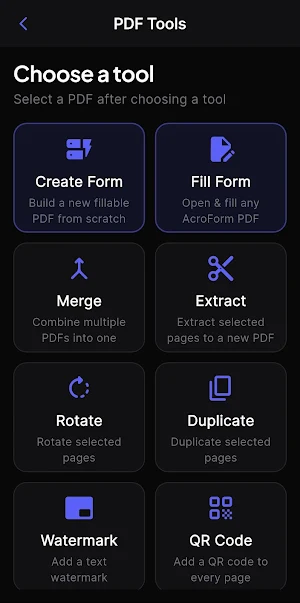
## 🛠️ PDF Tools
* Merge multiple PDFs into one document
* Extract specific pages from PDFs
* Rotate pages by 90°
* Add watermarks such as “CONFIDENTIAL” and “DRAFT”
* Duplicate pages
* QR Code Generator
* Send documents by email with one click
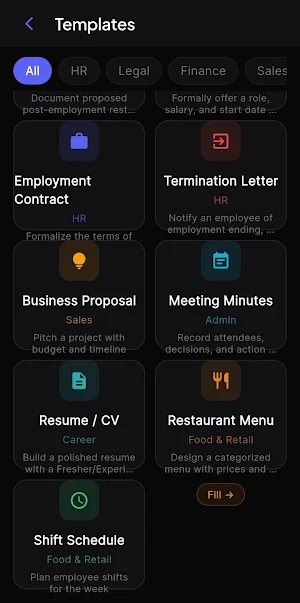
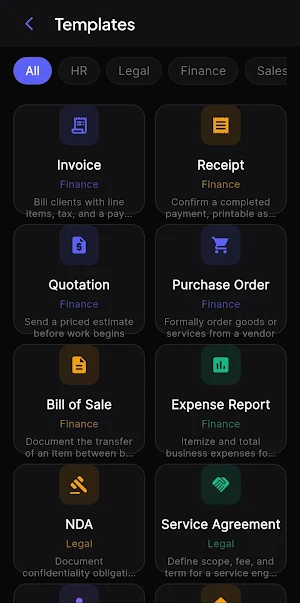
## 📋 16 Business Templates
Create professional business documents quickly with ready-to-use templates.
Invoice, Receipt, Quotation, Purchase Order, Sale Deed, Expense Report, NDA, Service Agreement, Freelance Contract, Rental Agreement, Non-Compete Agreement, Offer Letter, Employment Contract, Termination Letter, Business Proposal, and Meeting Minutes.
## 📱 Document Scanner
Turn your device into a powerful document scanner.
* Automatic document detection and crop
* Multi-page scanning with Batch Mode
* Black & White mode for print-ready documents
* Save scanned documents as PDFs
* OCR for extracting text from scanned documents
* AI analysis and summarization for scanned documents
## 🔒 Privacy & Security
* **100% Offline**
* No account required
* No data collection or tracking
* Your documents are never uploaded to the cloud
* Password-protected PDF support
* Signature audit trail
* AI processing happens directly on your device
**Your files stay yours. Your data stays yours.**
## 📊 Pro Tools – No Paywall
Powerful document tools without subscriptions or feature paywalls.
* AI Document Summaries
* Document Comparison – Side-by-side diff
* Full-Text Search
* Clause Bookmarks
* Annotation Summary Panel
* Keyboard Shortcuts – Ctrl+S, Ctrl+Z, Ctrl+P
**All features are free. No paywall. No subscription required.**
## 🌐 Available Everywhere
Designed for Android, Web, iOS, Windows, Mac, and Linux.
Built with Flutter using a shared codebase across platforms.
**Open Source – MIT License**
## 🎯 Who Is It For?
Small businesses • Freelancers • Lawyers • Auditors • HR Professionals • Real Estate Agents • Medical Professionals • Retail Businesses • Anyone who works with PDF documents
## 🔐 Your Documents. Your Device. Your Privacy.
DocScanSign processes PDF files, OCR, and AI analysis directly on your device.
## 📧 Contact
📧 [[email protected]](mailto:[email protected])
🌐 pdf.contractmind.ai
What’s new
Version 2.0.1 · Updated September 28, 2026
What's new in iPageMint: • New name: iPagemint is now iPageMint — same app, sharper identity. • Full PDF editor — annotate, redact, add text, edit text, and sign with an audit trail. • 21 ready-to-fill templates, including Invoice, NDA, Rental Agreement, Resume, Cheat Sheet, Visiting Card and more. • 5 document styles per template — Classic, Modern, Bold, Elegant, Compact. • Works offline. No account. No watermarks.
User reviews

SUPER APP DOWNLOAD NOW ALL

very nice App ... to editing PDFs
Alternatives to DocScanSign - PDF Tools
Looking for apps like DocScanSign - PDF Tools? Here are 6 similar Android apps on Google Play. The highest rated is ProBooks: Invoice Maker (4.7/5), and all 6 are free to download.
-
MYCPE ONE 4.4
-
ProBooks: Invoice Maker 4.7
-
PDF Reader(KDAN PDF): Edit PDF 3.8
-
Mobi PDF・Editor・Scanner・Reader 4.4
-
Polaris Office: Edit&View, PDF 3.5
-
FastField: Field Service Forms 4.7
| App | Rating | Price | Installs | Last updated | Compare |
|---|---|---|---|---|---|
| DocScanSign - PDF Tools | – | Free | 100+ | Sep 28, 2026 | |
| MYCPE ONE | 4.4 / 5 | Free | 1,000+ | – | Compare |
| ProBooks: Invoice Maker | 4.7 / 5 | Free | 100,000+ | Aug 28, 2026 | Compare |
| PDF Reader(KDAN PDF): Edit PDF | 3.8 / 5 | Free | 10,000,000+ | – | Compare |
| Mobi PDF・Editor・Scanner・Reader | 4.4 / 5 | Free | 10,000,000+ | – | Compare |
| Polaris Office: Edit&View, PDF | 3.5 / 5 | Free | 50,000,000+ | – | Compare |
| FastField: Field Service Forms | 4.7 / 5 | Free | 100,000+ | Oct 19, 2026 | Compare |