
Clock Vault - Gallery Lock
PArt Studio Photography Contains ads
Hide photos & videos securely behind a secret clock vault
- Downloads
- 23.2K+
- on Google Play
- Price
- Free
- No in-app purchases
- Updated
- Sep 18
- 2026 · v17.0
Screenshots


About Clock Vault - Gallery Lock
Smart privacy protection for your personal photos, videos & files
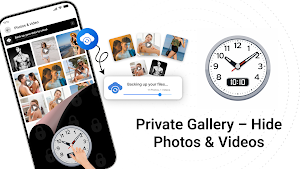
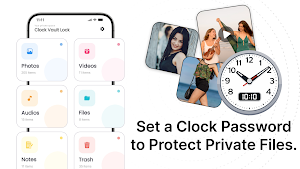
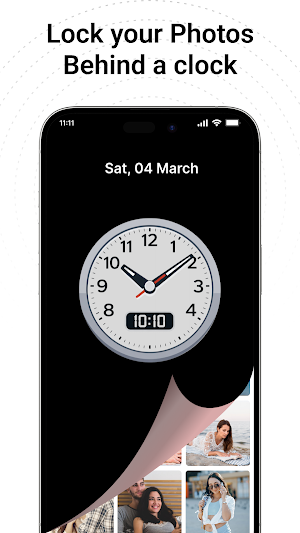
Keep your private memories secure and hidden with Clock Vault - Gallery Lock, a powerful privacy app designed to protect your personal media behind a fully functional clock interface. Only you know the secret time password — others see just a normal clock.
🛡️ Why Choose Clock Vault?
Your private content deserves real protection. This app combines security, simplicity, and smart disguise to ensure your files stay hidden and safe.
⭐ Clock Vault - Gallery Lock Features
📸 Hide Photos Instantly
Move your personal images from your gallery into a secure vault in seconds. Built-in viewer lets you zoom, crop, and rotate images easily.
🎥 Secure Video Locker
Protect your videos in multiple formats. Watch them anytime using the in-app player or your preferred external player.
📁 Organized Albums
Create folders, customize album covers, and manage your hidden files in a clean and structured way.
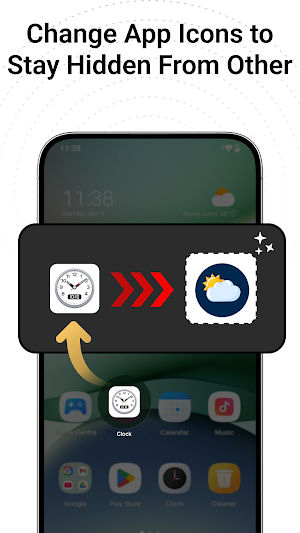
🎭 Disguised App Icon
Keep your vault invisible by changing the app icon to look like a clock, calculator, weather app, and more.
🔐 Intruder Detection
Capture photos of anyone trying to access your vault without permission.
▶️ Built-in Media Player
Enjoy seamless playback of your hidden videos without leaving the app.
👆 Fingerprint Unlock
Quick and secure access with fingerprint support (on compatible devices).
☁️ Cloud Backup
Safely store your important files online and restore them anytime on a new device.
⚠️ Only files uploaded to the cloud can be recovered.
🔑 How Clock Vault Works
Set Your Password
1. Open the app clock resets to 00:00
2. Move clock hands to your secret time
3. Confirm the same time again
4. Vault unlocked 🎉
Unlock the Vault
1. Tap the center of the clock
2. Set your saved time password
3. Tap again to access your private files
❓ Forgot Password?
Set the clock to 12:59 and tap the center button to access recovery options.
⚠️ Important Notes
* Your files are stored locally unless you enable cloud backup
* Always backup before uninstalling or switching devices
* Files not backed up may be permanently lost
🔐 Your Privacy, Your Control
With Clock Vault - Gallery Lock, your personal files stay truly private hidden in plain sight.
Keep your private memories secure and hidden with Clock Vault - Gallery Lock, a powerful privacy app designed to protect your personal media behind a fully functional clock interface. Only you know the secret time password — others see just a normal clock.
🛡️ Why Choose Clock Vault?
Your private content deserves real protection. This app combines security, simplicity, and smart disguise to ensure your files stay hidden and safe.
⭐ Clock Vault - Gallery Lock Features
📸 Hide Photos Instantly
Move your personal images from your gallery into a secure vault in seconds. Built-in viewer lets you zoom, crop, and rotate images easily.
🎥 Secure Video Locker
Protect your videos in multiple formats. Watch them anytime using the in-app player or your preferred external player.
📁 Organized Albums
Create folders, customize album covers, and manage your hidden files in a clean and structured way.
🎭 Disguised App Icon
Keep your vault invisible by changing the app icon to look like a clock, calculator, weather app, and more.
🔐 Intruder Detection
Capture photos of anyone trying to access your vault without permission.
▶️ Built-in Media Player
Enjoy seamless playback of your hidden videos without leaving the app.
👆 Fingerprint Unlock
Quick and secure access with fingerprint support (on compatible devices).
☁️ Cloud Backup
Safely store your important files online and restore them anytime on a new device.
⚠️ Only files uploaded to the cloud can be recovered.
🔑 How Clock Vault Works
Set Your Password
1. Open the app clock resets to 00:00
2. Move clock hands to your secret time
3. Confirm the same time again
4. Vault unlocked 🎉
Unlock the Vault
1. Tap the center of the clock
2. Set your saved time password
3. Tap again to access your private files
❓ Forgot Password?
Set the clock to 12:59 and tap the center button to access recovery options.
⚠️ Important Notes
* Your files are stored locally unless you enable cloud backup
* Always backup before uninstalling or switching devices
* Files not backed up may be permanently lost
🔐 Your Privacy, Your Control
With Clock Vault - Gallery Lock, your personal files stay truly private hidden in plain sight.
What’s new
Version 17.0 · Updated September 18, 2026
Minor Bug Fix
User reviews

nice

nice

nice security-related

okay
Alternatives to Clock Vault - Gallery Lock
Looking for apps like Clock Vault - Gallery Lock? Here are 6 similar Android apps on Google Play. The highest rated is Calculator Pro: Calculator App (4.9/5), and all 6 are free to download.
-
PhotoSpot: For Travel Planning 4.7
-
LockMyPix Safe Photo Vault 4.5
-
AppLock - Fingerprint 4.3
-
Calculator Pro: Calculator App 4.9
-
PRIVARY Secure Photo Vault 4.4
-
Tyfoom | Engagement Platform 4.6
| App | Rating | Price | Installs | Last updated | Compare |
|---|---|---|---|---|---|
| Clock Vault - Gallery Lock | – | Free | 10,000+ | Sep 18, 2026 | |
| PhotoSpot: For Travel Planning | 4.7 / 5 | Free | 5,000+ | Jun 10, 2026 | Compare |
| LockMyPix Safe Photo Vault | 4.5 / 5 | Free | 10,000,000+ | Oct 29, 2026 | Compare |
| AppLock - Fingerprint | 4.3 / 5 | Free | 50,000,000+ | Oct 23, 2026 | Compare |
| Calculator Pro: Calculator App | 4.9 / 5 | Free | 1,000,000+ | Sep 1, 2026 | Compare |
| PRIVARY Secure Photo Vault | 4.4 / 5 | Free | 1,000,000+ | Sep 29, 2026 | Compare |
| Tyfoom | Engagement Platform | 4.6 / 5 | Free | 10,000+ | – | Compare |