
WiFi Mesh Placement
Click Solutions Pro Tools
Find the perfect spot for your mesh extender with real-time WiFi scanning.
- Downloads
- 655+
- on Google Play
- Price
- Free
- No in-app purchases
- Updated
- Aug 7
- 2026 · v2.2.7
Screenshots
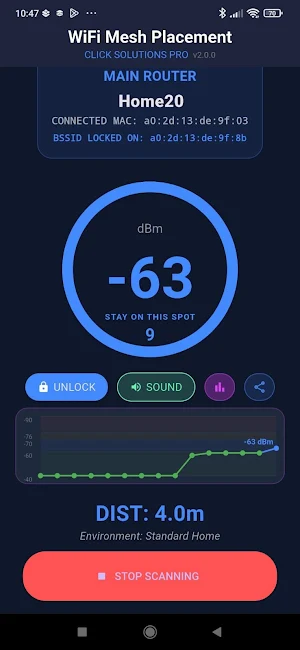


About WiFi Mesh Placement
WiFi Mesh Placement helps you find the exact location to place your mesh WiFi extender — no guesswork, no trial and error.
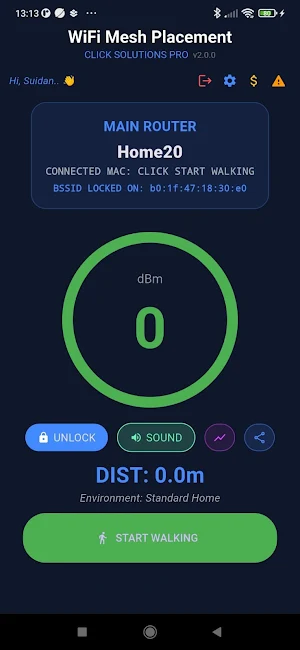
Simply walk through your home or office while the app measures the WiFi signal strength (RSSI) in real time. Color-coded zones and audio beeps guide you step by step until you reach the Sweet Spot — the optimal location where your extender will perform best.
HOW IT WORKS
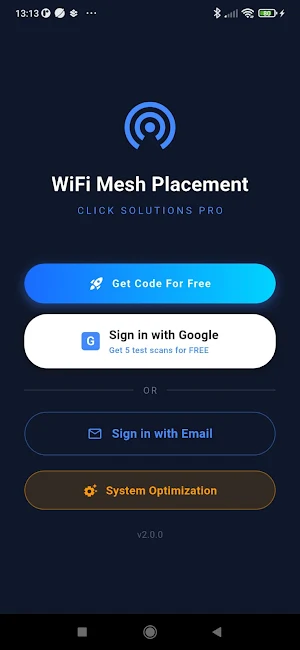
1. Sign in with Google or your activation code
2. Stand next to your router and select it from the live scan list
3. Tap START WALKING and move away from the router
4. Listen for the audio beeps — they get faster as you approach the Sweet Spot
5. When the app confirms a stable Sweet Spot for 10 seconds, place your extender there
SIGNAL ZONES
🟢 Green (-40 to -60 dBm) — Too close to the router
🔵 Blue (-61 to -70 dBm) — Sweet Spot — place your extender here
🟠 Orange (-71 to -76 dBm) — Edge zone, marginal signal
🔴 Red (-77 dBm and below) — Too far, weak signal
KEY FEATURES
- Real-time RSSI scanning updated every 2 seconds
- Audio beep guidance — slow beeps approaching, fast beeps in the Sweet Spot
- 10-second Sweet Spot confirmation countdown
- Live signal graph showing the last 30 readings
- Supports 2.4 GHz, 5 GHz, and 6 GHz bands
- Roaming detection between mesh nodes
- Dead zone logging
- Share scan report via WhatsApp, Email, and more
- Works with any mesh system — Eero, Orbi, Deco, Ubiquiti, Airties, and more
WHO IS IT FOR
- Home users setting up a mesh WiFi system
- IT professionals and network technicians
- Anyone who wants better WiFi coverage without expensive equipment
PLANS
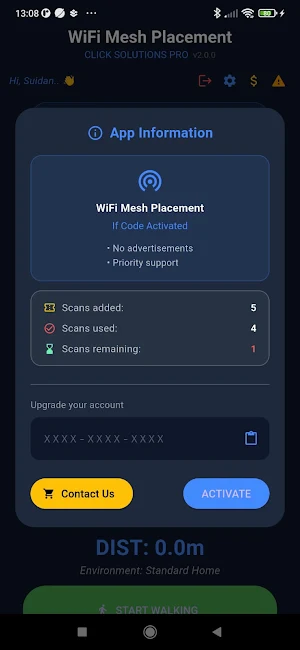
Free Trial — 5 scans, no credit card required
Starter — 50 scans
Professional — 500 scans
Get your free trial at clicksolutionspro.com
CLICK Solutions Pro — 25+ years of network engineering expertise.
Simply walk through your home or office while the app measures the WiFi signal strength (RSSI) in real time. Color-coded zones and audio beeps guide you step by step until you reach the Sweet Spot — the optimal location where your extender will perform best.
HOW IT WORKS
1. Sign in with Google or your activation code
2. Stand next to your router and select it from the live scan list
3. Tap START WALKING and move away from the router
4. Listen for the audio beeps — they get faster as you approach the Sweet Spot
5. When the app confirms a stable Sweet Spot for 10 seconds, place your extender there
SIGNAL ZONES
🟢 Green (-40 to -60 dBm) — Too close to the router
🔵 Blue (-61 to -70 dBm) — Sweet Spot — place your extender here
🟠 Orange (-71 to -76 dBm) — Edge zone, marginal signal
🔴 Red (-77 dBm and below) — Too far, weak signal
KEY FEATURES
- Real-time RSSI scanning updated every 2 seconds
- Audio beep guidance — slow beeps approaching, fast beeps in the Sweet Spot
- 10-second Sweet Spot confirmation countdown
- Live signal graph showing the last 30 readings
- Supports 2.4 GHz, 5 GHz, and 6 GHz bands
- Roaming detection between mesh nodes
- Dead zone logging
- Share scan report via WhatsApp, Email, and more
- Works with any mesh system — Eero, Orbi, Deco, Ubiquiti, Airties, and more
WHO IS IT FOR
- Home users setting up a mesh WiFi system
- IT professionals and network technicians
- Anyone who wants better WiFi coverage without expensive equipment
PLANS
Free Trial — 5 scans, no credit card required
Starter — 50 scans
Professional — 500 scans
Get your free trial at clicksolutionspro.com
CLICK Solutions Pro — 25+ years of network engineering expertise.
What’s new
Version 2.2.7 · Updated August 7, 2026
• Updated to the latest Android requirements (Android 16, API 36) • Full edge-to-edge display support on Android 15 and later • Smaller app size and improved performance and memory usage • General stability improvements and bug fixes
Alternatives to WiFi Mesh Placement
Looking for apps like WiFi Mesh Placement? Here are 4 similar Android apps on Google Play. All of them are free to download.


| App | Rating | Price | Installs | Last updated | Compare |
|---|---|---|---|---|---|
| WiFi Mesh Placement | – | Free | 500+ | Aug 7, 2026 | |
| WIFI SCORE | – | Free | 10+ | Aug 7, 2026 | Compare |
| WIFI LOG COLLECTOR | – | Free | 100+ | Aug 17, 2026 | Compare |
| Cakes Design | – | Free | 10+ | Apr 1, 2026 | Compare |
| CLIC CAKES | – | Free | 10+ | Apr 1, 2026 | Compare |