
Dr. Diary - Clinic management App
Clagt Tools Contains ads
Dr. Diary is a Clinic management App for Personal use of a Doctor.
- Downloads
- 1K+
- on Google Play
- Price
- Free
- No in-app purchases
- Updated
- Aug 12
- 2026 · v1.1.2
Screenshots


About Dr. Diary - Clinic management App
ARE YOU FACING DIFFICULTY IN MANAGING YOUR DAILY CLINIC APPOINTMENT???
Use Dr.Diary and simply add your clinic, your patients and start adding their daily appointments, manage prescriptions , create bills and more easily.
MANAGE YOUR ENTIRE CLINIC FROM PHONE AND YOUR PC
Features:
— Appointment booking with new and existing patient
— Add and manage patients
— Payment and invoice create
— Patient Prescription with test and medicine option
— Manage more than one clinic
— More other feature coming soon
How to use
=============
How to add new clinic
-- Click on Plus Icon(+) --> Clinic --> "Add Clinic" button
-- Enter clinic name and address than click on "Save" button.
How to schedule clinic day and time
-- Go to clinic page ( ≡ --> Clinic)
-- Click edit button which you want to edit
-- And schedule date and time than click "Save Schedule" button.
How to Switch Clinic
-- Click of hospital icon (Near Plus icon)
-- Than select clinic which you want.
Note: Appointments, Prescription and Billing is separate to each clinic.
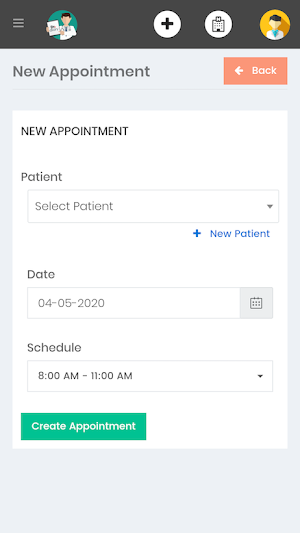
How to book a appointment.
-- Click on "+" icon --> Appointment
-- Select existing patient from drop down or for new patient click on "+ New Patient"
-- Select date and schedule time.
*Note: If Clinic schedule day and time is not setup than here schedule will not show.
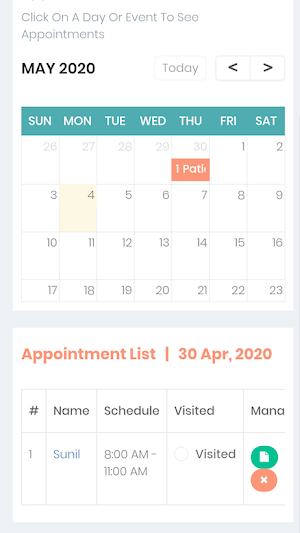
How to view appointment list
-- Go to appointment page (≡ --> Appointment)
-- Click date on calendar (appointment will show blow calendar)
*Note: By default today date is selected.
How to add new patient
-- Click on "+" icon --> Patient
-- Fill the detail of patient and click on "Save Patient Info" button
How to add medical info detail of patient
-- Go on patient list page (≡ --> Patient)
-- Click "Edit" button which patient you want to edit.
-- and fill the basic medal details just like Blood group, weight, height and more.
-- also upload file.
-- finally click on save button.
Use Dr.Diary and simply add your clinic, your patients and start adding their daily appointments, manage prescriptions , create bills and more easily.
MANAGE YOUR ENTIRE CLINIC FROM PHONE AND YOUR PC
Features:
— Appointment booking with new and existing patient
— Add and manage patients
— Payment and invoice create
— Patient Prescription with test and medicine option
— Manage more than one clinic
— More other feature coming soon
How to use
=============
How to add new clinic
-- Click on Plus Icon(+) --> Clinic --> "Add Clinic" button
-- Enter clinic name and address than click on "Save" button.
How to schedule clinic day and time
-- Go to clinic page ( ≡ --> Clinic)
-- Click edit button which you want to edit
-- And schedule date and time than click "Save Schedule" button.
How to Switch Clinic
-- Click of hospital icon (Near Plus icon)
-- Than select clinic which you want.
Note: Appointments, Prescription and Billing is separate to each clinic.
How to book a appointment.
-- Click on "+" icon --> Appointment
-- Select existing patient from drop down or for new patient click on "+ New Patient"
-- Select date and schedule time.
*Note: If Clinic schedule day and time is not setup than here schedule will not show.
How to view appointment list
-- Go to appointment page (≡ --> Appointment)
-- Click date on calendar (appointment will show blow calendar)
*Note: By default today date is selected.
How to add new patient
-- Click on "+" icon --> Patient
-- Fill the detail of patient and click on "Save Patient Info" button
How to add medical info detail of patient
-- Go on patient list page (≡ --> Patient)
-- Click "Edit" button which patient you want to edit.
-- and fill the basic medal details just like Blood group, weight, height and more.
-- also upload file.
-- finally click on save button.
Alternatives to Dr. Diary - Clinic management App
Looking for apps like Dr. Diary - Clinic management App? Here are 6 similar Android apps on Google Play. The highest rated is T Mail - Instant Free Temporar (4.3/5), and all 6 are free to download.
-
yTool - Grow Video and Channel 4.3
-
T Mail - Instant Free Temporar 4.3
-
Number Maze
-
Choco Crush
-
GoExam
-
SendUnknown
| App | Rating | Price | Installs | Last updated | Compare |
|---|---|---|---|---|---|
| Dr. Diary - Clinic management App | – | Free | 1,000+ | Aug 12, 2026 | |
| yTool - Grow Video and Channel | 4.3 / 5 | Free | 1,000,000+ | Aug 17, 2026 | Compare |
| T Mail - Instant Free Temporar | 4.3 / 5 | Free | 500,000+ | – | Compare |
| Number Maze | – | Free | 500+ | – | Compare |
| Choco Crush | – | Free | 10,000+ | Mar 21, 2020 | Compare |
| GoExam | – | Free | 50+ | Dec 27, 2019 | Compare |
| SendUnknown | – | Free | 1,000+ | Aug 12, 2026 | Compare |