

BAM Homeowner and Board App
CINC Systems Business
Homeowner & Board App for BAM Clients. Online payments and account information.
- Downloads
- 42+
- on Google Play
- Price
- Free
- No in-app purchases
- Updated
- Sep 14
- 2026 · v10.1.1
Screenshots

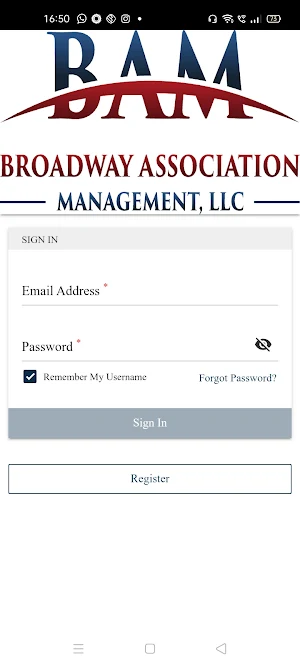
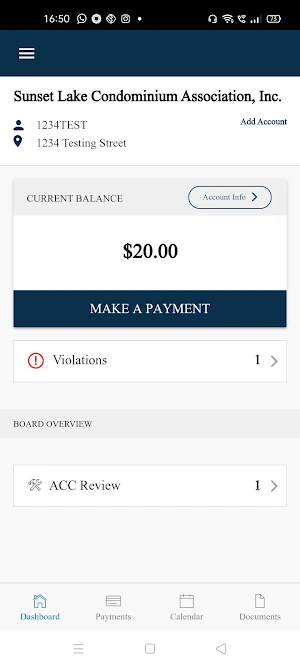


About BAM Homeowner and Board App
The Broadway Management Homeowner and Board App is a mobile-friendly way to interface with your community association. You will be able to make payments, view your account, and access community information all in one place.
If you already have a login to your association website, you can login to the App using the same email address and password you use for your association website. If you do not have a current login to your association site, simply click the register button and submit your information. Once your registration is approved, you will receive an email with a link to set your password and then you will be able to log into your account directly from this app.
If you already have a login and do not remember your password, click the Forgot Password link, enter your email address to request a password reset and you will receive an email with a link to set your password. Once set, you can login with your email address and new password.
Once logged in, Homeowners will have direct access to the following features:
a. Easily switch between accounts if multiple properties are owned
b. Homeowner Dashboard
c. Access association documents
d. Access association directories
e. Access association photos
f. Access Contact Us Page
g. Pay Assessments
h. Access violations – add comments and take pictures from mobile device to add to violation
i. Submit ACC Requests and include pictures and attachments (pictures can be taken from mobile device)
j. Access homeowner ledger
k. Submit work orders and check on status of their work orders (add comments and take pictures from mobile device)
In addition, Board Members will be able to take advantage of the following features:
a. Board Tasks
b. ACC Review
c. Board documents
d. Violations Review
e. Work Order Review
f. Invoice Approval
If you already have a login to your association website, you can login to the App using the same email address and password you use for your association website. If you do not have a current login to your association site, simply click the register button and submit your information. Once your registration is approved, you will receive an email with a link to set your password and then you will be able to log into your account directly from this app.
If you already have a login and do not remember your password, click the Forgot Password link, enter your email address to request a password reset and you will receive an email with a link to set your password. Once set, you can login with your email address and new password.
Once logged in, Homeowners will have direct access to the following features:
a. Easily switch between accounts if multiple properties are owned
b. Homeowner Dashboard
c. Access association documents
d. Access association directories
e. Access association photos
f. Access Contact Us Page
g. Pay Assessments
h. Access violations – add comments and take pictures from mobile device to add to violation
i. Submit ACC Requests and include pictures and attachments (pictures can be taken from mobile device)
j. Access homeowner ledger
k. Submit work orders and check on status of their work orders (add comments and take pictures from mobile device)
In addition, Board Members will be able to take advantage of the following features:
a. Board Tasks
b. ACC Review
c. Board documents
d. Violations Review
e. Work Order Review
f. Invoice Approval
Frequently asked questions
What is the BAM Homeowner and Board App?
The BAM Homeowner and Board App is a mobile-friendly platform that allows users to interface with their community association, make payments, view their account, and access community information all in one place.
How can I login to the BAM Homeowner and Board App?
If you already have a login to your association website, you can use the same email address and password to login to the App. If you do not have a current login, you can click the register button and submit your information. Once approved, you will receive an email to set your password and then you can log into your account from the app.
What should I do if I forgot my password to the BAM Homeowner and Board App?
If you forgot your password, you can click the Forgot Password link, enter your email address, and request a password reset. You will receive an email with a link to set your new password. Once set, you can login with your email address and new password.
What features can homeowners access in the BAM Homeowner and Board App?
Homeowners can easily switch between accounts if they own multiple properties, access the homeowner dashboard, view association documents, browse association directories and photos, access the Contact Us page, make payments, add comments and pictures to violations, submit ACC requests with pictures and attachments, view the homeowner ledger, and submit and track work orders with comments and pictures.
What features are available for Board Members in the BAM Homeowner and Board App?
Board Members can access board tasks, review ACC requests, view board documents, review violations, review work orders, and approve invoices.
Alternatives to BAM Homeowner and Board App
Looking for apps like BAM Homeowner and Board App? Here are 4 similar Android apps on Google Play. The highest rated is The Porch (4.8/5), and all 4 are free to download.




| App | Rating | Price | Installs | Last updated | Compare |
|---|---|---|---|---|---|
| BAM Homeowner and Board App | – | Free | 10+ | Sep 14, 2026 | |
| Myndlift | 4.6 / 5 | Free | 10,000+ | Oct 25, 2026 | Compare |
| Fretronome Trainer | – | Free | 500+ | Jan 10, 2021 | Compare |
| The Porch | 4.8 / 5 | Free | 10,000+ | Sep 21, 2026 | Compare |
| Spirit & Truth | 4.6 / 5 | Free | 10,000+ | Aug 21, 2026 | Compare |