
Sentry Editor: Tesla Dashcam
chufleco Auto & Vehicles In-app purchases Contains ads
View, edit & export Tesla Sentry Mode and Dashcam footage with GPS & telemetry
- Downloads
- 206+
- on Google Play
- Price
- Free
- In-app purchases
- Updated
- Nov 9
- 2026 · v1.1.6
Screenshots


About Sentry Editor: Tesla Dashcam
FEATURES:
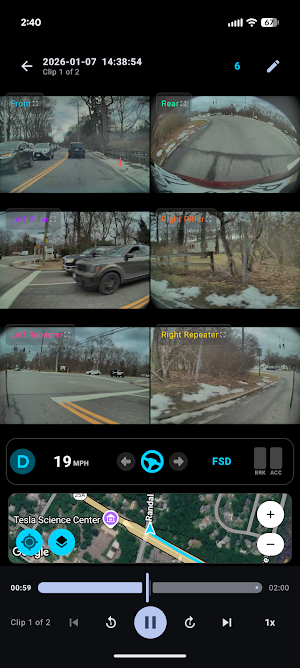
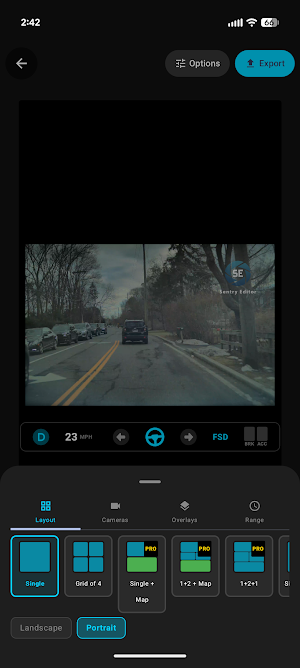
• View all camera angles simultaneously (HW2.5, HW3 & HW4 supported)
• Synchronized multi-camera playback
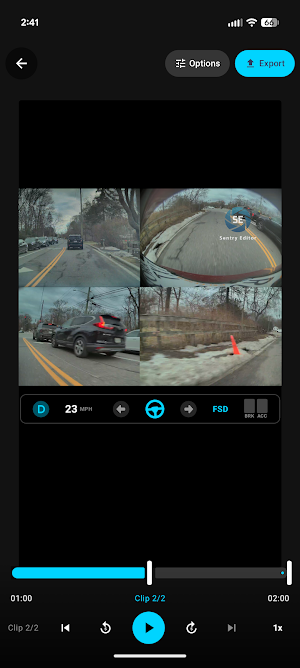
• 10 export layouts: Grid, Side-by-Side, 1+2, 1+3, Single with Map, and more
• Telemetry overlay: speed, gear, steering angle, blinkers, brake, accelerator, autopilot state
• GPS map with driving path visualization
• Jump directly to Sentry events
• Trim and clip range selection
• Full-resolution frame capture with instant share
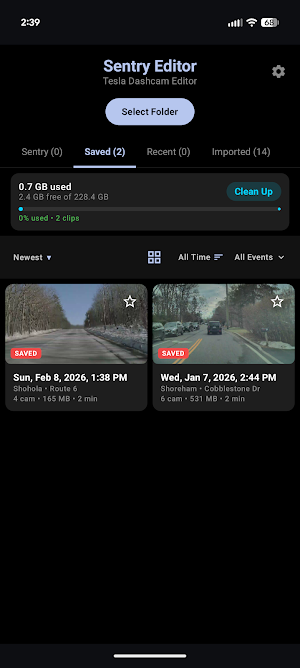
• Favorite, sort, and filter clips
• Import clips from USB drives for offline viewing
• NAS backup to your home server (SFTP & SMB)
• 27 languages supported
EXPORT OPTIONS:
• Portrait and landscape orientations
• Full telemetry overlay baked into exports
• Customizable telemetry elements and positioning (Pro)
• Add GPS map to exports
FREE:
• Full viewing: all cameras, GPS map, telemetry display
• Single and Grid 4 export layouts at 1080p with watermark
• 5 free ad-trial exports for premium layouts
PRO ($3.99/year):
• All 10 export layouts
• Up to 4K native resolution exports
• No ads
• Optional watermark
• Customizable telemetry overlay
• Multi-select bulk delete
• NAS backup
SUPPORTED HARDWARE:
• Tesla Hardware 2.5 (4 cameras, no telemetry)
• Tesla Hardware 3 (4 cameras)
• Tesla Hardware 4 (6 cameras including pillar cameras)
Perfect for reviewing Sentry events, saving dashcam highlights, or sharing interesting footage on social media. Works with clips from any Tesla Model S, 3, X, Y, or Cybertruck.
Download Sentry Editor and start reviewing your Tesla footage in full quality — no PC needed.
Note: This app is not affiliated with Tesla, Inc.
What’s new
Version 1.1.6 · Updated November 9, 2026
• NEW compact Tesla-style band (Settings › Playback). Free in the player, Pro in exports • SentryUSB: faster clips, seeking and map; works with Pi web login on • Sentry Connect: open your whole Pi, with its login sharing • Pro exports up to 4K: every camera in full detail • Map exports: sharper, and back-to-back exports stay fast • Grid 6: Rows option (Tight or Spaced) • NAS: clips show as each folder loads, with progress • Export fixes, bug fixes and stability improvements
Alternatives to Sentry Editor: Tesla Dashcam
Looking for apps like Sentry Editor: Tesla Dashcam? Here are 6 similar Android apps on Google Play. All of them are free to download.
-
Multirastro 2.0
-
BOXIV SHARE - 次世代カーシェア
-
AURA DRIVE
-
Caminhões e Estradas: Gestão
-
CarroKleen
-
SpeedoMy: Speedometer Odometer
| App | Rating | Price | Installs | Last updated | Compare |
|---|---|---|---|---|---|
| Sentry Editor: Tesla Dashcam | – | Free | 100+ | Nov 9, 2026 | |
| Multirastro 2.0 | – | Free | 500+ | – | Compare |
| BOXIV SHARE - 次世代カーシェア | – | Free | 1,000+ | – | Compare |
| AURA DRIVE | – | Free | 50+ | May 11, 2026 | Compare |
| Caminhões e Estradas: Gestão | – | Free | 1,000+ | Sep 24, 2026 | Compare |
| CarroKleen | – | Free | 50+ | Jan 12, 2023 | Compare |
| SpeedoMy: Speedometer Odometer | – | Free | 1,000+ | Aug 20, 2026 | Compare |
Similar apps on Google Play
- Multirastro 2.0
- BOXIV SHARE - 次世代カーシェア
- AURA DRIVE
- Caminhões e Estradas: Gestão
- CarroKleen
- SpeedoMy: Speedometer Odometer
- AutoLog: Vehicle Manager
- Fixer All
- E-Servis
- Wheeliyo
- AI Mechanic: Engine Sound Scan
- DAB Energy Albania
- Grupo São Mateus
- TG EV Station
- My Car
- BILGE-B-DRY 3
- Hoist
- Faso Sira
- BDC TRACK
- Xicar
- ProterSystem
- HBZero Multimarcas
- E-OtoSanayi
- WR Localiza
- MotoVibe