

Chromique
JayOabs Tools
Mix digital colors by proportion, save results, and build a private palette.
- Price
- Free
- No in-app purchases
- Updated
- Aug 19
- 2026 · v1.0.0
Screenshots


About Chromique
Chromique — Where Colors Mind
Create digital colors with intention.
Chromique is a private, local-first color mixing app for designers, developers, artists, students, content creators, and anyone who enjoys exploring color. Select two to five colors, control the percentage of each source, and blend them using perceptual OKLab interpolation to create balanced screen-based results.
MIX WITH CONTROL
• Select between two and five built-in or custom colors.
• Adjust each color’s contribution with percentage controls.
• Equalize the mix whenever you want a balanced starting point.
• Run a smooth blend animation and view the result in the same workspace.
• Reopen an existing creation and refine its original ingredients.
SAVE AND ORGANIZE
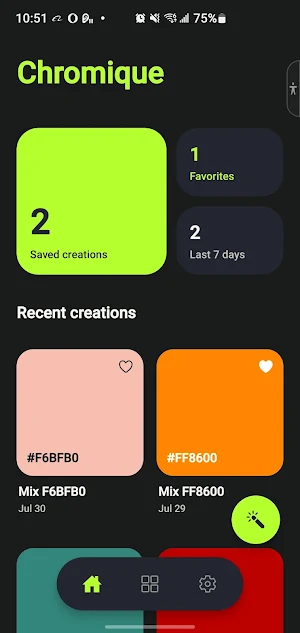
Chromique keeps your latest experiments close without forcing every result into your permanent collection. Save the colors worth keeping, rename them, mark favorites, edit their original mix, copy them, or remove them later.
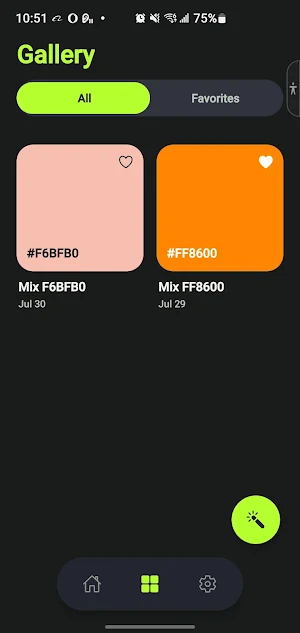
Your Gallery provides:
• A clean two-column collection of saved colors.
• All and Favorites views.
• Quick favorite controls.
• Detailed views for every saved creation.
• Original source colors and their proportions.
USE COLOR VALUES ANYWHERE
Open a saved creation to inspect and copy its:
• HEX value
• RGB value
• HSL value
• OKLCH value
Paste the copied value into design tools, development projects, documents, or any other app that accepts color codes.
BUILD YOUR OWN PALETTE
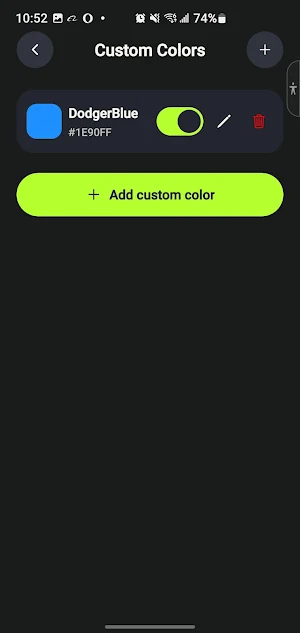
Add reusable custom colors by entering a name and HEX value. Your custom colors appear alongside the built-in palette and can be reused in future mixes. You can edit or remove palette entries without losing the source-color snapshots stored in older creations.
PRIVATE, LOCAL, AND OFFLINE
Chromique does not require an account for its core features. Your creations, favorites, custom colors, and preferences remain stored locally on your device, and the main mixing and library experience works offline.
Because there is currently no cloud backup or synchronization, clearing the app’s data or uninstalling it may permanently remove your local color library.
MADE FOR COMFORT
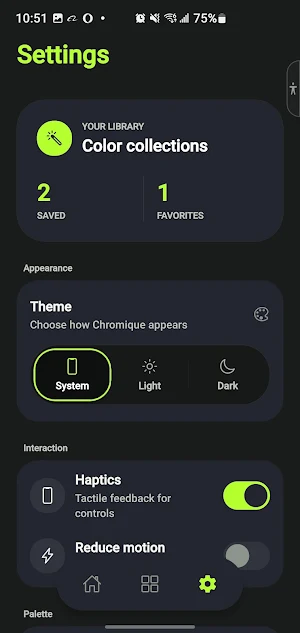
• System, Light, and Dark appearance modes.
• Optional haptic feedback.
• Reduced Motion support.
• Contrast-aware text and controls on color surfaces.
• System font scaling and accessible labels.
Chromique is designed for digital screen-color exploration. It does not simulate the physical behavior of paint, ink, dyes, or pigments.
Mix with control. Save what works. Return to every useful color.
Create digital colors with intention.
Chromique is a private, local-first color mixing app for designers, developers, artists, students, content creators, and anyone who enjoys exploring color. Select two to five colors, control the percentage of each source, and blend them using perceptual OKLab interpolation to create balanced screen-based results.
MIX WITH CONTROL
• Select between two and five built-in or custom colors.
• Adjust each color’s contribution with percentage controls.
• Equalize the mix whenever you want a balanced starting point.
• Run a smooth blend animation and view the result in the same workspace.
• Reopen an existing creation and refine its original ingredients.
SAVE AND ORGANIZE
Chromique keeps your latest experiments close without forcing every result into your permanent collection. Save the colors worth keeping, rename them, mark favorites, edit their original mix, copy them, or remove them later.
Your Gallery provides:
• A clean two-column collection of saved colors.
• All and Favorites views.
• Quick favorite controls.
• Detailed views for every saved creation.
• Original source colors and their proportions.
USE COLOR VALUES ANYWHERE
Open a saved creation to inspect and copy its:
• HEX value
• RGB value
• HSL value
• OKLCH value
Paste the copied value into design tools, development projects, documents, or any other app that accepts color codes.
BUILD YOUR OWN PALETTE
Add reusable custom colors by entering a name and HEX value. Your custom colors appear alongside the built-in palette and can be reused in future mixes. You can edit or remove palette entries without losing the source-color snapshots stored in older creations.
PRIVATE, LOCAL, AND OFFLINE
Chromique does not require an account for its core features. Your creations, favorites, custom colors, and preferences remain stored locally on your device, and the main mixing and library experience works offline.
Because there is currently no cloud backup or synchronization, clearing the app’s data or uninstalling it may permanently remove your local color library.
MADE FOR COMFORT
• System, Light, and Dark appearance modes.
• Optional haptic feedback.
• Reduced Motion support.
• Contrast-aware text and controls on color surfaces.
• System font scaling and accessible labels.
Chromique is designed for digital screen-color exploration. It does not simulate the physical behavior of paint, ink, dyes, or pigments.
Mix with control. Save what works. Return to every useful color.
What’s new
Version 1.0.0 · Updated August 19, 2026
Where Colors Mind
Alternatives to Chromique
Looking for apps like Chromique? Here are 3 similar Android apps on Google Play. All of them are free to download.
| App | Rating | Price | Installs | Last updated | Compare |
|---|---|---|---|---|---|
| Chromique | – | Free | 0+ | Aug 19, 2026 | |
| SignalPulse | – | Free | 10+ | – | Compare |
| PlanFlow | – | Free | 10+ | Sep 29, 2026 | Compare |
| WaveLink | – | Free | 100+ | Oct 1, 2026 | Compare |
Compare Chromique with the top alternatives: ratings, updates, ASO score and keyword gaps →