
Screen Time Monitor
cheervinsky Tools Contains ads
Screen time tracking with per-app charts and overuse notifications.
- Downloads
- 182+
- on Google Play
- Price
- Free
- No in-app purchases
- Updated
- Aug 11
- 2026 · v47.0
Screenshots


About Screen Time Monitor
Screen Time Monitor helps you understand how you spend time on your phone - by app and by day. View clear usage stats and graphs, then set notifications to stay on track.
What you can do:
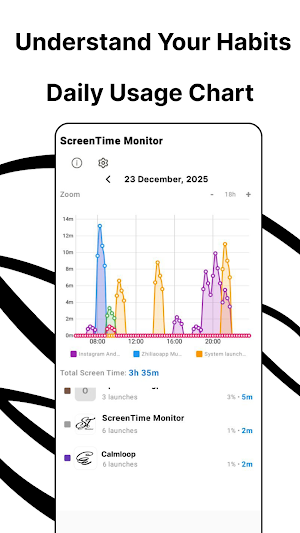
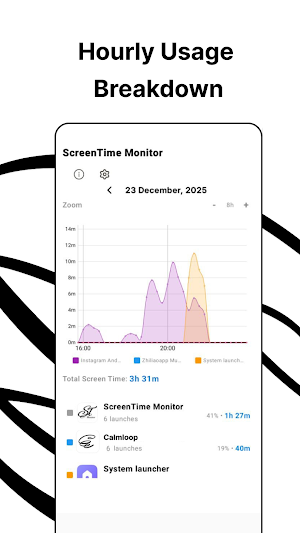
- Daily screen time overview — see total device usage for today and recent days
- Per-app usage details — find the apps that take the most time
- Usage graphs — simple charts to spot patterns quickly
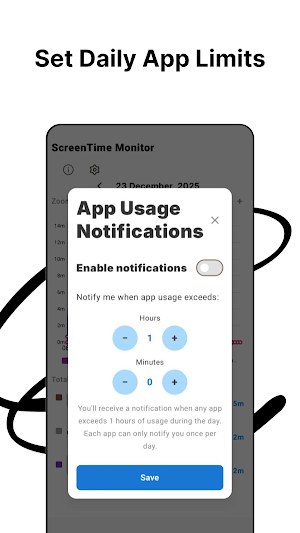
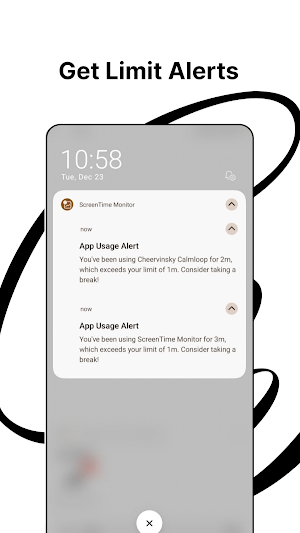
- Limit notifications — set a daily time limit for any app and get notified when you exceed it
- Lightweight and focused — no extra features, just monitoring and alerts
How it works
- Open the app to see today’s screen time and top apps.
- Tap an app to view its daily usage.
- Set a limit (for example, 30 min/day).
- Get a notification when the limit is exceeded.
Mood Tracker helps you understand how your apps affect your emotional state.
With Mood Tracker, you can select specific apps to track and see how they influence your mood over time. Simply mark the apps you want to monitor, and every time you open one of them, you will be asked to rate how you feel. When you leave the app, you’ll be prompted again.
This creates a clear before-and-after picture of how each app impacts your mood — positively or negatively.
How it works:
- Choose which apps you want to track using a simple checkbox list
- Get a short mood check-in when you open a tracked app
- Get another mood check-in when you leave it
- Review insights showing which apps improve your mood and which drain it
By connecting screen time with emotional awareness, Mood Tracker helps you make healthier digital choices and regain control over how apps affect your well-being.
Made by Calmloop.
What you can do:
- Daily screen time overview — see total device usage for today and recent days
- Per-app usage details — find the apps that take the most time
- Usage graphs — simple charts to spot patterns quickly
- Limit notifications — set a daily time limit for any app and get notified when you exceed it
- Lightweight and focused — no extra features, just monitoring and alerts
How it works
- Open the app to see today’s screen time and top apps.
- Tap an app to view its daily usage.
- Set a limit (for example, 30 min/day).
- Get a notification when the limit is exceeded.
Mood Tracker helps you understand how your apps affect your emotional state.
With Mood Tracker, you can select specific apps to track and see how they influence your mood over time. Simply mark the apps you want to monitor, and every time you open one of them, you will be asked to rate how you feel. When you leave the app, you’ll be prompted again.
This creates a clear before-and-after picture of how each app impacts your mood — positively or negatively.
How it works:
- Choose which apps you want to track using a simple checkbox list
- Get a short mood check-in when you open a tracked app
- Get another mood check-in when you leave it
- Review insights showing which apps improve your mood and which drain it
By connecting screen time with emotional awareness, Mood Tracker helps you make healthier digital choices and regain control over how apps affect your well-being.
Made by Calmloop.
What’s new
Version 47.0 · Updated August 11, 2026
minor changes
Alternatives to Screen Time Monitor
Looking for apps like Screen Time Monitor? Here are 6 similar Android apps on Google Play. The highest rated is blockit | stop phone addiction (4.5/5), and all 6 are free to download.
-
No Contact: Let Them Go 4.4
-
Engross: ADHD Focus Timer 4.4
-
Cruxly AI Tutor Quiz Flashcard
-
Screen Time for Focus -Blockin 4.3
-
Focus Launcher
-
blockit | stop phone addiction 4.5
| App | Rating | Price | Installs | Last updated | Compare |
|---|---|---|---|---|---|
| Screen Time Monitor | – | Free | 100+ | Aug 11, 2026 | |
| No Contact: Let Them Go | 4.4 / 5 | Free | 10,000+ | Sep 30, 2026 | Compare |
| Engross: ADHD Focus Timer | 4.4 / 5 | Free | 500,000+ | Jul 6, 2026 | Compare |
| Cruxly AI Tutor Quiz Flashcard | – | Free | 1,000+ | Jul 31, 2026 | Compare |
| Screen Time for Focus -Blockin | 4.3 / 5 | Free | 100,000+ | Sep 1, 2026 | Compare |
| Focus Launcher | – | Free | 5,000+ | Oct 21, 2026 | Compare |
| blockit | stop phone addiction | 4.5 / 5 | Free | 500,000+ | Oct 20, 2026 | Compare |