
BlueDiamond™ Toolkit
Carrier Fire & Security Americas Corporation Business
Conveniently commission BlueDiamond™ readers from a mobile device.
- Downloads
- 1K+
- on Google Play
- Price
- Free
- No in-app purchases
- Updated
- Dec 12
- 2025 · v2.3.2
Screenshots
About BlueDiamond™ Toolkit
The BlueDiamond™ Toolkit mobile application is a convenient way for installers to commission BlueDiamond multi-technology readers from a mobile device. The commissioning process has been simplified by eliminating the need for a Bluetooth® dongle in order to commission readers. Connection to the multi-technology readers is achieved by using Bluetooth technology from the mobile device.
• No Bluetooth dongle requirement
The BlueDiamond Toolkit mobile application does not require a Bluetooth dongle to commission BlueDiamond multi-technology readers. Connection to the readers is done using a Bluetooth mobile device.
• Assign use- friendly names to BlueDiamond readers (commissioning)
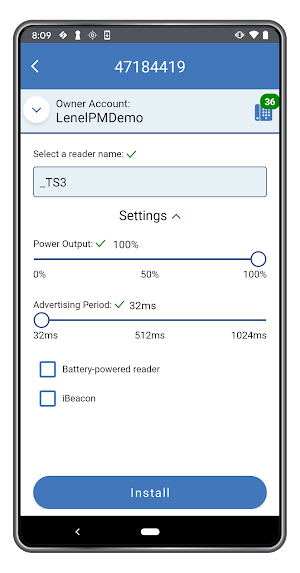
With the BlueDiamond Toolkit mobile application, installers can assign a “friendly name” to a reader making it available for use with BlueDiamond mobile credentials.
• Modify/Update existing readers
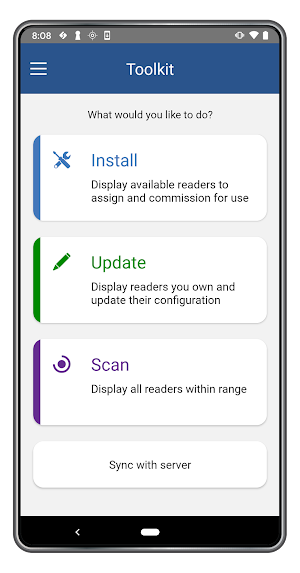
With the Update option installers can scan for readers that have already been commissioned at a location. Installers can modify reader settings, un-assign or re-assign readers using a different name.
• Commission BlueDiamond multi-technology mobile-ready readers
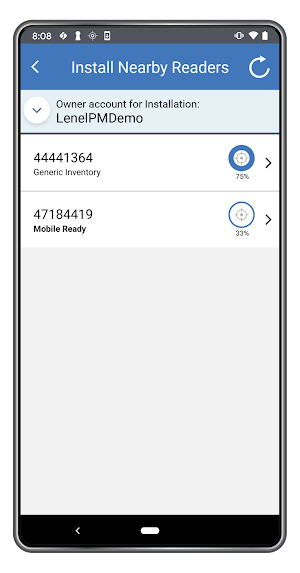
BlueDiamond mobile-ready readers will be appear in the mobile application as known devices that have no license. These readers will be able to be scanned and commissioned within the application once a License Meter has been enabled.
The BlueDiamond platform offers a complete, next-generation access control experience, with multi-technology readers, a feature-rich mobile app and mobile credentials. BlueDiamond mobile credentials offer a touchless access experience, enabling building occupants to eliminate a significant number of access touch points by turning smartphones into secure access control devices.
Important Notes:
1. Use of the BlueDiamond Toolkit mobile application requires BlueDiamond multi-technology readers and the app must be authorized to use Bluetooth on your mobile device.
2. For end users, use of the BlueDiamond mobile app requires that the organization have BlueDiamond multi-technology readers and the ability to issue BlueDiamond mobile credentials.
• No Bluetooth dongle requirement
The BlueDiamond Toolkit mobile application does not require a Bluetooth dongle to commission BlueDiamond multi-technology readers. Connection to the readers is done using a Bluetooth mobile device.
• Assign use- friendly names to BlueDiamond readers (commissioning)
With the BlueDiamond Toolkit mobile application, installers can assign a “friendly name” to a reader making it available for use with BlueDiamond mobile credentials.
• Modify/Update existing readers
With the Update option installers can scan for readers that have already been commissioned at a location. Installers can modify reader settings, un-assign or re-assign readers using a different name.
• Commission BlueDiamond multi-technology mobile-ready readers
BlueDiamond mobile-ready readers will be appear in the mobile application as known devices that have no license. These readers will be able to be scanned and commissioned within the application once a License Meter has been enabled.
The BlueDiamond platform offers a complete, next-generation access control experience, with multi-technology readers, a feature-rich mobile app and mobile credentials. BlueDiamond mobile credentials offer a touchless access experience, enabling building occupants to eliminate a significant number of access touch points by turning smartphones into secure access control devices.
Important Notes:
1. Use of the BlueDiamond Toolkit mobile application requires BlueDiamond multi-technology readers and the app must be authorized to use Bluetooth on your mobile device.
2. For end users, use of the BlueDiamond mobile app requires that the organization have BlueDiamond multi-technology readers and the ability to issue BlueDiamond mobile credentials.
What’s new
Version 2.3.2 · Updated December 12, 2025
Android 16 changes and minor improvements
Alternatives to BlueDiamond™ Toolkit
Looking for apps like BlueDiamond™ Toolkit? Here are 6 similar Android apps on Google Play. The highest rated is Mobile Security Professional (3.1/5), and all 6 are free to download.
-
BlueDiamond™ Mobile 2.4
-
TruVision TVRmobile 2.5
-
Mobile Security Professional 3.1
-
Occupant Assistant
-
ConnectedControls
-
ESTMobile™
| App | Rating | Price | Installs | Last updated | Compare |
|---|---|---|---|---|---|
| BlueDiamond™ Toolkit | – | Free | 1,000+ | Dec 12, 2025 | |
| BlueDiamond™ Mobile | 2.4 / 5 | Free | 10,000+ | Sep 21, 2026 | Compare |
| TruVision TVRmobile | 2.5 / 5 | Free | 100,000+ | – | Compare |
| Mobile Security Professional | 3.1 / 5 | Free | 5,000+ | Dec 17, 2025 | Compare |
| Occupant Assistant | – | Free | 100+ | – | Compare |
| ConnectedControls | – | Free | 10+ | Jun 25, 2024 | Compare |
| ESTMobile™ | – | Free | 100+ | Sep 4, 2026 | Compare |