

Cabsmith: Cabinet Cut List
Syslogic Global Productivity In-app purchases
Cut list optimizer & cabinet design: plywood cutting diagrams, less waste, DXF
- Downloads
- 3.6K+
- on Google Play
- Price
- Free
- In-app purchases
- Updated
- Sep 22
- 2026 · v1.4.1
Screenshots


About Cabsmith: Cabinet Cut List
Cabsmith is a cabinet cut list generator and panel cutting optimizer in one. Size a cabinet from a template, get every part, and nest them onto the fewest plywood or MDF sheets.
Whether you write it cabinet cutlist or cut list, the job is the same. Cabsmith is the cut list calculator that does the carcass maths and the nesting, then hands you a cutting plan for the saw.
"I NEED A CABINET CUT LIST" (Pro)
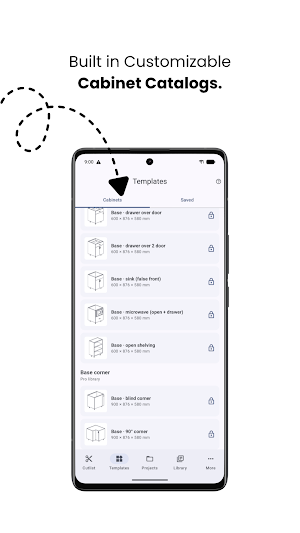
• A cabinet template library: base, wall, tall, vanity, drawer, corner, sink and cupboard units.
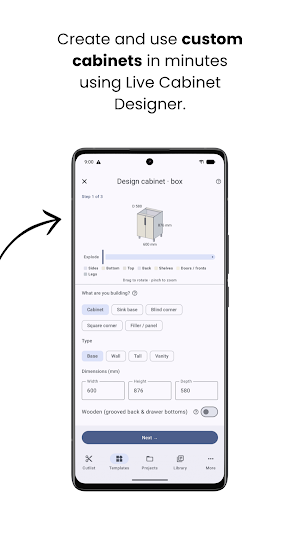
• Size the cabinet carcass — width, height, depth, shelves, drawers — and every part is calculated: sides, bottom, back, shelves, rails, doors and drawer fronts.
• Frameless 32 mm system construction, with Blum-standard drawer box sizing.
• Live 3D preview built from the real cut parts — the same geometry you will cut.
• Hardware list — hinges, slides, handles, legs — tracked alongside the cut list.
• Many cabinets in one project, nested across every sheet at once.
• Save your own cabinet as a template and reuse it on the next kitchen.
• Queue a run of cabinets — a whole kitchen wall — and drop it into a room.
"HOW MANY SHEETS DO I ACTUALLY NEED?"
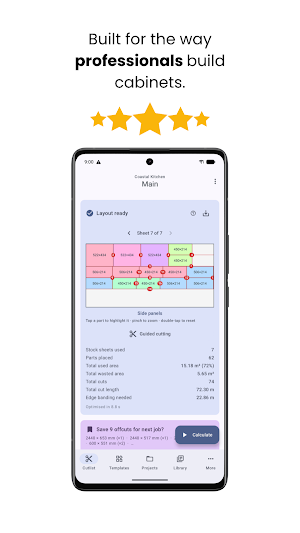
• Optimized panel cutting layouts, with the cut order numbered for you.
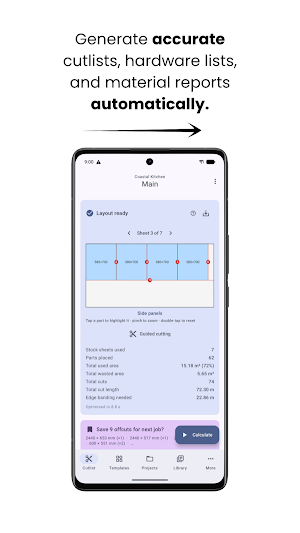
• Sheet yield and waste reported honestly — surplus, offcuts, kerf and trim.
• Mixed sheet sizes and materials in one job, never cross-nested by thickness.
• Unlimited stock, or a fixed number of boards if that is all the lumber yard has.
• Offcut tracking — save the usable drops and pull them into the next job.
"GIVE ME A CUTTING DIAGRAM I CAN TAKE TO THE SAW"
• A cutting diagram with dimensions on every part, not a wall of numbers.
• Tap any part to highlight it on the diagram and list.
• Kerf, or blade width, carved out so adjacent parts share one saw pass.
• Max cut length, so every cut fits your panel saw or track saw.
• Grain direction matched. Mismatches are reported, never silently rotated.
• Edge banding deducted from part sizes, so the finished piece is the size you wanted.
• Workshop mode — step through the cuts hands-free using the volume keys.
• Voice entry — say a measurement out loud instead of typing with gloves on.
• Free PDF cutting plan to print or send. Not a teaser, the real thing.
"CAN I SEND THIS TO MY CNC, OR TO A CLIENT?" (Pro)
• DXF export for CNC nesting — Fusion, VCarve and your router.
• Printable part labels with QR codes.
• Job costing and quotation for cabinet makers: materials, edging, cutting and labour.
• White-label quotes: your shop profile, logo, tax details and payment terms.
• A material library of your own rates, plus CSV import and export.
• Unlimited saved projects.
WHY WOODWORKERS SWITCH
• Works fully offline. No account, no sign-up, projects stay on your device.
• No daily calculation limits and no ads. Optimize as many times as you like, free.
• Less waste per sheet, so you buy fewer boards on every job.
WHO IT IS FOR
Cabinet makers, cupboard builders, carpenters, joiners, kitchen cabinet fitters, furniture makers, contractors and DIY woodworking. If you cut sheet goods — plywood, MDF, melamine or chipboard — Cabsmith turns a cutting list into a cutting plan in minutes.
FREE AND PRO
Free: the full optimizer with no daily limits, cutting diagrams, offcut tracking, Workshop mode, voice entry and PDF export, with up to 3 saved projects.
Pro: the cabinet designer and cabinet template library, DXF export, part labels, job costing and quotations, the material library, CSV import and export, and unlimited projects.
Pro is a subscription, from $7.49 a month or $59.99 a year — around a third less on the yearly plan. Prices vary by country and you will see your local price in the app. Billed through Google Play; cancel any time in Play Store, Subscriptions.
Please note: Cabsmith works in millimetres. Inch and feet-and-inches support is on the roadmap — if you work in imperial, watch for that update.
Questions or feedback? Email [email protected]
Whether you write it cabinet cutlist or cut list, the job is the same. Cabsmith is the cut list calculator that does the carcass maths and the nesting, then hands you a cutting plan for the saw.
"I NEED A CABINET CUT LIST" (Pro)
• A cabinet template library: base, wall, tall, vanity, drawer, corner, sink and cupboard units.
• Size the cabinet carcass — width, height, depth, shelves, drawers — and every part is calculated: sides, bottom, back, shelves, rails, doors and drawer fronts.
• Frameless 32 mm system construction, with Blum-standard drawer box sizing.
• Live 3D preview built from the real cut parts — the same geometry you will cut.
• Hardware list — hinges, slides, handles, legs — tracked alongside the cut list.
• Many cabinets in one project, nested across every sheet at once.
• Save your own cabinet as a template and reuse it on the next kitchen.
• Queue a run of cabinets — a whole kitchen wall — and drop it into a room.
"HOW MANY SHEETS DO I ACTUALLY NEED?"
• Optimized panel cutting layouts, with the cut order numbered for you.
• Sheet yield and waste reported honestly — surplus, offcuts, kerf and trim.
• Mixed sheet sizes and materials in one job, never cross-nested by thickness.
• Unlimited stock, or a fixed number of boards if that is all the lumber yard has.
• Offcut tracking — save the usable drops and pull them into the next job.
"GIVE ME A CUTTING DIAGRAM I CAN TAKE TO THE SAW"
• A cutting diagram with dimensions on every part, not a wall of numbers.
• Tap any part to highlight it on the diagram and list.
• Kerf, or blade width, carved out so adjacent parts share one saw pass.
• Max cut length, so every cut fits your panel saw or track saw.
• Grain direction matched. Mismatches are reported, never silently rotated.
• Edge banding deducted from part sizes, so the finished piece is the size you wanted.
• Workshop mode — step through the cuts hands-free using the volume keys.
• Voice entry — say a measurement out loud instead of typing with gloves on.
• Free PDF cutting plan to print or send. Not a teaser, the real thing.
"CAN I SEND THIS TO MY CNC, OR TO A CLIENT?" (Pro)
• DXF export for CNC nesting — Fusion, VCarve and your router.
• Printable part labels with QR codes.
• Job costing and quotation for cabinet makers: materials, edging, cutting and labour.
• White-label quotes: your shop profile, logo, tax details and payment terms.
• A material library of your own rates, plus CSV import and export.
• Unlimited saved projects.
WHY WOODWORKERS SWITCH
• Works fully offline. No account, no sign-up, projects stay on your device.
• No daily calculation limits and no ads. Optimize as many times as you like, free.
• Less waste per sheet, so you buy fewer boards on every job.
WHO IT IS FOR
Cabinet makers, cupboard builders, carpenters, joiners, kitchen cabinet fitters, furniture makers, contractors and DIY woodworking. If you cut sheet goods — plywood, MDF, melamine or chipboard — Cabsmith turns a cutting list into a cutting plan in minutes.
FREE AND PRO
Free: the full optimizer with no daily limits, cutting diagrams, offcut tracking, Workshop mode, voice entry and PDF export, with up to 3 saved projects.
Pro: the cabinet designer and cabinet template library, DXF export, part labels, job costing and quotations, the material library, CSV import and export, and unlimited projects.
Pro is a subscription, from $7.49 a month or $59.99 a year — around a third less on the yearly plan. Prices vary by country and you will see your local price in the app. Billed through Google Play; cancel any time in Play Store, Subscriptions.
Please note: Cabsmith works in millimetres. Inch and feet-and-inches support is on the roadmap — if you work in imperial, watch for that update.
Questions or feedback? Email [email protected]
What’s new
Version 1.4.1 · Updated September 22, 2026
What's new: • Pro Lifetime: pay once instead of subscribing. Every Pro feature on your device, including future updates. Nothing renews. • A cleaner Pro screen: every plan at a glance, the button always in reach. • Monthly and yearly plans are still there if you prefer them.
User reviews

also good

good

fantastic app

Amazing experience
Alternatives to Cabsmith: Cabinet Cut List
Looking for apps like Cabsmith: Cabinet Cut List? Here are 3 similar Android apps on Google Play. The highest rated is Sensi (4.5/5), and all 3 are free to download.



| App | Rating | Price | Installs | Last updated | Compare |
|---|---|---|---|---|---|
| Cabsmith: Cabinet Cut List | – | Free | 1,000+ | Sep 22, 2026 | |
| DesignEvo - Logo Maker | 3.0 / 5 | Free | 1,000,000+ | Apr 19, 2018 | Compare |
| Reveri: Relief in Minutes | 4.1 / 5 | Free | 100,000+ | Sep 25, 2026 | Compare |
| Sensi | 4.5 / 5 | Free | 1,000,000+ | Sep 14, 2026 | Compare |