
KeyDeck - 블루투스 매크로 키보드
%EC%98%A8%EB%A9%94%EB%AA%A8%EB%A6%AC%EB%9E%A9%EC%8A%A4 Lifestyle In-app purchases Contains ads
Turn your phone into a Bluetooth macro keyboard! Shortcuts and launch apps with a single button press.
- Downloads
- 64+
- on Google Play
- Price
- Free
- In-app purchases
- Updated
- Sep 18
- 2026 · v1.4.5
Screenshots

About KeyDeck - 블루투스 매크로 키보드
■ Your Own Portable Macro Keyboard
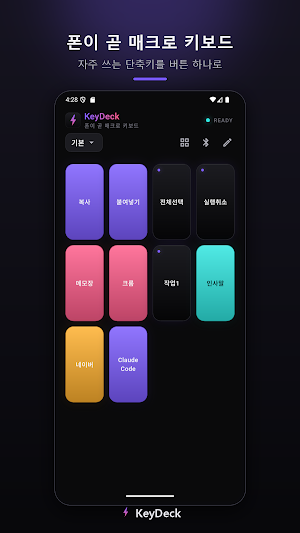
KeyDeck is a macro pad app that turns your Android phone into a Bluetooth keyboard (HID) for your PC.
With a single press of a button on your phone screen, everything from shortcuts like copy and paste to launching programs and typing frequently used sentences is executed directly on your PC. You do not need to install any programs on your PC — because your phone is simply recognized as a 'keyboard'.
▶ Install now to enjoy unlimited, ad-free access to all features for one month.
** ■ Perfect for:
• Those who want to use shortcuts quickly in video editing, design, or coding
• Those who want to launch frequently used programs or websites at once
• Those who want to easily send commands during presentations or broadcasts
• Those who need an auxiliary keypad (like a Stream Deck) but find purchasing one separately burdensome
■ Key Features
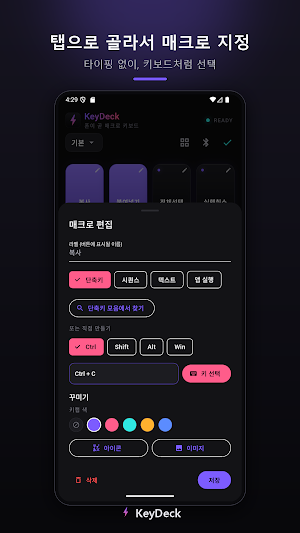
• Shortcuts — Assign Ctrl, Shift, Alt, and Win combinations to Tab in the keyboard layout selector
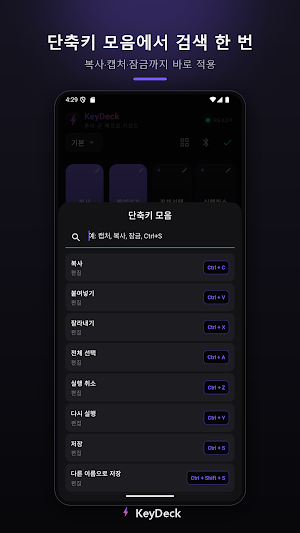
• Shortcut Sets — Search for and instantly apply frequently used shortcuts such as copy, capture, screen lock, and window splitting
• Launch Apps — Select from a list such as Notepad, Chrome, or Calculator, or specify the path directly
• Open Websites — Open directly in a browser such as Naver, YouTube, or ChatGPT
• Terminal Commands — Execute desired commands in PowerShell/CMD
• Text Input — Input frequently used sentences entirely with a single button
• Key Sequences — Automatically execute multiple key inputs in sequence
■ Customize
• Set keycap colors (text automatically uses a highly visible color)
• Select icons or decorate keycaps with gallery images
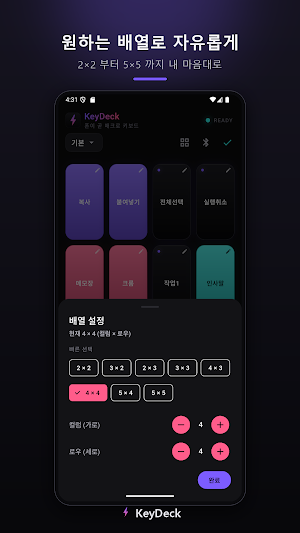
• Freely configure layouts of your choice, such as 2x2 to 5x5
• Save and switch between multiple profiles for different uses
■ Smart Connection
• Automatically connect to the last connected PC on the next launch
• Display recent devices at the top of connection settings
• Display the name of the connected PC at the top
■ How to Use (Very Simple)
1. Install the app and allow Bluetooth permissions.
2. Add (pair) your phone in your PC's Bluetooth settings.
3. Once connected, press the macro button to control your PC!
■ Supported Environments
• Android 9.0 (Pie) or higher, Bluetooth-enabled devices
• Connection Target: PCs that support Bluetooth keyboards (Windows, etc.)
※ iOS devices are not supported due to operating system policies that restrict their function as Bluetooth keyboards.
Experience the fastest personalized macro pad with a stylish dark design and satisfying key response.
KeyDeck is a macro pad app that turns your Android phone into a Bluetooth keyboard (HID) for your PC.
With a single press of a button on your phone screen, everything from shortcuts like copy and paste to launching programs and typing frequently used sentences is executed directly on your PC. You do not need to install any programs on your PC — because your phone is simply recognized as a 'keyboard'.
▶ Install now to enjoy unlimited, ad-free access to all features for one month.
** ■ Perfect for:
• Those who want to use shortcuts quickly in video editing, design, or coding
• Those who want to launch frequently used programs or websites at once
• Those who want to easily send commands during presentations or broadcasts
• Those who need an auxiliary keypad (like a Stream Deck) but find purchasing one separately burdensome
■ Key Features
• Shortcuts — Assign Ctrl, Shift, Alt, and Win combinations to Tab in the keyboard layout selector
• Shortcut Sets — Search for and instantly apply frequently used shortcuts such as copy, capture, screen lock, and window splitting
• Launch Apps — Select from a list such as Notepad, Chrome, or Calculator, or specify the path directly
• Open Websites — Open directly in a browser such as Naver, YouTube, or ChatGPT
• Terminal Commands — Execute desired commands in PowerShell/CMD
• Text Input — Input frequently used sentences entirely with a single button
• Key Sequences — Automatically execute multiple key inputs in sequence
■ Customize
• Set keycap colors (text automatically uses a highly visible color)
• Select icons or decorate keycaps with gallery images
• Freely configure layouts of your choice, such as 2x2 to 5x5
• Save and switch between multiple profiles for different uses
■ Smart Connection
• Automatically connect to the last connected PC on the next launch
• Display recent devices at the top of connection settings
• Display the name of the connected PC at the top
■ How to Use (Very Simple)
1. Install the app and allow Bluetooth permissions.
2. Add (pair) your phone in your PC's Bluetooth settings.
3. Once connected, press the macro button to control your PC!
■ Supported Environments
• Android 9.0 (Pie) or higher, Bluetooth-enabled devices
• Connection Target: PCs that support Bluetooth keyboards (Windows, etc.)
※ iOS devices are not supported due to operating system policies that restrict their function as Bluetooth keyboards.
Experience the fastest personalized macro pad with a stylish dark design and satisfying key response.
Alternatives to KeyDeck - 블루투스 매크로 키보드
Looking for apps like KeyDeck - 블루투스 매크로 키보드? Here are 6 similar Android apps on Google Play. All of them are free to download.
-
다시, 로컬 — 숨은 여행지 재발견
-
사지마 24 — 충동구매 봉인
-
오늘의 핑계 — 하루 10초 자기 디버깅
-
오늘의 선택 — 결정 기록
-
온서재 - 독서기록과 나만의 서재
-
Ongirok: AI Emotional Diary
| App | Rating | Price | Installs | Last updated | Compare |
|---|---|---|---|---|---|
| KeyDeck - 블루투스 매크로 키보드 | – | Free | 50+ | Sep 18, 2026 | |
| 다시, 로컬 — 숨은 여행지 재발견 | – | Free | 5+ | Sep 20, 2026 | Compare |
| 사지마 24 — 충동구매 봉인 | – | Free | 5+ | Jun 29, 2026 | Compare |
| 오늘의 핑계 — 하루 10초 자기 디버깅 | – | Free | 1+ | – | Compare |
| 오늘의 선택 — 결정 기록 | – | Free | 1+ | Jun 28, 2026 | Compare |
| 온서재 - 독서기록과 나만의 서재 | – | Free | 10+ | – | Compare |
| Ongirok: AI Emotional Diary | – | Free | 10+ | – | Compare |