
Block Touch in Broken Screen
JITechApps Tools Contains ads
Block random touch area of phone's defective screen.
- Rating
- 3.2
- 489 ratings
- Downloads
- 90.1K+
- on Google Play
- Price
- Free
- No in-app purchases
- Updated
- Sep 26
- 2025 · v7.0
Screenshots

About Block Touch in Broken Screen
Do you have a broken, damaged or defective mobile display? Your device gets accidental, random, arbitrary & self touch? Want to block touch in broken screen area?
All the above questions answer is here in the Block Touch in Broken Screen application.
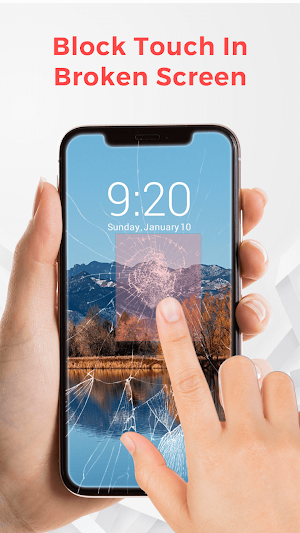
This app helps to block touch in the damaged screen area. You can block the defective screen area manually by locking the touch area of the desired size.
Block Touch in Broken Screen gives two modes to lock the touch:
1. Manual mode
2. Automatic mode
1. Manual mode
- Firstly, enable this manual auto block service.
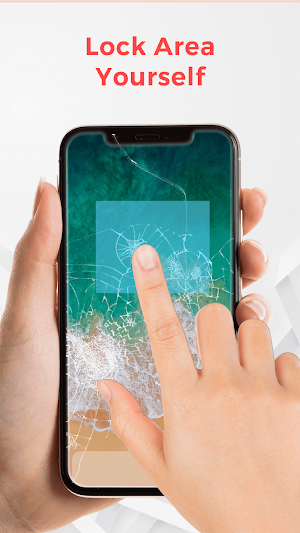
- Lock the touch area of the desired size on the mobile screen.
- To apply it on screen, then press the volume up button or double-tap.
- To cancel it, press the volume down button.
2. Automatic mode
- Enable the auto block touch service.
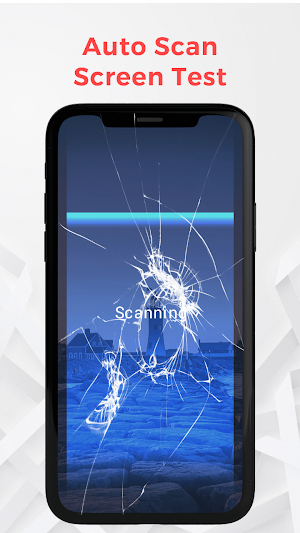
- It automatically detects the broken, damaged, and defective screen touches.
Note:- During the auto analysis, do not touch on screen.
Additional options in block touch in broken screen area:
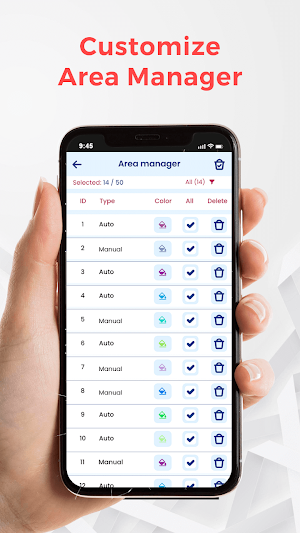
→ Area manager
- It gives the details of the defective area as auto/manual type and color.
- You can also delete the areas which you think are working properly.
- Easy to filter by auto and manual type.
→ Settings
* Rounded corner
- If you want to block the mobile corner display, then use this option.
- You can adjust the degree of the rounded corner and make it more rounded.
- Enable the Top and rounded as desired.
* Automatic analysis
- Set duration for block screen auto analysis.
- Can set the area size from 5(px) to 50(px).
- Set overlay area for block screen(maximum 50 overlays).
* Manual analysis
- Enable to apply view using a double-tap on the selected area.
- Can select broken screen area by free size or by entering its DP size.
Use this app as a Partial Screen to avoid touch in a broken screen.
All the above questions answer is here in the Block Touch in Broken Screen application.
This app helps to block touch in the damaged screen area. You can block the defective screen area manually by locking the touch area of the desired size.
Block Touch in Broken Screen gives two modes to lock the touch:
1. Manual mode
2. Automatic mode
1. Manual mode
- Firstly, enable this manual auto block service.
- Lock the touch area of the desired size on the mobile screen.
- To apply it on screen, then press the volume up button or double-tap.
- To cancel it, press the volume down button.
2. Automatic mode
- Enable the auto block touch service.
- It automatically detects the broken, damaged, and defective screen touches.
Note:- During the auto analysis, do not touch on screen.
Additional options in block touch in broken screen area:
→ Area manager
- It gives the details of the defective area as auto/manual type and color.
- You can also delete the areas which you think are working properly.
- Easy to filter by auto and manual type.
→ Settings
* Rounded corner
- If you want to block the mobile corner display, then use this option.
- You can adjust the degree of the rounded corner and make it more rounded.
- Enable the Top and rounded as desired.
* Automatic analysis
- Set duration for block screen auto analysis.
- Can set the area size from 5(px) to 50(px).
- Set overlay area for block screen(maximum 50 overlays).
* Manual analysis
- Enable to apply view using a double-tap on the selected area.
- Can select broken screen area by free size or by entering its DP size.
Use this app as a Partial Screen to avoid touch in a broken screen.
What’s new
Version 7.0 · Updated September 26, 2025
- Bug fix. - Improve Performance.
Alternatives to Block Touch in Broken Screen
Looking for apps like Block Touch in Broken Screen? Here are 6 similar Android apps on Google Play. The highest rated is Audio, Video Noise Remover (3.6/5), and all 6 are free to download.
-
Change Color in Photos 2.1
-
Audio, Video Noise Remover 3.6
-
Beach Photo Background Editor
-
Learn Korean in 15 Days
-
Kids Fashion Photo Editor
-
African Female Hairstyle Edit 3.4
| App | Rating | Price | Installs | Last updated | Compare |
|---|---|---|---|---|---|
| Block Touch in Broken Screen | 3.2 / 5 | Free | 50,000+ | Sep 26, 2025 | |
| Change Color in Photos | 2.1 / 5 | Free | 100,000+ | Aug 12, 2025 | Compare |
| Audio, Video Noise Remover | 3.6 / 5 | Free | 50,000+ | – | Compare |
| Beach Photo Background Editor | – | Free | 500+ | – | Compare |
| Learn Korean in 15 Days | – | Free | 1,000+ | – | Compare |
| Kids Fashion Photo Editor | – | Free | 100,000+ | – | Compare |
| African Female Hairstyle Edit | 3.4 / 5 | Free | 10,000+ | – | Compare |
Similar apps on Google Play
- Change Color in Photos
- Audio, Video Noise Remover
- Beach Photo Background Editor
- Learn Korean in 15 Days
- Kids Fashion Photo Editor
- African Female Hairstyle Edit
- Car Photo Background Edit
- Learn Japanese in 15 Days
- Airport Photo Background Edit
- Draw Beach Sand Name Art
- Famous Places Background Edit
- Bible Knowledge Quiz
- Before-After Collage Edit
- Bird Photo Background Editor
- Family Tree pic Collage Editor
- UK Passport Size Photo Maker
- My Photo with Gods Background
- EMI Calculation for Bike Loan
- Loan EMI Calculator for Car
- USA Passport Size Photo Maker
- K-POP Hairstyle Editor
- Body Retouch - Perfect Figure
- Photo Memes Templates & Maker
- Baby Milestones Status Editor
- Photo Mirror Style Editor
- Pimple Remover - Beauty Face
- Girls Jewellery Photo Editor
- Woman Photo Sunglass Changer
- Flower Crown for Wedding Pic
- Hill Photo Background Editor