
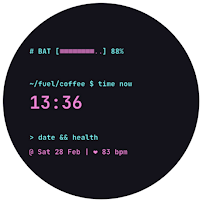
Terminal Z Watch Face
BR Faces Personalization
A real live terminal on your wrist. Dynamic paths & ASCII battery
- Downloads
- 20+
- on Google Play
- Price
- $0.99
- No in-app purchases
- Updated
- Jun 6
- 2026 · v1.0.3
Screenshots


About Terminal Z Watch Face
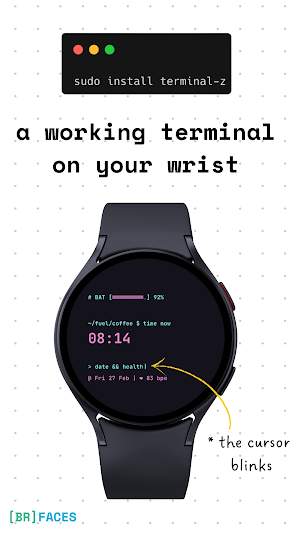
Transform your Wear OS device into a powerful command-line interface. Terminal Z is designed for those who appreciate the beauty of raw code, offering a retro-modern CLI aesthetic that reacts to your day.
From the blinking cursor to the dynamic directory path that changes as your day progresses, every detail is crafted to feel like an active shell session.
Compatible with Wear OS 4+ (API 33+) only.
Requires Samsung Galaxy Watch 4/5/6/7/Ultra, Pixel Watch 2/3, or newer devices.
_> FEATURES
Running...
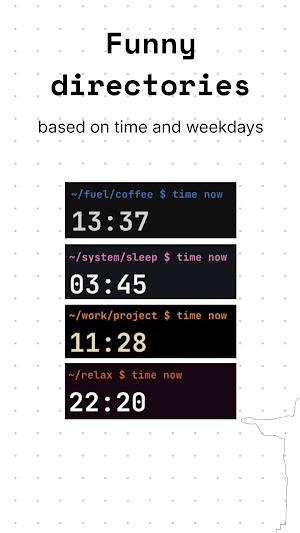
• Dynamic Shell Environment: Your prompt directory changes automatically based on the time of day (e.g., ~/morning-coffee vs ~/night-mode).
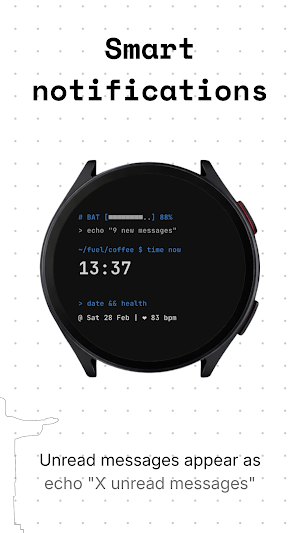
• Active Notification Stream: Unread messages trigger a command line alert: echo "3 new messages".
• ASCII Battery Bar: A retro-styled progress bar visualizes your power level.
• Blinking Cursor: An animated cursor keeps the terminal feeling "live."
_> SYSTEM SHORTCUTS
chmod +x ./apps
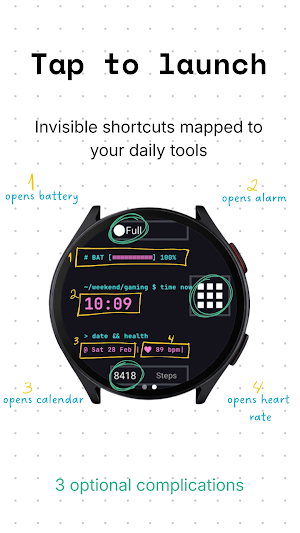
Run apps directly from the terminal interface by tapping specific zones:
• Click Time → Opens Alarm
• Click Date → Opens Calendar
• Click Battery → Opens Battery Status
• Click BPM → Opens Heart Rate Monitor
_> CUSTOMIZATION
source .zshrc --theme
• 3x Configurable Complications: Add weather, steps, or UV index to your command arguments.
• 12 Color Themes: Switch between Matrix Green, Ubuntu Purple, Arch Blue, and more.
_> SMART AOD
systemctl suspend
Optimized for efficiency. The screen dims to a low-power mode showing only the time and a witty "sleep" status message, saving battery while keeping the aesthetic alive.
_> COMPATIBILITY & TECHNICAL
Target API: Android 13 (API Level 33)
Minimum Requirement: Wear OS 4.0
Tested Devices:
• Samsung: Galaxy Watch 7, Galaxy Watch Ultra, Galaxy Watch 6, Galaxy Watch 5, Galaxy Watch 4 (updated to Wear OS 4)
• Google: Pixel Watch 3, Pixel Watch 2
• OnePlus: OnePlus Watch 2
• Xiaomi: Watch 2 Pro
Installation Note: Please ensure your watch firmware is updated to the latest version (Wear OS 4) for full compatibility.
From the blinking cursor to the dynamic directory path that changes as your day progresses, every detail is crafted to feel like an active shell session.
Compatible with Wear OS 4+ (API 33+) only.
Requires Samsung Galaxy Watch 4/5/6/7/Ultra, Pixel Watch 2/3, or newer devices.
_> FEATURES
Running...
• Dynamic Shell Environment: Your prompt directory changes automatically based on the time of day (e.g., ~/morning-coffee vs ~/night-mode).
• Active Notification Stream: Unread messages trigger a command line alert: echo "3 new messages".
• ASCII Battery Bar: A retro-styled progress bar visualizes your power level.
• Blinking Cursor: An animated cursor keeps the terminal feeling "live."
_> SYSTEM SHORTCUTS
chmod +x ./apps
Run apps directly from the terminal interface by tapping specific zones:
• Click Time → Opens Alarm
• Click Date → Opens Calendar
• Click Battery → Opens Battery Status
• Click BPM → Opens Heart Rate Monitor
_> CUSTOMIZATION
source .zshrc --theme
• 3x Configurable Complications: Add weather, steps, or UV index to your command arguments.
• 12 Color Themes: Switch between Matrix Green, Ubuntu Purple, Arch Blue, and more.
_> SMART AOD
systemctl suspend
Optimized for efficiency. The screen dims to a low-power mode showing only the time and a witty "sleep" status message, saving battery while keeping the aesthetic alive.
_> COMPATIBILITY & TECHNICAL
Target API: Android 13 (API Level 33)
Minimum Requirement: Wear OS 4.0
Tested Devices:
• Samsung: Galaxy Watch 7, Galaxy Watch Ultra, Galaxy Watch 6, Galaxy Watch 5, Galaxy Watch 4 (updated to Wear OS 4)
• Google: Pixel Watch 3, Pixel Watch 2
• OnePlus: OnePlus Watch 2
• Xiaomi: Watch 2 Pro
Installation Note: Please ensure your watch firmware is updated to the latest version (Wear OS 4) for full compatibility.
What’s new
Version 1.0.3 · Updated June 6, 2026
first version
User reviews

Very clean and good interface
Alternatives to Terminal Z Watch Face
Looking for apps like Terminal Z Watch Face? Here are 6 similar Android apps on Google Play. The highest rated is perslot19 (4.2/5), and 2 of the 6 are free to download.
-
GRBL Nothing 2A Glyph
-
perslot19 4.2
-
RHS 128 WR Retro Arcade
-
Terminal Watch face
-
JW266 jwstudio watchface
-
DB: Neon Edge Watchface [LITE]
| App | Rating | Price | Installs | Last updated | Compare |
|---|---|---|---|---|---|
| Terminal Z Watch Face | – | $0.99 | 10+ | Jun 6, 2026 | |
| GRBL Nothing 2A Glyph | – | 0.99 USD | 100+ | Oct 7, 2026 | Compare |
| perslot19 | 4.2 / 5 | Free | 10,000+ | – | Compare |
| RHS 128 WR Retro Arcade | – | 0.49 USD | 100+ | – | Compare |
| Terminal Watch face | – | 0.99 USD | 50+ | Jul 23, 2026 | Compare |
| JW266 jwstudio watchface | – | 1.49 USD | 100+ | Jul 14, 2025 | Compare |
| DB: Neon Edge Watchface [LITE] | – | Free | 1,000+ | Aug 31, 2026 | Compare |
Similar apps on Google Play
- GRBL Nothing 2A Glyph
- perslot19
- RHS 128 WR Retro Arcade
- Terminal Watch face
- JW266 jwstudio watchface
- DB: Neon Edge Watchface [LITE]
- Rich Rose Gold Watch Face
- Strange Digital Watch Face
- LED Retro Black Informer IN62
- GRBL Nothing Bars Watchface
- Guard Watch Face
- MatrixStyle Digital DSH3
- VCR Digits Watch Face
- Lucid Watch Face
- Simply LED
- Neon Outrun - watch face
- Pixel Game Controller
- Terminal Ubuntu Watch Face
- KYaml Watch Face by time.dev
- Digital Glitch - watch face
- Yaml Watch Face by time.dev
- Watch Face Minimalism 4
- Cyber Space Watch Face
- Music Equalizer - watch face
- Neon Dusk Pro
- Dreamy Neon Bleeds
- Crimson Alloy Dial