
AR Tiles
BMAC INFOTECH Tools Contains ads
Try your tiles with Augmented Reality before you buy them.
- Downloads
- 792+
- on Google Play
- Price
- Free
- No in-app purchases
- Updated
- Nov 13
- 2024 · v1.0.1
Screenshots


About AR Tiles
AR TilesTry your tiles with Augmented Reality before you buy them.
Nowadays choose interior design has never been easier. When you choose an interior design and if you don't like after some time then at that time you don't have any option to do. At this point, here is a solution, we are creating the best application where you can choose your own interior design, and see how that looks after design. This is totally Augmented Reality based app. Before you know how this application is work first you have to know about what is Augmented Reality and how Augmented Reality works.
WHAT IS AUGMENTED REALITY?
Augmented Reality is an enhanced version of the physical world through the visual, audio element. In other words, we can say that augmented reality integrates all the information with the user all this shows in real-time. All the data shown in real worlds. Unlike virtual reality is created in totally artificial environments. Where augmented reality can work on your existing environment and simply overlays virtual things on top of it and work on that. The main benefit of Augmented reality is the better user experience of an improved natural world. where the information from the virtual worlds are the basic information that provides the tool and basic information in the real world.
HOW AUGMENTED REALITY WORKS?
Augmented Reality refers to deploying virtual all over the real-world objects. That the overlay is executed together with the input received from a camera or another input device like smart glasses. This virtual image is all over the real world objects create an illusion that can effectively engage users on the virtual device.
HOW AR Tiles ARE WORKS?
AR Tiles are used to create your tiles with augmented reality and you have to choose your texture and create your tiles. Here you can see one more awesome feature and that is you have also chosen the texture from gallery and camera. At the topmost, you have to move your phone to detect a surface, when the surface is detected then you have seen a one add( + ) here you have to click this icon and add the start point of the wall. Then after again click on the add ( + ) button and this button will endpoint of the wall. Them after move your phone to the up direction and select your height of the wall. Click the confirm button to add your texture. Here you can see many textures choose one of them and create your wall tiles. You also choose a texture from your gallery and camera. you can also create a video or take a photo of your texture. You can create your wall in a few steps.
STEPS TO CREATE A WALL WITH YOUR TEXTURE:
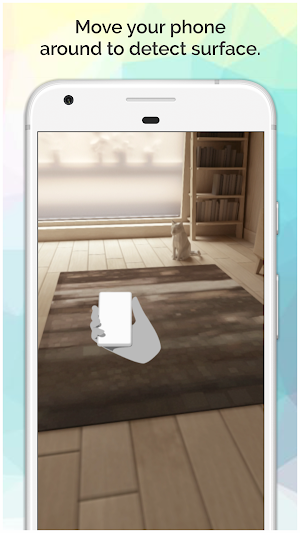
Step 1: Move your phone around to detect surface.
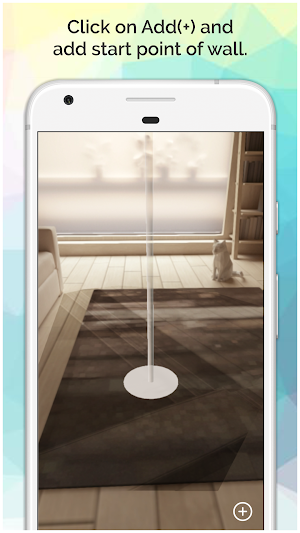
Step 2: Click on Add(+) and add a start point of the wall.
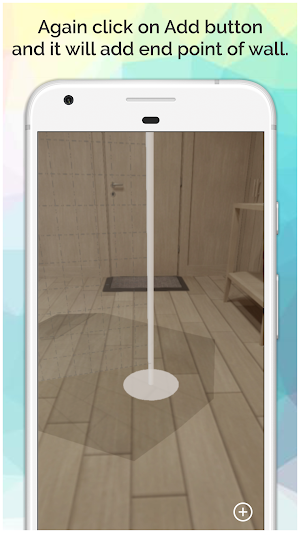
Step 3: Again click on the Add button and it will add endpoint of the wall.
Step 4: Move your phone towards up direction to set the height of the wall and click the add button
Step 5: Click the confirm button to set a texture.
Step 6: Set texture from the wheel and you can also set texture from camera/gallery
Yes, you can choose tiles image from our collection or from your phone gallery. Or even you can take a photo of any tile and use it.
If you have any suggestions and query related to this application then kindly share on [email protected]
Nowadays choose interior design has never been easier. When you choose an interior design and if you don't like after some time then at that time you don't have any option to do. At this point, here is a solution, we are creating the best application where you can choose your own interior design, and see how that looks after design. This is totally Augmented Reality based app. Before you know how this application is work first you have to know about what is Augmented Reality and how Augmented Reality works.
WHAT IS AUGMENTED REALITY?
Augmented Reality is an enhanced version of the physical world through the visual, audio element. In other words, we can say that augmented reality integrates all the information with the user all this shows in real-time. All the data shown in real worlds. Unlike virtual reality is created in totally artificial environments. Where augmented reality can work on your existing environment and simply overlays virtual things on top of it and work on that. The main benefit of Augmented reality is the better user experience of an improved natural world. where the information from the virtual worlds are the basic information that provides the tool and basic information in the real world.
HOW AUGMENTED REALITY WORKS?
Augmented Reality refers to deploying virtual all over the real-world objects. That the overlay is executed together with the input received from a camera or another input device like smart glasses. This virtual image is all over the real world objects create an illusion that can effectively engage users on the virtual device.
HOW AR Tiles ARE WORKS?
AR Tiles are used to create your tiles with augmented reality and you have to choose your texture and create your tiles. Here you can see one more awesome feature and that is you have also chosen the texture from gallery and camera. At the topmost, you have to move your phone to detect a surface, when the surface is detected then you have seen a one add( + ) here you have to click this icon and add the start point of the wall. Then after again click on the add ( + ) button and this button will endpoint of the wall. Them after move your phone to the up direction and select your height of the wall. Click the confirm button to add your texture. Here you can see many textures choose one of them and create your wall tiles. You also choose a texture from your gallery and camera. you can also create a video or take a photo of your texture. You can create your wall in a few steps.
STEPS TO CREATE A WALL WITH YOUR TEXTURE:
Step 1: Move your phone around to detect surface.
Step 2: Click on Add(+) and add a start point of the wall.
Step 3: Again click on the Add button and it will add endpoint of the wall.
Step 4: Move your phone towards up direction to set the height of the wall and click the add button
Step 5: Click the confirm button to set a texture.
Step 6: Set texture from the wheel and you can also set texture from camera/gallery
Yes, you can choose tiles image from our collection or from your phone gallery. Or even you can take a photo of any tile and use it.
If you have any suggestions and query related to this application then kindly share on [email protected]
What’s new
Version 1.0.1 · Updated November 13, 2024
Try your tiles with Augmented Reality before you buy them.
User reviews

Very interactive and useful
Alternatives to AR Tiles
Looking for apps like AR Tiles? Here are 6 similar Android apps on Google Play. The highest rated is KML Converter and Viewer (2.8/5), and all 6 are free to download.
-
KML Converter and Viewer 2.8
-
Gujarat Wildlife - Forest
-
Quote Maker for Writers
-
Fruits Bear Mania
-
MORO Cycling - Bike Tracker
-
Personal Stickers Maker and Co
| App | Rating | Price | Installs | Last updated | Compare |
|---|---|---|---|---|---|
| AR Tiles | – | Free | 500+ | Nov 13, 2024 | |
| KML Converter and Viewer | 2.8 / 5 | Free | 100,000+ | Sep 11, 2026 | Compare |
| Gujarat Wildlife - Forest | – | Free | 1,000+ | Aug 4, 2022 | Compare |
| Quote Maker for Writers | – | Free | 10,000+ | Apr 28, 2026 | Compare |
| Fruits Bear Mania | – | Free | 100+ | Oct 6, 2019 | Compare |
| MORO Cycling - Bike Tracker | – | Free | 1,000+ | Aug 11, 2025 | Compare |
| Personal Stickers Maker and Co | – | Free | 500+ | Jun 17, 2019 | Compare |
Compare AR Tiles with the top alternatives: ratings, updates, ASO score and keyword gaps →