
File Encryption Utility
Encrypt Solutions Tools Contains ads
Encrypts files with a private key stream cipher.
- Rating
- 3.6
- 15 ratings
- Downloads
- 1K+
- on Google Play
- Price
- Free
- No in-app purchases
- Updated
- Jan 16
- 2017 · v1.0
Screenshots
About File Encryption Utility
File Encryption Utilization App
File Encryption Utilizing Stream Cipher Encryption
File Encryption Utility Encryption of Local/Cloud Based Files
File Protection from Hacking
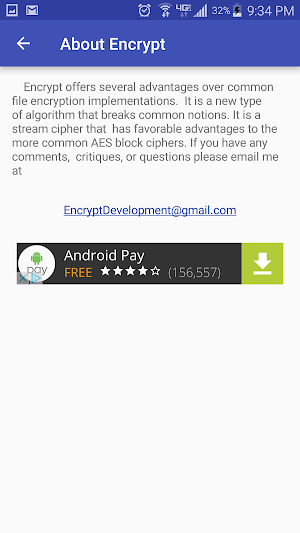
This app is based off of "Binary Lagged Fibonacci: An Aperiodic Pseudo Random Number Generator"
The 8 main advantages of using this app:
1. 100% free, with no in app purchases.
2. Using an unknown algorithm, hackers currently have no idea how to break it.
3. Security of the future. The app allows any length of pin security meaning a brute force break attempt can be made nearly impossible.
- Day by day, as computing power grows, we are getting closer and closer to breaking AES.
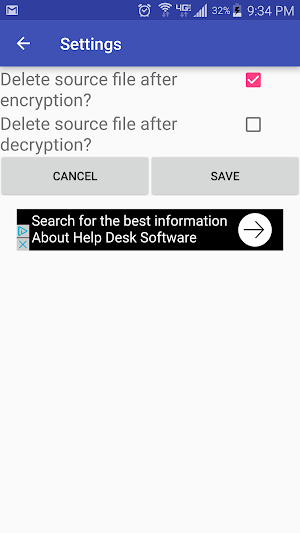
4. Once encryption of a file begins you have full phone function as files are encrypted in the background.
5. Allows access to all possible connected storage including cloud storage.
6. Multiple files can be encrypted simultaneously.
7. Small amount of space required. 1.8 MB
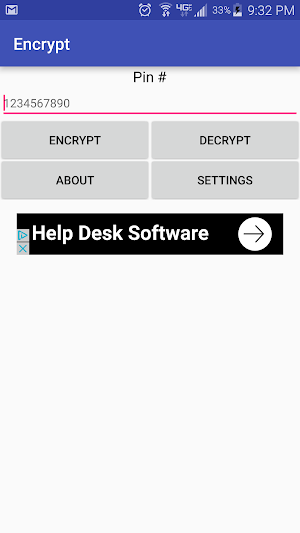
8. Encrypting a file is a simple four step process.
- Enter any pin number
- Press encrypt
- Select file(s) to encrypt
- Save file(s) for later decryption
Afterwards, the encryption will continue in the background and you are free to exit the app. A notification will appear when encryption(s) is/are complete.
File Encryption Utilizing Stream Cipher Encryption
File Encryption Utility Encryption of Local/Cloud Based Files
File Protection from Hacking
This app is based off of "Binary Lagged Fibonacci: An Aperiodic Pseudo Random Number Generator"
The 8 main advantages of using this app:
1. 100% free, with no in app purchases.
2. Using an unknown algorithm, hackers currently have no idea how to break it.
3. Security of the future. The app allows any length of pin security meaning a brute force break attempt can be made nearly impossible.
- Day by day, as computing power grows, we are getting closer and closer to breaking AES.
4. Once encryption of a file begins you have full phone function as files are encrypted in the background.
5. Allows access to all possible connected storage including cloud storage.
6. Multiple files can be encrypted simultaneously.
7. Small amount of space required. 1.8 MB
8. Encrypting a file is a simple four step process.
- Enter any pin number
- Press encrypt
- Select file(s) to encrypt
- Save file(s) for later decryption
Afterwards, the encryption will continue in the background and you are free to exit the app. A notification will appear when encryption(s) is/are complete.
User reviews

Awesome app, now the docs uploaded on free cloud might be safe
Fast, easy to use, unbreakable by even the government. Highly recommend.
It's simple, intuitive, and fast. Recommended for the neophyte and the aficionado.
This smart easy app is so helpful in the current environment with technology security risks.
Great app that just works well straight out the gate and it doesn't cost anything , the CCleaner of the encryption world
Alternatives to File Encryption Utility
Looking for apps like File Encryption Utility? Here are 4 similar Android apps on Google Play. The highest rated is KeePro Unlocker (4.7/5), and 3 of the 4 are free to download.


| App | Rating | Price | Installs | Last updated | Compare |
|---|---|---|---|---|---|
| File Encryption Utility | 3.6 / 5 | Free | 1,000+ | Jan 16, 2017 | |
| KeePro Unlocker | 4.7 / 5 | 10 USD | 5,000+ | Jan 27, 2026 | Compare |
| Egnyte | 4.5 / 5 | Free | 100,000+ | Sep 24, 2026 | Compare |
| Decrypt - Bitcoin & crypto new | 4.1 / 5 | Free | 100,000+ | Jul 18, 2024 | Compare |
| Locker Password Manager | 4.4 / 5 | Free | 50,000+ | Oct 20, 2026 | Compare |