
InkVista: AI Tattoo Design
Photography In-app purchases
Create custom tattoo designs with AI. Realistic body preview & skin matching.
- Downloads
- 5.1K+
- on Google Play
- Price
- Free
- In-app purchases
- Updated
- Jul 24
- 2026 · v1.6.0
Screenshots


About InkVista: AI Tattoo Design
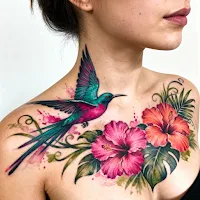
InkVista - AI Tattoo Design Generator & Body Preview
Create professional tattoo designs with AI technology. Generate custom tattoo art from text or photos, then preview realistic placement on your body.
TEXT-TO-TATTOO GENERATOR
Describe your tattoo idea and InkVista AI creates professional artwork instantly. Transform text into custom tattoo designs. No artistic skills needed.
PHOTO-TO-TATTOO CONVERSION
Upload photos and convert into professional tattoo art. Perfect for memorial tattoos, pet portraits, or custom tattoo designs.
20 PROFESSIONAL TATTOO STYLES
Traditional: Bold lines, classic colors, vintage American style
Japanese: Dragons, koi fish, cherry blossoms, oriental art
Minimalist: Delicate fine lines, simple elegant designs
Geometric: Sacred geometry, mandala patterns
Realistic: Photo-realistic portraits with detail
Watercolor: Vibrant flowing colors, artistic effects
Tribal: Bold black patterns, ethnic designs
Blackwork: Solid black coverage, high contrast
Neo Traditional: Modern classic tattoo art
Dotwork: Intricate stippling technique
Sketch: Raw artistic pencil style
Trash Polka: Edgy red and black collage
Animal Portrait: Wildlife and pet designs
Floral: Botanical flower illustrations
Mythical: Dragons, phoenix, fantasy creatures
Text: Beautiful lettering and typography
Spiritual: Sacred meaningful symbols
Sleeve: Comprehensive arm designs
Small: Tiny delicate placements
Large: Epic statement pieces
REALISTIC BODY PREVIEW
Upload your photo and preview tattoo designs on arm, chest, back, leg, shoulder, neck, wrist, hand, ankle. InkVista adapts tattoo art to match your skin tone perfectly. Adjust size from tiny to large. Test multiple placements instantly. Preview fresh versus healed appearance.
CUSTOMIZATION CONTROLS
Modify tattoo design size and scale. Rotate orientation. Adjust position precisely. Change colors and styles. Test on different body areas. Save multiple variations.
PERFECT FOR
First Tattoo Planning: Explore tattoo design ideas safely before permanent ink
Collection Building: Visualize new tattoo designs with existing tattoos
Artist Consultation: Show tattoo artist custom designs
Social Media: Create tattoo design content for Instagram and TikTok
Design Inspiration: Discover new tattoo design styles
HOW TO USE INKVISTA
1. Create: Describe idea or upload photo
2. Select Style: Choose from 20 professional styles
3. Generate: AI creates custom artwork instantly
4. Preview: Upload photo and place design realistically
5. Adjust: Modify size, position, placement
6. Save: Download HD art or share preview
BASIC FEATURES
Limited tattoo design generation. Access to select styles. Basic body preview. Standard quality exports.
PREMIUM FEATURES
Unlimited tattoo design generation. All 20 professional styles. Unlimited HD exports without watermarks. Advanced body placement controls. Exclusive premium styles. Priority AI processing. Multiple tattoos on one photo. Aging effect previews.
Premium features require subscription or credits.
WHY CHOOSE INKVISTA
Advanced AI Technology: Latest generation algorithms
20 Tattoo Styles: Widest professional variety
Realistic Preview: See designs on actual body
Instant Results: Generate in seconds
Easy Use: No design skills needed
Professional Quality: Ready for tattoo artists
From tiny delicate tattoo designs to epic statement pieces, explore when AI meets tattoo artistry with InkVista.
Download InkVista now and start creating professional tattoo designs!
IMPORTANT: This is a visualization tool only. Actual tattoo application must be performed by professional licensed tattoo artists. Consult qualified professionals about placement, sizing, skin compatibility, aftercare, and safety before getting permanent tattoos.
---
Privacy & Terms: Your privacy matters. We never share your photos without permission. Premium features require subscription or credits.
Create professional tattoo designs with AI technology. Generate custom tattoo art from text or photos, then preview realistic placement on your body.
TEXT-TO-TATTOO GENERATOR
Describe your tattoo idea and InkVista AI creates professional artwork instantly. Transform text into custom tattoo designs. No artistic skills needed.
PHOTO-TO-TATTOO CONVERSION
Upload photos and convert into professional tattoo art. Perfect for memorial tattoos, pet portraits, or custom tattoo designs.
20 PROFESSIONAL TATTOO STYLES
Traditional: Bold lines, classic colors, vintage American style
Japanese: Dragons, koi fish, cherry blossoms, oriental art
Minimalist: Delicate fine lines, simple elegant designs
Geometric: Sacred geometry, mandala patterns
Realistic: Photo-realistic portraits with detail
Watercolor: Vibrant flowing colors, artistic effects
Tribal: Bold black patterns, ethnic designs
Blackwork: Solid black coverage, high contrast
Neo Traditional: Modern classic tattoo art
Dotwork: Intricate stippling technique
Sketch: Raw artistic pencil style
Trash Polka: Edgy red and black collage
Animal Portrait: Wildlife and pet designs
Floral: Botanical flower illustrations
Mythical: Dragons, phoenix, fantasy creatures
Text: Beautiful lettering and typography
Spiritual: Sacred meaningful symbols
Sleeve: Comprehensive arm designs
Small: Tiny delicate placements
Large: Epic statement pieces
REALISTIC BODY PREVIEW
Upload your photo and preview tattoo designs on arm, chest, back, leg, shoulder, neck, wrist, hand, ankle. InkVista adapts tattoo art to match your skin tone perfectly. Adjust size from tiny to large. Test multiple placements instantly. Preview fresh versus healed appearance.
CUSTOMIZATION CONTROLS
Modify tattoo design size and scale. Rotate orientation. Adjust position precisely. Change colors and styles. Test on different body areas. Save multiple variations.
PERFECT FOR
First Tattoo Planning: Explore tattoo design ideas safely before permanent ink
Collection Building: Visualize new tattoo designs with existing tattoos
Artist Consultation: Show tattoo artist custom designs
Social Media: Create tattoo design content for Instagram and TikTok
Design Inspiration: Discover new tattoo design styles
HOW TO USE INKVISTA
1. Create: Describe idea or upload photo
2. Select Style: Choose from 20 professional styles
3. Generate: AI creates custom artwork instantly
4. Preview: Upload photo and place design realistically
5. Adjust: Modify size, position, placement
6. Save: Download HD art or share preview
BASIC FEATURES
Limited tattoo design generation. Access to select styles. Basic body preview. Standard quality exports.
PREMIUM FEATURES
Unlimited tattoo design generation. All 20 professional styles. Unlimited HD exports without watermarks. Advanced body placement controls. Exclusive premium styles. Priority AI processing. Multiple tattoos on one photo. Aging effect previews.
Premium features require subscription or credits.
WHY CHOOSE INKVISTA
Advanced AI Technology: Latest generation algorithms
20 Tattoo Styles: Widest professional variety
Realistic Preview: See designs on actual body
Instant Results: Generate in seconds
Easy Use: No design skills needed
Professional Quality: Ready for tattoo artists
From tiny delicate tattoo designs to epic statement pieces, explore when AI meets tattoo artistry with InkVista.
Download InkVista now and start creating professional tattoo designs!
IMPORTANT: This is a visualization tool only. Actual tattoo application must be performed by professional licensed tattoo artists. Consult qualified professionals about placement, sizing, skin compatibility, aftercare, and safety before getting permanent tattoos.
---
Privacy & Terms: Your privacy matters. We never share your photos without permission. Premium features require subscription or credits.
What’s new
Version 1.6.0 · Updated July 24, 2026
Improvements made, bugs fixed, and new tools added.
Alternatives to InkVista: AI Tattoo Design
Looking for apps like InkVista: AI Tattoo Design? Here are 6 similar Android apps on Google Play. The highest rated is Fotogenic : Face & Body Editor (4.8/5), and 4 of the 6 are free to download.
-
Photo Background Changer App
-
DesignEvo - Logo Maker 3.0
-
Home Interior Design AI App
-
Oji: AI Avatar Photo Generator 4.3
-
Fotogenic : Face & Body Editor 4.8
-
Invitd Invitation Maker & RSVP 4.4
| App | Rating | Price | Installs | Last updated | Compare |
|---|---|---|---|---|---|
| InkVista: AI Tattoo Design | – | Free | 5,000+ | Jul 24, 2026 | |
| Photo Background Changer App | – | – | 500,000+ | Oct 9, 2026 | Compare |
| DesignEvo - Logo Maker | 3.0 / 5 | Free | 1,000,000+ | Apr 19, 2018 | Compare |
| Home Interior Design AI App | – | – | – | Jan 21, 2026 | Compare |
| Oji: AI Avatar Photo Generator | 4.3 / 5 | Free | 1,000+ | Jul 17, 2023 | Compare |
| Fotogenic : Face & Body Editor | 4.8 / 5 | Free | 5,000,000+ | Jun 4, 2026 | Compare |
| Invitd Invitation Maker & RSVP | 4.4 / 5 | Free | 100,000+ | Oct 9, 2026 | Compare |
Similar apps on Google Play
- Photo Background Changer App
- DesignEvo - Logo Maker
- Home Interior Design AI App
- Oji: AI Avatar Photo Generator
- Fotogenic : Face & Body Editor
- Invitd Invitation Maker & RSVP
- MindSync - Therapy Journal
- LightX AI Photo Editor Retouch
- Apowersoft Background Eraser
- Firsties: Family Photo Sharing
- Lift: AI Photo Editor
- SelfieCity
- Photo Editor Pro - Square Pic
- Evite: Email & SMS Invitations
- Image Api - AI Image Generator
- Invitation Maker & Card Design
- ARTA: AI Art & Photo Generator
- Soothe: Wellness On Demand
- AI Photo Generator - Fotorama
- PicMa: AI Video&Photo Enhancer
- Blend: AI Videos Logos Try On
- Prisma Art Effect Photo Editor
- TON: Filters for Video & Photo
- SynkedUP
- MakeupPlus - Virtual Makeup
- Photify AI: AI Photo Generator
- Glitch Photo Editor & Glitch V