
Contact Side bar - Shortcuts
Tools In-app purchases Contains ads
Speed dial favorite contacts with edge screen gesture using contact shortcuts.
- Downloads
- 4.5K+
- on Google Play
- Price
- Free
- In-app purchases
- Updated
- Aug 5
- 2025 · v1.6
Screenshots


About Contact Side bar - Shortcuts
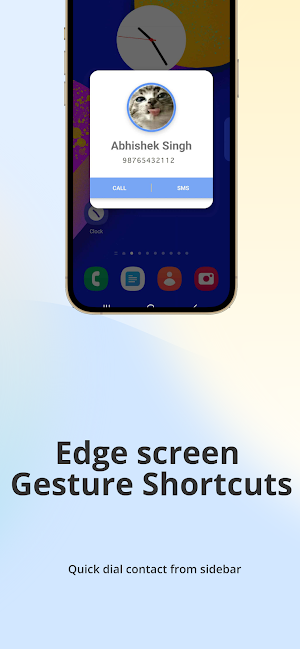
Contact Shortcuts placed on edge screen gesture bar to speed dial contacts and sms contacts quickly.
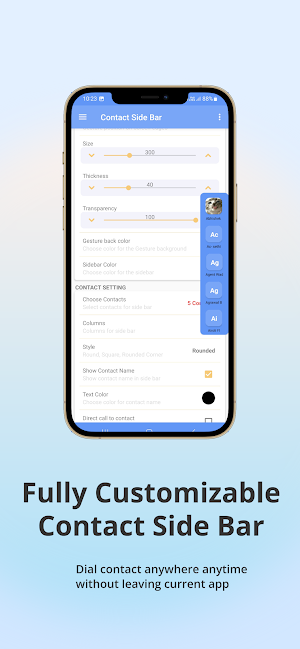
Contact Sidebar is a launcher on the edge of the screen. Find contact easily and speed dial contact any time without leaving your current app.
Now quickly access your favorite contacts, No more scrolling through the long contact list, simply swipe the edge screen, and connect to your favorite contacts.
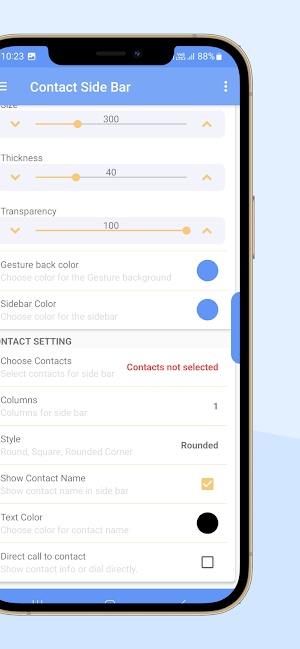
Contact sidebar have many features for you to customize. You can change sidebar's columns, size, thickness, transparency, location on screen and many more option to make it easy and convenient for you.
You can also customize background color and position of edge screen, change icon style and show contact name or just image icon.
Contact Sidebar Features
• Multitasking and productivity booster
• Works with any launcher
• One hand operation with intuitive gestures
• Always-on-top launcher on the edge of your screen
• Quick access to contacts
• Edge screen gestures
• Speed dial
• Widgets on the edge of your screen
• Floating widgets
• Contacts Shortcuts
• Location - Left top - Left center, Left bottom, Right -Top , Right - center, Right bottom etc..
• Auto-start on boot
• Backup locally or using Drive
Choose any number of contacts to place them on sidebar edge screen to speed dial contacts.
No need to leave your current app for calling any contact, simply swipe gesture from edge screen to access contacts. Boost your multitasking!
Place your family contacts to the sidebar and connect with them with a single edge swipe
Add your favorite contacts to the sidebar and speed dial contact, sms contact.
Location - place sidebar edge screen swipe gesture on the Left, Right or at the Bottom edge of your screen.
Other customization options - you can customize icon style, show contact name or hide and change background color and size, width-thickness etc.
One hand operation - place your sidebars wherever you like, adjust the size and navigate with a single hand
Contact Sidebar app makes your android experience better, provides easy multitasking from anywhere and anytime!
It's fast and highly customizable. You can easily customize the way it works and Connect to your contacts easily. Just a swipe to connect with your favorite contacts.
Easy UI in the main screen with descriptions of each function for ease and to avoid confusions.
Completely customizable settings, You can easily adjust it to your convenience.
Place your family, friends contacts to sidebar, At any point, you can choose which all contacts to be displayed in the sidebar.
More features to come...
PERMISSIONS REQUIRED:
Contact - Required for accessing contacts
CALL - Required for direct dial shortcut to any specified number.
Internet - Require for In app purchases and ads.
Overlay permission - Require to create edge screen gesture control.
Contact Sidebar is a launcher on the edge of the screen. Find contact easily and speed dial contact any time without leaving your current app.
Now quickly access your favorite contacts, No more scrolling through the long contact list, simply swipe the edge screen, and connect to your favorite contacts.
Contact sidebar have many features for you to customize. You can change sidebar's columns, size, thickness, transparency, location on screen and many more option to make it easy and convenient for you.
You can also customize background color and position of edge screen, change icon style and show contact name or just image icon.
Contact Sidebar Features
• Multitasking and productivity booster
• Works with any launcher
• One hand operation with intuitive gestures
• Always-on-top launcher on the edge of your screen
• Quick access to contacts
• Edge screen gestures
• Speed dial
• Widgets on the edge of your screen
• Floating widgets
• Contacts Shortcuts
• Location - Left top - Left center, Left bottom, Right -Top , Right - center, Right bottom etc..
• Auto-start on boot
• Backup locally or using Drive
Choose any number of contacts to place them on sidebar edge screen to speed dial contacts.
No need to leave your current app for calling any contact, simply swipe gesture from edge screen to access contacts. Boost your multitasking!
Place your family contacts to the sidebar and connect with them with a single edge swipe
Add your favorite contacts to the sidebar and speed dial contact, sms contact.
Location - place sidebar edge screen swipe gesture on the Left, Right or at the Bottom edge of your screen.
Other customization options - you can customize icon style, show contact name or hide and change background color and size, width-thickness etc.
One hand operation - place your sidebars wherever you like, adjust the size and navigate with a single hand
Contact Sidebar app makes your android experience better, provides easy multitasking from anywhere and anytime!
It's fast and highly customizable. You can easily customize the way it works and Connect to your contacts easily. Just a swipe to connect with your favorite contacts.
Easy UI in the main screen with descriptions of each function for ease and to avoid confusions.
Completely customizable settings, You can easily adjust it to your convenience.
Place your family, friends contacts to sidebar, At any point, you can choose which all contacts to be displayed in the sidebar.
More features to come...
PERMISSIONS REQUIRED:
Contact - Required for accessing contacts
CALL - Required for direct dial shortcut to any specified number.
Internet - Require for In app purchases and ads.
Overlay permission - Require to create edge screen gesture control.
User reviews

Support Super Thank You 😁😁😁

good

Excellent app! Very useful. Thanks to dev.

JC stop mm go

very very usefully app. works perfectly fine.

👍
Alternatives to Contact Side bar - Shortcuts
Looking for apps like Contact Side bar - Shortcuts? Here are 6 similar Android apps on Google Play. The highest rated is App Organizer (4.3/5), and 2 of the 6 are free to download.
-
Gallery Slideshow 3.9
-
Simple App Locker 3.7
-
Smart navigation bar - navbar 4.1
-
App Organizer 4.3
-
Side Bar - Edge Screen 3.8
-
Volume Control per app 2.9
| App | Rating | Price | Installs | Last updated | Compare |
|---|---|---|---|---|---|
| Contact Side bar - Shortcuts | – | Free | 1,000+ | Aug 5, 2025 | |
| Gallery Slideshow | 3.9 / 5 | 0.99 USD | 10,000+ | Oct 3, 2026 | Compare |
| Simple App Locker | 3.7 / 5 | 0.99 USD | 10,000+ | – | Compare |
| Smart navigation bar - navbar | 4.1 / 5 | 0.99 USD | 50,000+ | Aug 1, 2025 | Compare |
| App Organizer | 4.3 / 5 | Free | 50,000+ | Oct 1, 2026 | Compare |
| Side Bar - Edge Screen | 3.8 / 5 | Free | 100,000+ | – | Compare |
| Volume Control per app | 2.9 / 5 | 0.99 USD | 10,000+ | – | Compare |