
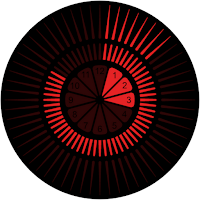
Tempus Red Android Watch Face
Personalization
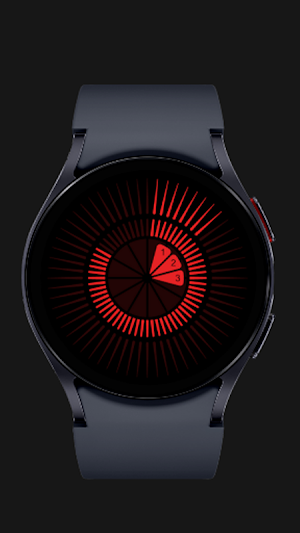
Tempus Red Smart watch artwork by light artist & designer Ben Rousseau
- Downloads
- 12+
- on Google Play
- Price
- $4.99
- No in-app purchases
- Updated
- Mar 27
- 2026
Screenshots
Save to Pinterest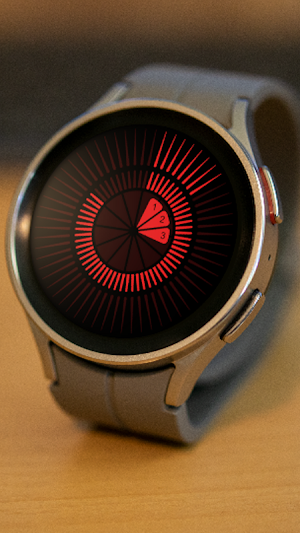


About Tempus Red Android Watch Face
Our "Tempus Red Android watch face" is now compatible with Wear OS by Google, bringing you a stylish and functional watch face for your smartwatch. Enjoy a seamless experience on your Wear OS device with Tempus Watch.'
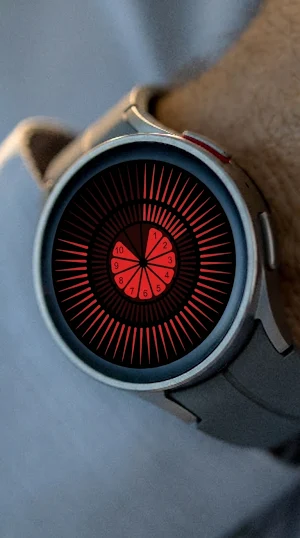
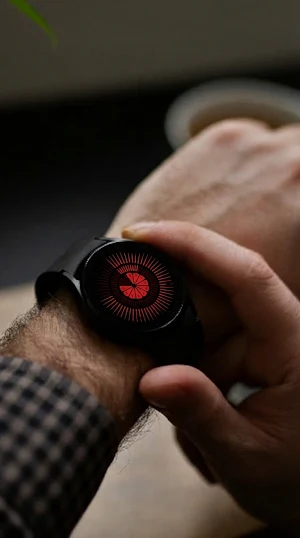
A unique Tempus timepiece light pattern by designer Ben Rousseau. A smart watch artwork that represents the time over 12 hours in real time using a constantly building pattern of light over 3 uniform arrangements with 12 for hours in centre, 60 for minutes in middle ring and 60 for seconds on outer ring.
Time redesigned.
Download now and experience time in a new light.
Protected by international design registration No. DM/222085 Copyright Rousseau Design LTD. Member of Acid - Anti Copying In Design.
About: Ben Rousseau is a lighting artist and designer focused on creating beautiful experiential creations that bring light and positive energy into people’s lives and environments.
www.benrousseau.com
www.tempustime.com
Video link on how to download and install Tempus Watch face on your smartwatch:
https://youtu.be/O0SVGG0xw8Y?si=30M-HBwpqk9Jhv6L
Step-by-Step Guide to Install the Tempus Watch Face
Download and Open the Tempus Companion App
Phone: Download the Tempus Companion App from the Play Store.
Watch: Ensure your smartwatch is connected to your phone and has an internet connection.
Enable Bluetooth on Both Devices
Phone: Make sure Bluetooth is turned on. The app will prompt you to turn it on if it's not already enabled. Grant the app all required permissions.
Watch: Ensure Bluetooth is enabled and your smartwatch is discoverable.
Connect Your Smartwatch to the App
Phone: Open the Tempus Companion App. You will see a button: 'Connect'.
Phone: Tap on the 'Connect' button. The app will search for nearby Bluetooth devices.
Phone: Select your smartwatch from the list of available devices. Wait for the connection to be established. Once connected, a 'Install' button will become visible.
Initiate the Installation of the Watch Face
Phone: Tap on the 'Install' button. This will open the Play Store page for the Tempus watch face on your smartwatch.
Watch: On your smartwatch, you will see the Tempus watch face Play Store page.
Purchase and Download the Watch Face
Watch: Click on the price button to purchase the watch face.
Watch: Follow the prompts to complete your purchase. You may need to confirm the purchase on your phone by following the instructions provided (e.g., open the notification from Google Play Store or visit g.co/continue on your phone or browser).
Watch: Once the purchase is complete, the watch face will begin downloading. Wait for the download to finish.
Apply the Watch Face
Phone: Open the Galaxy Wearable app (download from the Play Store if not available) and navigate to 'Watch faces'.
Phone: Scroll down to 'Downloaded watch faces' and select the Tempus watch face you just purchased.
Phone: A progress bar will appear, indicating that the watch face is being applied to your smartwatch. Wait for the process to complete.
Watch: The Tempus watch face will now be visible and applied on your smartwatch.
Troubleshooting Tips
Connection Issues: Ensure both your phone and smartwatch have Bluetooth enabled and are in close proximity.
Payment Issues: Follow the instructions carefully for completing the purchase. Ensure you are logged into the correct Google account.
Watch Face Not Visible: If the watch face does not appear immediately, try restarting your smartwatch and checking the Galaxy Wearable app for the downloaded watch face.
A unique Tempus timepiece light pattern by designer Ben Rousseau. A smart watch artwork that represents the time over 12 hours in real time using a constantly building pattern of light over 3 uniform arrangements with 12 for hours in centre, 60 for minutes in middle ring and 60 for seconds on outer ring.
Time redesigned.
Download now and experience time in a new light.
Protected by international design registration No. DM/222085 Copyright Rousseau Design LTD. Member of Acid - Anti Copying In Design.
About: Ben Rousseau is a lighting artist and designer focused on creating beautiful experiential creations that bring light and positive energy into people’s lives and environments.
www.benrousseau.com
www.tempustime.com
Video link on how to download and install Tempus Watch face on your smartwatch:
https://youtu.be/O0SVGG0xw8Y?si=30M-HBwpqk9Jhv6L
Step-by-Step Guide to Install the Tempus Watch Face
Download and Open the Tempus Companion App
Phone: Download the Tempus Companion App from the Play Store.
Watch: Ensure your smartwatch is connected to your phone and has an internet connection.
Enable Bluetooth on Both Devices
Phone: Make sure Bluetooth is turned on. The app will prompt you to turn it on if it's not already enabled. Grant the app all required permissions.
Watch: Ensure Bluetooth is enabled and your smartwatch is discoverable.
Connect Your Smartwatch to the App
Phone: Open the Tempus Companion App. You will see a button: 'Connect'.
Phone: Tap on the 'Connect' button. The app will search for nearby Bluetooth devices.
Phone: Select your smartwatch from the list of available devices. Wait for the connection to be established. Once connected, a 'Install' button will become visible.
Initiate the Installation of the Watch Face
Phone: Tap on the 'Install' button. This will open the Play Store page for the Tempus watch face on your smartwatch.
Watch: On your smartwatch, you will see the Tempus watch face Play Store page.
Purchase and Download the Watch Face
Watch: Click on the price button to purchase the watch face.
Watch: Follow the prompts to complete your purchase. You may need to confirm the purchase on your phone by following the instructions provided (e.g., open the notification from Google Play Store or visit g.co/continue on your phone or browser).
Watch: Once the purchase is complete, the watch face will begin downloading. Wait for the download to finish.
Apply the Watch Face
Phone: Open the Galaxy Wearable app (download from the Play Store if not available) and navigate to 'Watch faces'.
Phone: Scroll down to 'Downloaded watch faces' and select the Tempus watch face you just purchased.
Phone: A progress bar will appear, indicating that the watch face is being applied to your smartwatch. Wait for the process to complete.
Watch: The Tempus watch face will now be visible and applied on your smartwatch.
Troubleshooting Tips
Connection Issues: Ensure both your phone and smartwatch have Bluetooth enabled and are in close proximity.
Payment Issues: Follow the instructions carefully for completing the purchase. Ensure you are logged into the correct Google account.
Watch Face Not Visible: If the watch face does not appear immediately, try restarting your smartwatch and checking the Galaxy Wearable app for the downloaded watch face.
Alternatives to Tempus Red Android Watch Face
Looking for apps like Tempus Red Android Watch Face? Here are 6 similar Android apps on Google Play. The highest rated is CWF019 Paper Art Watch Face (4.2/5), and 1 of the 6 are free to download.
-
SamWatch Classic E 2021
-
Dahlia Watch Face 034
-
Eclipse Minimal Watch Face -22
-
BFF10- Animation 4th of July
-
Kinesis - Animated Watch Face
-
CWF019 Paper Art Watch Face 4.2
| App | Rating | Price | Installs | Last updated | Compare |
|---|---|---|---|---|---|
| Tempus Red Android Watch Face | – | $4.99 | 10+ | Mar 27, 2026 | |
| SamWatch Classic E 2021 | – | 0.99 USD | 500+ | Aug 12, 2026 | Compare |
| Dahlia Watch Face 034 | – | 0.99 USD | 50+ | Sep 16, 2024 | Compare |
| Eclipse Minimal Watch Face -22 | – | 0.49 USD | 100+ | Jul 31, 2024 | Compare |
| BFF10- Animation 4th of July | – | 1.49 USD | 5+ | Jun 15, 2026 | Compare |
| Kinesis - Animated Watch Face | – | 0.99 USD | 100+ | – | Compare |
| CWF019 Paper Art Watch Face | 4.2 / 5 | Free | 10,000+ | – | Compare |
Similar apps on Google Play
- SamWatch Classic E 2021
- Dahlia Watch Face 034
- Eclipse Minimal Watch Face -22
- BFF10- Animation 4th of July
- Kinesis - Animated Watch Face
- CWF019 Paper Art Watch Face
- Tantalum watch face
- Quantum Flare WatchFace SAM-34
- Balance Board
- Tempus Aqua Android Watch Face
- Carnage Watch Face V19
- Really Red
- One Sunflower WatchFace SMA 07
- CELEST5120 Cyber Watch
- METATRON - Watch Face
- ANIMATED LED SABERS WATCH FACE
- UsA Golden Flower - USA157
- The Eye Watchface
- Counting Stars
- Solar Circles
- All-Seeing Eye Watch Face
- Watch Series 10 - Watch Face
- Tempus Pink Android Watch Face