
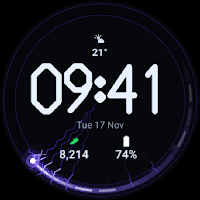
Arcline Digital Watch Face
BasilBase Personalization
A plasma arc tells the second. Five complications, full before you touch it.
- Price
- $1.49
- No in-app purchases
- Updated
- Sep 2
- 2026 · v1.0
Screenshots


About Arcline Digital Watch Face
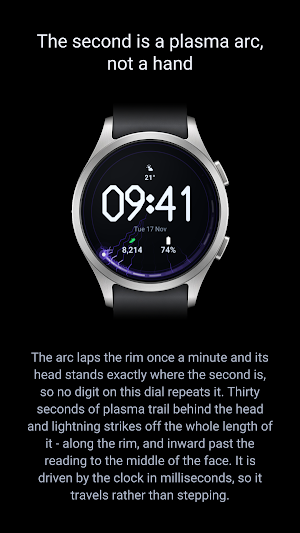
The arc laps the rim once a minute and its head stands exactly where the second is. Behind the head trails thirty seconds of plasma - half the dial - and lightning strikes off the whole length of that trail: along the rim, and inward past the reading to the middle of the face. The bolts shorten and dim the further back they sit, and the trail glitters as it goes. It is driven by the clock in milliseconds, so it travels the way an arc travels rather than stepping once a second.
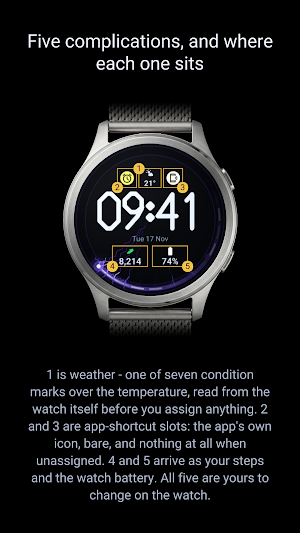
Five complications, and every one of them born full
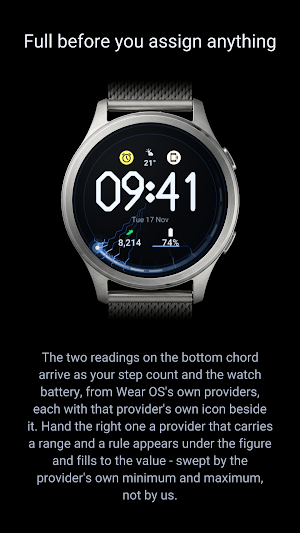
Two complications sit on the bottom chord. Each takes short text, a ranged value, a monochromatic icon or a small image, and each may be left empty. Out of the box the left one is your step count and the right one is the watch battery - both from Wear OS's own providers, so they carry a real reading before you assign anything - and each draws that provider's own icon beside the figure.
A weather complication sits centred above the reading. It takes short text or an icon, and it does not start blank either: with nothing assigned, the face reads the watch's own weather and draws one of seven condition marks - clear, partly cloudy, cloudy, rain, snow, fog, storm - with the temperature under it. Point it at a provider and that provider's icon takes the same place.
Two app-shortcut slots flank the weather, one either side. Each takes a small image or a monochromatic icon and draws the app's own icon, bare: no label, no frame, no backing disc. Left unassigned, a shortcut slot draws nothing at all - no placeholder, no outline, no reserved gap.
All five can be reassigned on the watch.
Weather needs one permission, once
Wear OS does not grant watch faces location access by default, so the temperature shows --° until you allow it: Settings > Security and privacy > Permission manager > Location > Watch faces > Allow while using the app. Everything else on the face - time, date, steps, battery, the plasma - works the moment you install it.
A reading, not a badge
The hour and the minute are the dial. HH:MM fills 23 per cent of the screen, in an alphabet drawn for this face: one stroke weight, every corner and every terminal cut at 45 degrees, not a curve anywhere. The lightning passes behind the digits and never across them.
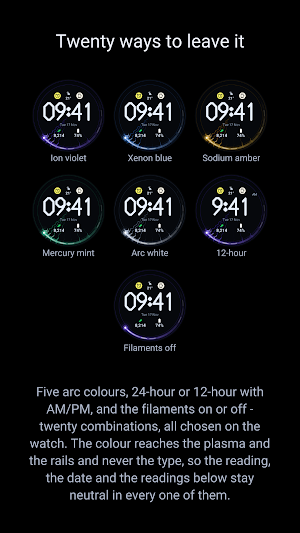
Twenty ways to leave it
- 5 arc colours: ion violet, xenon blue, sodium amber, mercury mint, arc white
- 24-hour, or 12-hour with AM/PM
- filaments on or off
The colour reaches the plasma and the rails and never the type: the reading, the date and the complications stay neutral in every one of them.
Always-on is a separate composition, not this one dimmed
The plasma goes out, and the date and the complications go with it. What is left is the reading hollowed to a three-pixel wall and one short mark standing where the minute is.
Nothing on the dial carries our name. No account, no ads, no subscription.
If you have a question, or something is not working right, please write to us at [email protected].
What’s new
Version 1.0 · Updated September 2, 2026
First release. The second is a plasma arc that laps the rim once a minute, with a thirty-second lightning trail behind it that reaches the middle of the dial. Five complications, all of them showing a real reading before you assign anything - including a weather complication with seven condition marks. Five arc colours, 24 or 12 hour, filaments on or off. If you have a question, or something is not working right, please write to us at [email protected].
Alternatives to Arcline Digital Watch Face
Looking for apps like Arcline Digital Watch Face? Here are 6 similar Android apps on Google Play. 1 of the 6 are free to download.
-
Aurora Flux Watch Face
-
Infinity Arc - Watch Face
-
Aurora: AMOLED Minimal
-
EXD142: Fit Watch Face
-
Digital Arc - Watchface
-
Minimal Mono Watch Face
| App | Rating | Price | Installs | Last updated | Compare |
|---|---|---|---|---|---|
| Arcline Digital Watch Face | – | $1.49 | 0+ | Sep 2, 2026 | |
| Aurora Flux Watch Face | – | 1.99 USD | 1+ | Jul 3, 2026 | Compare |
| Infinity Arc - Watch Face | – | 1.99 USD | 1+ | – | Compare |
| Aurora: AMOLED Minimal | – | Free | 10+ | Jul 28, 2026 | Compare |
| EXD142: Fit Watch Face | – | 1.49 USD | 500+ | Aug 25, 2025 | Compare |
| Digital Arc - Watchface | – | 0.49 USD | 50+ | Oct 4, 2026 | Compare |
| Minimal Mono Watch Face | – | 1.09 USD | 1+ | – | Compare |
Similar apps on Google Play
- Aurora Flux Watch Face
- Infinity Arc - Watch Face
- Aurora: AMOLED Minimal
- EXD142: Fit Watch Face
- Digital Arc - Watchface
- Minimal Mono Watch Face
- Pulse Watch Face
- Zenith Watch Face
- Health 2: Watch Face
- PEN (gradation, select)
- Circles- for wear os 5
- VFM04 Minimal Digital
- SonarFace
- RHS 79 WR Gradin
- Active Watch Face for Wear OS
- Material Shadow WatchFace 2026
- Nothing Minimal Watch Face
- Weather in Spring Minimalist A
- Modulux - WearOS Watchface
- Fusion Watch Face
- Nothing watchface
- SHL Six Seven Watch Face
- Eclipse: Digital Watch Face
- Minimal-Clean Time Watch
- AD Gemini - Watch Face
- Digital watchface for Juggluco
- Minimal Digital Watch Face
- minimalist 04