
PocketPDF: PDF Tools & Scanner
AyushTheVibeCoder Productivity Contains ads
Merge, split, compress, scan & convert PDFs — 100% offline & private.
- Downloads
- 29+
- on Google Play
- Price
- Free
- No in-app purchases
- Updated
- Jul 30
- 2026 · v1.0.1
Screenshots

About PocketPDF: PDF Tools & Scanner
PocketPDF is a complete PDF toolbox that works entirely on your phone — merge, split, compress, convert, scan, sign, and organize PDFs without ever uploading your files to the cloud.
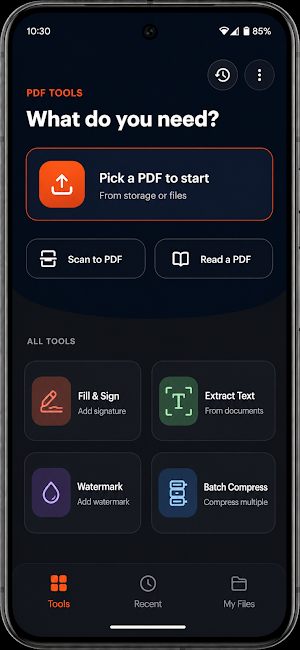
EVERYTHING YOU NEED IN ONE APP
• Merge PDF — combine multiple files into one
• Split PDF — extract or separate pages
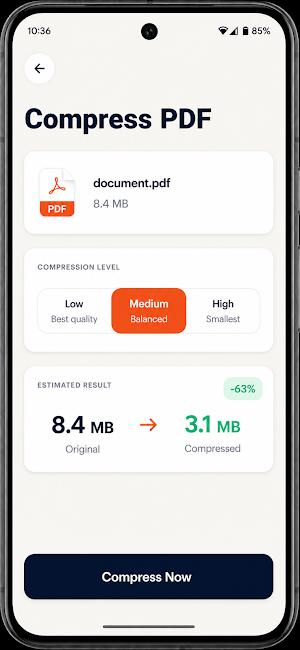
• Compress PDF — shrink file size, with adjustable quality
• Batch Compress — process many files at once
• Rotate PDF — fix page orientation
• Lock / Unlock — password-protect your PDFs (AES-256)
• Organize Pages — reorder or delete pages
• Page Numbers — stamp page numbers automatically
• Watermark — add a text watermark to every page
• Fill & Sign — draw your signature and place it on any page
• Images to PDF — turn photos into a PDF
• PDF to Images — export pages as JPEGs
• Extract Text (OCR) — pull text out of scanned documents, in multiple languages
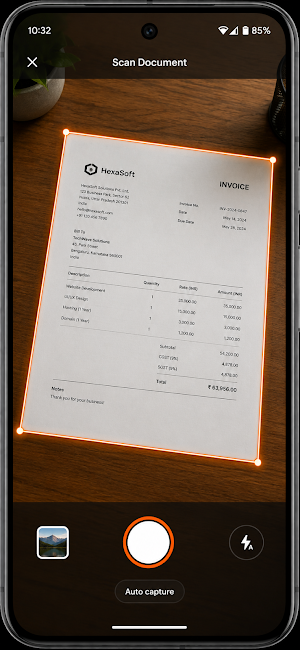
• Scan to PDF — turn your camera into a document scanner with auto-crop and filters
• PDF to Word — convert to an editable document
100% ON-DEVICE & PRIVATE
Every tool above runs locally on your phone. Your files are never uploaded or stored on our servers — no account, no sign-in, no uploads required.
BUILT-IN READER
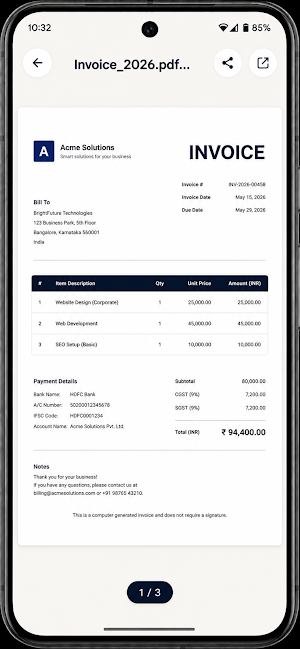
Open and read any PDF right inside the app — no need to switch to another viewer.
LIGHT & DARK MODE
A clean, modern interface that adapts to your system theme.
PocketPDF is free to use and supported by ads. An optional one-time purchase removes ads entirely.
EVERYTHING YOU NEED IN ONE APP
• Merge PDF — combine multiple files into one
• Split PDF — extract or separate pages
• Compress PDF — shrink file size, with adjustable quality
• Batch Compress — process many files at once
• Rotate PDF — fix page orientation
• Lock / Unlock — password-protect your PDFs (AES-256)
• Organize Pages — reorder or delete pages
• Page Numbers — stamp page numbers automatically
• Watermark — add a text watermark to every page
• Fill & Sign — draw your signature and place it on any page
• Images to PDF — turn photos into a PDF
• PDF to Images — export pages as JPEGs
• Extract Text (OCR) — pull text out of scanned documents, in multiple languages
• Scan to PDF — turn your camera into a document scanner with auto-crop and filters
• PDF to Word — convert to an editable document
100% ON-DEVICE & PRIVATE
Every tool above runs locally on your phone. Your files are never uploaded or stored on our servers — no account, no sign-in, no uploads required.
BUILT-IN READER
Open and read any PDF right inside the app — no need to switch to another viewer.
LIGHT & DARK MODE
A clean, modern interface that adapts to your system theme.
PocketPDF is free to use and supported by ads. An optional one-time purchase removes ads entirely.
What’s new
Version 1.0.1 · Updated July 30, 2026
Welcome to PocketPDF! • Scan documents with auto-crop and enhancement filters • Merge, split, compress, rotate and organize PDFs • Fill & Sign, watermark and page numbers • Extract text with OCR (English, Hindi, Chinese, Japanese, Korean) • Built-in PDF reader with light and dark mode • Everything runs on your device — no uploads, no sign-in
Alternatives to PocketPDF: PDF Tools & Scanner
Looking for apps like PocketPDF: PDF Tools & Scanner? Here are 6 similar Android apps on Google Play. The highest rated is PDF Scanner Plus - Doc Scanner (4.6/5), and all 6 are free to download.
-
Total Drive - Cloud Storage 3.6
-
pdfFiller Edit, fill, sign PDF 3.9
-
PDF Reader Zone 3.9
-
PDFelement-PDF Editor & Reader 4.1
-
Smallpdf: Scanner & PDF Editor 4.4
-
PDF Scanner Plus - Doc Scanner 4.6
| App | Rating | Price | Installs | Last updated | Compare |
|---|---|---|---|---|---|
| PocketPDF: PDF Tools & Scanner | – | Free | 10+ | Jul 30, 2026 | |
| Total Drive - Cloud Storage | 3.6 / 5 | Free | 500,000+ | Jul 27, 2026 | Compare |
| pdfFiller Edit, fill, sign PDF | 3.9 / 5 | Free | 5,000,000+ | Oct 22, 2026 | Compare |
| PDF Reader Zone | 3.9 / 5 | Free | 10,000,000+ | Sep 11, 2026 | Compare |
| PDFelement-PDF Editor & Reader | 4.1 / 5 | Free | 5,000,000+ | Oct 16, 2026 | Compare |
| Smallpdf: Scanner & PDF Editor | 4.4 / 5 | Free | 5,000,000+ | Oct 7, 2026 | Compare |
| PDF Scanner Plus - Doc Scanner | 4.6 / 5 | Free | 1,000,000+ | Oct 12, 2026 | Compare |
Similar apps on Google Play
- Total Drive - Cloud Storage
- pdfFiller Edit, fill, sign PDF
- PDF Reader Zone
- PDFelement-PDF Editor & Reader
- Smallpdf: Scanner & PDF Editor
- PDF Scanner Plus - Doc Scanner
- PDF Reader & Editor: Xodo
- PDF Merge: Scan, Sign & Edit
- Regula Document Reader
- Falcon PDF - Editor & Tools
- Mobi PDF・Editor・Scanner・Reader
- FastField: Field Service Forms
- iLovePDF: PDF Editor & Scanner
- Genius Scan - PDF Scanner
- Polaris Office: Edit&View, PDF
- Tiny Scanner - PDF Scanner App