

딴짓
AyboKobe Lifestyle Contains ads
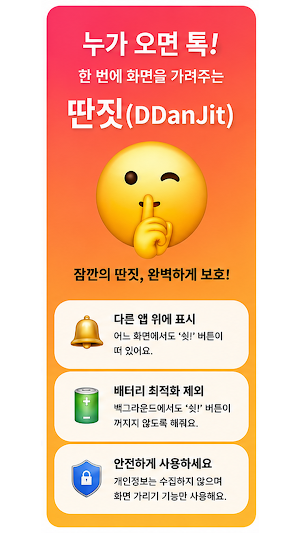
Tap when someone comes by! An essential item for distraction that instantly hides the screen! Tap the 'Shh!' button before you get caught! Cover the screen in an instant, anywhere.
- Downloads
- 27+
- on Google Play
- Price
- Free
- No in-app purchases
- Updated
- Jul 30
- 2026 · v1.6
Screenshots

About 딴짓
📱 App Name
DDanJit
---
✍️ Short description (within 80 characters)
A tap when someone comes! An essential DDanJit item that covers the screen in one go 🤫
Alternative:
A tap of the 'Shh!' button before you get caught! Cover the screen instantly anywhere
---
📄 Full description (within 4000 characters)
🤫 What's wrong with getting distracted for a moment?
At work, at school, at a cafe…
You know those times when you just want to browse shopping or look up travel destinations for a bit?
But what if someone approaches? Your heart sinks! 😱
That won't happen anymore.
'DDanJit' is the fastest and most natural screen-covering assistant that blacks out the screen with a single touch the moment someone approaches.
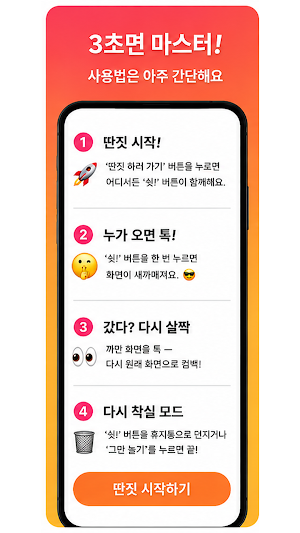
✨ How to use it (Master in 3 seconds!)
1️⃣ Start DDanJit!
When you press the 'Go Do Something Else' button, the floating 'Shh!' button accompanies you on any screen.
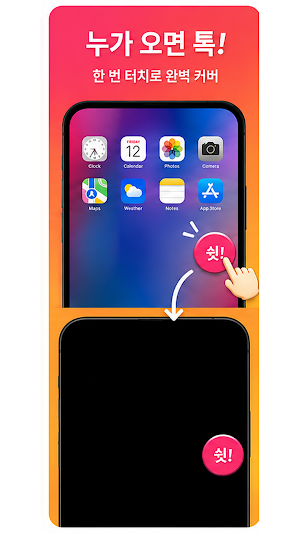
2️⃣ Tap when someone comes!
Press the 'Shh!' button once and the screen goes pitch black, so there's no chance of getting caught. 😎
3️⃣ Left? Just a quick tap back.
Tap the black screen — come back to the original screen as if nothing happened.
4️⃣ Back to diligent mode.
Throw the 'Shh!' button to the trash or press 'Stop Playing' and you're done!
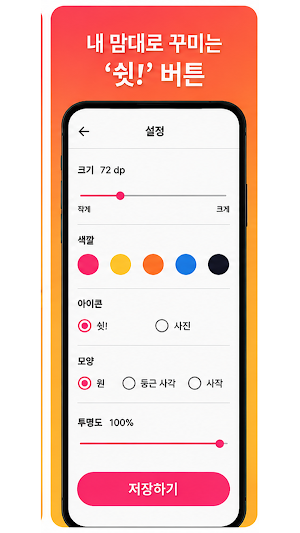
🎨 Customize 'Shh!' however you want Button
• Resize — Freely adjust to make it small or large
• Transparency — Blurry or make it sharp
• Shape — Circle / Rounded Square / Square
• Color — Customize to your liking
• Icon — Replace with your desired photo
• Position — Press and hold to move it anywhere
💡 Perfect for:
• Those who want to quickly browse shopping or travel information in the office
• Those who need to quickly hide their screen in a classroom
• Those who want to naturally hide their screen when someone approaches
• Everyone who wants to protect their privacy
🔒 Required Permissions Guide
• Show over other apps: Required to keep the 'Shh!' button visible on any screen.
• Notifications: Indicates when you are distracted and allows you to turn it off directly from notifications.
• Exclude from battery optimization: Ensures the 'Shh!' button does not turn off in the background.
Permissions are used solely for the screen hiding feature and
Do not collect or transmit your personal information externally.
The key is to press it before you get caught! 🏃💨
Enjoy a free and casual lifestyle with 'Ttanjit' right now.
DDanJit
---
✍️ Short description (within 80 characters)
A tap when someone comes! An essential DDanJit item that covers the screen in one go 🤫
Alternative:
A tap of the 'Shh!' button before you get caught! Cover the screen instantly anywhere
---
📄 Full description (within 4000 characters)
🤫 What's wrong with getting distracted for a moment?
At work, at school, at a cafe…
You know those times when you just want to browse shopping or look up travel destinations for a bit?
But what if someone approaches? Your heart sinks! 😱
That won't happen anymore.
'DDanJit' is the fastest and most natural screen-covering assistant that blacks out the screen with a single touch the moment someone approaches.
✨ How to use it (Master in 3 seconds!)
1️⃣ Start DDanJit!
When you press the 'Go Do Something Else' button, the floating 'Shh!' button accompanies you on any screen.
2️⃣ Tap when someone comes!
Press the 'Shh!' button once and the screen goes pitch black, so there's no chance of getting caught. 😎
3️⃣ Left? Just a quick tap back.
Tap the black screen — come back to the original screen as if nothing happened.
4️⃣ Back to diligent mode.
Throw the 'Shh!' button to the trash or press 'Stop Playing' and you're done!
🎨 Customize 'Shh!' however you want Button
• Resize — Freely adjust to make it small or large
• Transparency — Blurry or make it sharp
• Shape — Circle / Rounded Square / Square
• Color — Customize to your liking
• Icon — Replace with your desired photo
• Position — Press and hold to move it anywhere
💡 Perfect for:
• Those who want to quickly browse shopping or travel information in the office
• Those who need to quickly hide their screen in a classroom
• Those who want to naturally hide their screen when someone approaches
• Everyone who wants to protect their privacy
🔒 Required Permissions Guide
• Show over other apps: Required to keep the 'Shh!' button visible on any screen.
• Notifications: Indicates when you are distracted and allows you to turn it off directly from notifications.
• Exclude from battery optimization: Ensures the 'Shh!' button does not turn off in the background.
Permissions are used solely for the screen hiding feature and
Do not collect or transmit your personal information externally.
The key is to press it before you get caught! 🏃💨
Enjoy a free and casual lifestyle with 'Ttanjit' right now.
What’s new
Version 1.6 · Updated July 30, 2026
온보딩 페이지 추가
Alternatives to 딴짓
Looking for apps like 딴짓? Here are 4 similar Android apps on Google Play. All of them are free to download.



| App | Rating | Price | Installs | Last updated | Compare |
|---|---|---|---|---|---|
| 딴짓 | – | Free | 10+ | Jul 30, 2026 | |
| 아이뷰어 | – | Free | 1+ | Sep 14, 2026 | Compare |
| MediaSaver - 동영상 다운로드 영상 저장 | – | Free | 1,000+ | – | Compare |
| MoodEcho | – | Free | 1,000+ | Oct 2, 2026 | Compare |
| TodoPocket | – | Free | 100+ | Jul 9, 2026 | Compare |
Compare 딴짓 with the top alternatives: ratings, updates, ASO score and keyword gaps →