
Kids Screen Limit – Parental
Avicrown Parenting In-app purchases Contains ads
Parental control app for Kids screen time and app limits
- Downloads
- 336+
- on Google Play
- Price
- Free
- In-app purchases
- Updated
- Sep 1
- 2026 · v1.1.2
Screenshots

About Kids Screen Limit – Parental
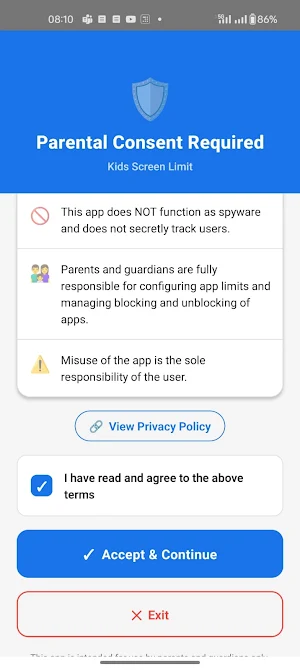
Take control of your child’s digital habits with Kids Screen Limit – Parental Control, an easy-to-use parental control app designed to help parents manage kids screen time, reduce mobile addiction and build healthy screen habits.
Kids Screen Limit helps parents and guardians manage children's app usage by setting a screen time limit, monitoring usage and automatically blocking apps when limits are reached. It is designed for family safety and healthy digital wellbeing.
🔒 KEY FEATURES
⏱ Screen Time Limit for Apps
Set daily screen time limits for selected apps and automatically restrict access when the limit is reached.
📊 Kids Screen Time Monitoring
Track app usage and understand your child’s digital habits with easy monitoring tools.
🚫 App Blocker for Kids
Automatically block selected apps after the allowed usage time is completed. A simple and effective app blocker for kids.
📱 Child Phone Control
Help manage how children use mobile devices with smart child phone control features.
🔐 Parental Protection (Pro)
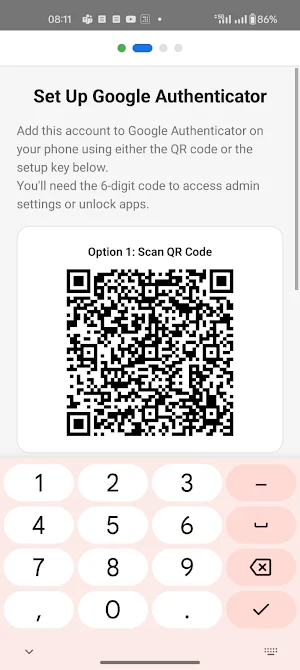
Protect settings using secure PIN-based parental control to prevent unauthorised changes.
📅 Smart Screen Control (Pro)
Manage total screen time across multiple apps and create healthier usage patterns.
👨👩👧 DESIGNED FOR PARENTS & FAMILY SAFETY
Kids Screen Limit is designed for parents and guardians who want better child phone control, improved family safety, and healthier digital routines for children.
🔐 PRIVACY & TRANSPARENCY
• No personal data is sold or shared
• Data stays securely on your device
• Monitoring features are visible to the user
• This app is not intended for secret tracking or surveillance
⚙ REQUIRED PERMISSIONS
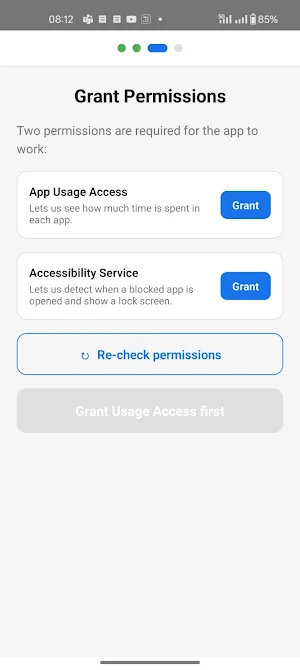
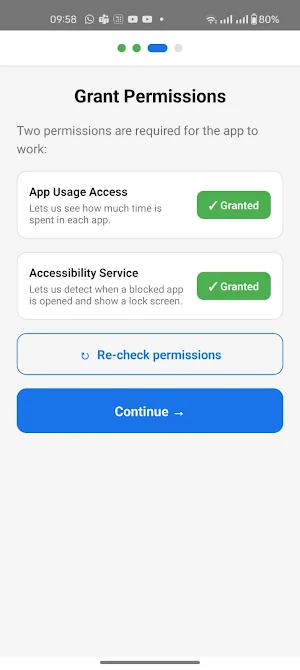
Accessibility Service is used only to detect when selected apps are opened and to block them after parent-configured screen time limits are reached.
Usage Access permission is required to measure app usage for kids screen time management.
A persistent notification may appear while protection is active to ensure transparency.
💡 WHY USE KIDS SCREEN LIMIT?
• Reduce excessive mobile usage
• Set effective screen time limits
• Build healthy screen habits
• Improve focus and study time
• Easy parental control for families
• Better family safety and child wellbeing
Upgrade to Pro to unlock advanced parental controls, enhanced child phone control, and smarter screen time management.
Start building healthier screen habits today with Kids Screen Limit – your trusted parental control app for managing kids screen time.
Kids Screen Limit helps parents and guardians manage children's app usage by setting a screen time limit, monitoring usage and automatically blocking apps when limits are reached. It is designed for family safety and healthy digital wellbeing.
🔒 KEY FEATURES
⏱ Screen Time Limit for Apps
Set daily screen time limits for selected apps and automatically restrict access when the limit is reached.
📊 Kids Screen Time Monitoring
Track app usage and understand your child’s digital habits with easy monitoring tools.
🚫 App Blocker for Kids
Automatically block selected apps after the allowed usage time is completed. A simple and effective app blocker for kids.
📱 Child Phone Control
Help manage how children use mobile devices with smart child phone control features.
🔐 Parental Protection (Pro)
Protect settings using secure PIN-based parental control to prevent unauthorised changes.
📅 Smart Screen Control (Pro)
Manage total screen time across multiple apps and create healthier usage patterns.
👨👩👧 DESIGNED FOR PARENTS & FAMILY SAFETY
Kids Screen Limit is designed for parents and guardians who want better child phone control, improved family safety, and healthier digital routines for children.
🔐 PRIVACY & TRANSPARENCY
• No personal data is sold or shared
• Data stays securely on your device
• Monitoring features are visible to the user
• This app is not intended for secret tracking or surveillance
⚙ REQUIRED PERMISSIONS
Accessibility Service is used only to detect when selected apps are opened and to block them after parent-configured screen time limits are reached.
Usage Access permission is required to measure app usage for kids screen time management.
A persistent notification may appear while protection is active to ensure transparency.
💡 WHY USE KIDS SCREEN LIMIT?
• Reduce excessive mobile usage
• Set effective screen time limits
• Build healthy screen habits
• Improve focus and study time
• Easy parental control for families
• Better family safety and child wellbeing
Upgrade to Pro to unlock advanced parental controls, enhanced child phone control, and smarter screen time management.
Start building healthier screen habits today with Kids Screen Limit – your trusted parental control app for managing kids screen time.
What’s new
Version 1.1.2 · Updated September 1, 2026
• Watch the setup guide directly from the Permissions screen — no need to go back to find it. • Updated Google Play Billing to the latest version for improved reliability of the Pro subscription flow. • Faster app startup on all devices. • Stability and reliability improvements.
Alternatives to Kids Screen Limit – Parental
Looking for apps like Kids Screen Limit – Parental? Here are 4 similar Android apps on Google Play. The highest rated is Parental Control - Kroha (4.6/5), and all 4 are free to download.
-
Sleep Tracker - Sleep Cycle 3.8
-
Parental Control - Kroha 4.6
-
Parental Control - Kidslox 4.0
-
Parental Control App- FamiSafe 4.4
| App | Rating | Price | Installs | Last updated | Compare |
|---|---|---|---|---|---|
| Kids Screen Limit – Parental | – | Free | 100+ | Sep 1, 2026 | |
| Sleep Tracker - Sleep Cycle | 3.8 / 5 | Free | 50,000+ | Feb 1, 2024 | Compare |
| Parental Control - Kroha | 4.6 / 5 | Free | 1,000,000+ | May 13, 2026 | Compare |
| Parental Control - Kidslox | 4.0 / 5 | Free | 1,000,000+ | Sep 14, 2026 | Compare |
| Parental Control App- FamiSafe | 4.4 / 5 | Free | 5,000,000+ | Oct 6, 2026 | Compare |