
AnyScan - PDF Scanner, OCR
Avenal Tools Contains ads
Scan Anything, Anytime, Anywhere!
- Downloads
- 100+
- on Google Play
- Price
- Free
- No in-app purchases
- Updated
- Feb 25
- 2022 · v3.0
Screenshots
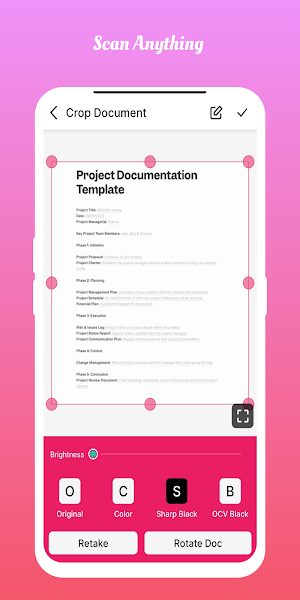


About AnyScan - PDF Scanner, OCR
All Features are Free to Use! No need to pay for any extra Feature, because we have already got you covered with every required feature to use for free of cost.
Scanner app that provides you with more advanced scan options compare to any other apps on the store.
We provide more than 50 tools to edit and manage documents. Let us start a detailed description of the app.
Sometimes in a single day you need your different documents scanned multiple times. In that situation if everything is planned you will definitely not suffer more. But if the need to scan that document arises one by one it will be a disaster for sure.
To rescue you from that situation we brings you a portable Doc Scanner, AnyScan. This Doc scanner will let you scan your documents anytime anywhere.
There are some additional features as well in the app which makes your document after scanning more professional and good to look at.
Let's take a tour of that attractive features::
* Scan your document.
* Enhance the scan quality automatically/Manually.
* Enhancement includes smart cropping and many more.
* Optimize your PDF into modes like B/W, Lighten, Color and dark.
* Turn scans into clear and and sharp PDF.
* Arrange your doc in folder and sub folders.
* Share PDF/JPEG files.
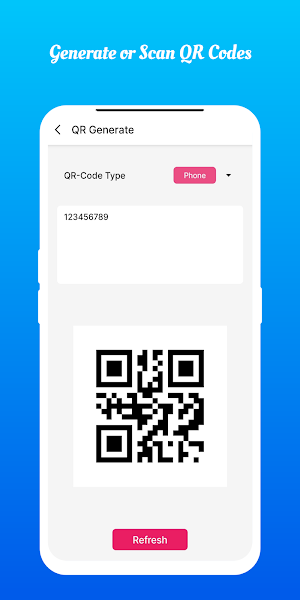
* Scan QR Code/Bar-code.
* Create QR Code.
* Share scanned QR Code.
* Turns your old documents into a clear and sharp one by removing the noise.
* Can create PDF in different sizes from A1 to A-6 and like Postcard, letter ,Note etc.
Features at a glance :
- Best Doc Scanner - It has all of the features that a scanner should have.
- Portable Doc Scanner - By having this document scanner in your phone, you can save your time and efforts by quickly scanning anything on the fly.
- Save as PDF/Image - Scans are saved to your device in image or PDF format.
- PDF Document Scanner - Scans PDF with edge detection feature additionally.
- All type of Doc Scan - Scan in color, Grey, Sky Blue.
- Easy Scanner - Scan in Instant in any size like A1, A2,A3,A4… etc.
- Portable Scanner - The Doc scanner once installed can turn every smartphone into a portable scanners.
- PDF Creator - Convert scanned images to the best quality PDF file.
- QR Code Scanner - This app also have QR Code Scanner feature.
- Bar-code Scanner - Another great feature Bar-code scanner is also integrated in this app.
- OCR Text Recognition - The OCR Text Recognition let you recognize text from images then edit texts or share text to other apps.
- High Quality Scans - The scan quality is of no match, You just get your documents digitally original.
- Images to PDF Converter - You can select some image from Image Gallery and convert it into a PDF file as document.
- Cam Scanner - Take a picture of the whiteboard or blackboard and produce it exactly same with the help of Doc Scanner at home even if you're offline. No internet required for the app to function.
- Remove grain/noise from old document/picture - Remove Noise from old image Using various advanced filter techniques and make it more clear and sharp than before.
- Flashlight - This scanner app also have Flash light feature that helps you in taking scans in low-light environment.
Scanner app that provides you with more advanced scan options compare to any other apps on the store.
We provide more than 50 tools to edit and manage documents. Let us start a detailed description of the app.
Sometimes in a single day you need your different documents scanned multiple times. In that situation if everything is planned you will definitely not suffer more. But if the need to scan that document arises one by one it will be a disaster for sure.
To rescue you from that situation we brings you a portable Doc Scanner, AnyScan. This Doc scanner will let you scan your documents anytime anywhere.
There are some additional features as well in the app which makes your document after scanning more professional and good to look at.
Let's take a tour of that attractive features::
* Scan your document.
* Enhance the scan quality automatically/Manually.
* Enhancement includes smart cropping and many more.
* Optimize your PDF into modes like B/W, Lighten, Color and dark.
* Turn scans into clear and and sharp PDF.
* Arrange your doc in folder and sub folders.
* Share PDF/JPEG files.
* Scan QR Code/Bar-code.
* Create QR Code.
* Share scanned QR Code.
* Turns your old documents into a clear and sharp one by removing the noise.
* Can create PDF in different sizes from A1 to A-6 and like Postcard, letter ,Note etc.
Features at a glance :
- Best Doc Scanner - It has all of the features that a scanner should have.
- Portable Doc Scanner - By having this document scanner in your phone, you can save your time and efforts by quickly scanning anything on the fly.
- Save as PDF/Image - Scans are saved to your device in image or PDF format.
- PDF Document Scanner - Scans PDF with edge detection feature additionally.
- All type of Doc Scan - Scan in color, Grey, Sky Blue.
- Easy Scanner - Scan in Instant in any size like A1, A2,A3,A4… etc.
- Portable Scanner - The Doc scanner once installed can turn every smartphone into a portable scanners.
- PDF Creator - Convert scanned images to the best quality PDF file.
- QR Code Scanner - This app also have QR Code Scanner feature.
- Bar-code Scanner - Another great feature Bar-code scanner is also integrated in this app.
- OCR Text Recognition - The OCR Text Recognition let you recognize text from images then edit texts or share text to other apps.
- High Quality Scans - The scan quality is of no match, You just get your documents digitally original.
- Images to PDF Converter - You can select some image from Image Gallery and convert it into a PDF file as document.
- Cam Scanner - Take a picture of the whiteboard or blackboard and produce it exactly same with the help of Doc Scanner at home even if you're offline. No internet required for the app to function.
- Remove grain/noise from old document/picture - Remove Noise from old image Using various advanced filter techniques and make it more clear and sharp than before.
- Flashlight - This scanner app also have Flash light feature that helps you in taking scans in low-light environment.
Alternatives to AnyScan - PDF Scanner, OCR
Looking for apps like AnyScan - PDF Scanner, OCR? Here are 6 similar Android apps on Google Play. The highest rated is Genius Scan - PDF Scanner (4.9/5), and 5 of the 6 are free to download.
-
PDF Scanner Plus - Doc Scanner 4.7
-
Tiny Scanner - PDF Scanner App 4.6
-
Genius Scan - PDF Scanner 4.9
-
PDF Merge: Scan, Sign & Edit 4.0
-
Document Reader, PDF Converter
-
Smallpdf: Scanner & PDF Editor 4.4
| App | Rating | Price | Installs | Last updated | Compare |
|---|---|---|---|---|---|
| AnyScan - PDF Scanner, OCR | – | Free | 100+ | Feb 25, 2022 | |
| PDF Scanner Plus - Doc Scanner | 4.7 / 5 | Free | 1,000,000+ | Oct 12, 2026 | Compare |
| Tiny Scanner - PDF Scanner App | 4.6 / 5 | Free | 10,000,000+ | – | Compare |
| Genius Scan - PDF Scanner | 4.9 / 5 | Free | 10,000,000+ | Oct 19, 2026 | Compare |
| PDF Merge: Scan, Sign & Edit | 4.0 / 5 | Free | 5,000,000+ | Feb 2, 2026 | Compare |
| Document Reader, PDF Converter | – | – | – | Jan 26, 2026 | Compare |
| Smallpdf: Scanner & PDF Editor | 4.4 / 5 | Free | 5,000,000+ | Oct 7, 2026 | Compare |
Similar apps on Google Play
- PDF Scanner Plus - Doc Scanner
- Tiny Scanner - PDF Scanner App
- Genius Scan - PDF Scanner
- PDF Merge: Scan, Sign & Edit
- Document Reader, PDF Converter
- Smallpdf: Scanner & PDF Editor
- Mobile Scanner App - Scan PDF
- Clear Scan - PDF Scanner App
- vFlat Scan - PDF Scanner, OCR
- PDF Viewer Lite & Editor
- PDF Reader(KDAN PDF): Edit PDF
- Adobe Scan AI PDF Scanner, OCR
- CSV File Viewer - Smart CSV
- pdfFiller Edit, fill, sign PDF
- Regula Document Reader
- PDF Scanner app - TapScanner
- iLovePDF: PDF Editor & Scanner
- Scientific Calculator Pro
- PDFelement-PDF Editor & Reader
- PDF Scanner - Document Scanner
- Foxit PDF Editor
- Docusign - Upload & Sign Docs
- Course Hero: AI Homework Help
- Fireflies: AI notetaker
- PDF Editor – Edit Everything!
- Mobi PDF・Editor・Scanner・Reader
- PDF Editor & Reader | Xodo
- RICOH Smart Device Connector
- AI Resume Builder & CV Maker
- CamCard AI Scanner, Transcribe
- ACE Scanner - PDF Scanner App
- PDF Reader Zone
- Brother Mobile Connect
- Resume Builder - CV Engineer
- SignNow: Sign & Fill PDF Docs
- Foodsage: Autoimmune Scanner
- FAX Desk: Send Fax from Phone
- Photo Scan App by Photomyne