

Auto Clicker – Tap Tool
REVAISOR LT Tools Contains ads
Automate taps, swipes, and long presses with flexible touch automation tools.
- Rating
- 4.2
- 11 ratings
- Downloads
- 10K+
- on Google Play
- Price
- Free
- No in-app purchases
- Updated
- Feb 4
- 2026 · v1.0.2
Screenshots


About Auto Clicker – Tap Tool
Auto Tapper – Touch Automation helps you reduce repetitive screen actions by automating taps and gestures with precision. Designed for gaming support and everyday scenarios, the app executes your configured touch actions so you can focus on what matters instead of tapping endlessly.
With an intuitive setup and powerful gesture controls, Auto Tapper enables hands-free interaction while keeping everything under your control.
🔹 Core Features
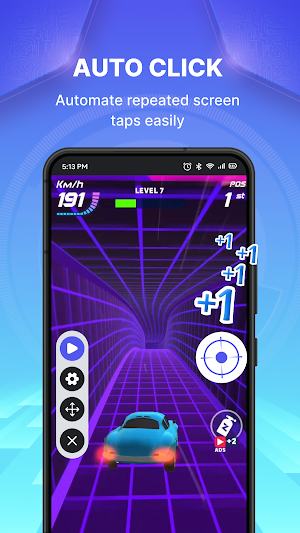
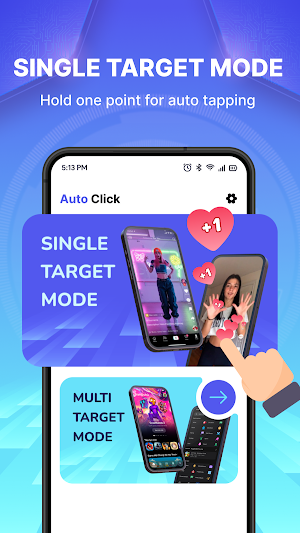
• Single Tap Automation
Repeat taps on a chosen position with adjustable intervals
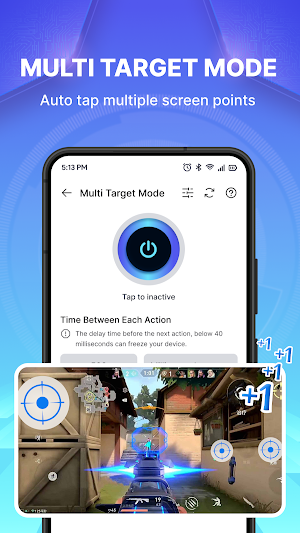
• Multi-Target Touch
Run multiple tap points sequentially or simultaneously
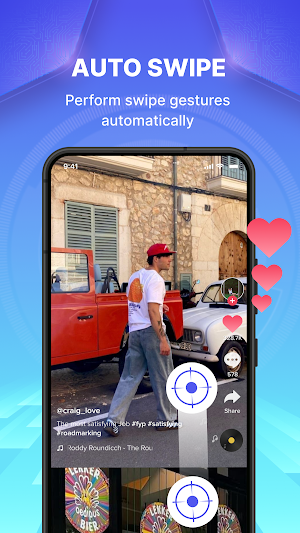
• Swipe Automation
Create swipe gestures with custom direction, speed, and distance
• Press & Hold Mode
Support long-press actions for tasks requiring sustained touch
• Loop Execution
Run touch sequences continuously or for a defined number of cycles
• Gesture Recording
Record your tap and swipe patterns, then replay them anytime
• Combo Automation
Mix taps, swipes, and holds into one smooth automated workflow
⚙️ Control & Customization
• Floating control panel for quick start and adjustment
• Save multiple automation presets for reuse
• Visual touch indicators for better accuracy
• Optional random delay and movement to simulate natural interaction
🔐 Accessibility Service Notice
This app uses Accessibility Service to enable automated touch actions. The permission is required to:
• Display a floating control overlay
• Perform automated tap, swipe, and long-press gestures
• Maintain continuous automation while switching between apps
📌 Privacy Commitment
No personal data is collected, stored, or transmitted
All automated actions run only based on your manual configuration
Accessibility permission is used strictly for touch automation features
Your data and on-device activity always remain private.
🚀 Simplify Every Touch
Avoid repetitive tapping and let automation handle routine actions.
Configure once, run anytime, and enjoy smoother interaction.
Auto Tapper – Touch Automation brings smarter control to every tap.
With an intuitive setup and powerful gesture controls, Auto Tapper enables hands-free interaction while keeping everything under your control.
🔹 Core Features
• Single Tap Automation
Repeat taps on a chosen position with adjustable intervals
• Multi-Target Touch
Run multiple tap points sequentially or simultaneously
• Swipe Automation
Create swipe gestures with custom direction, speed, and distance
• Press & Hold Mode
Support long-press actions for tasks requiring sustained touch
• Loop Execution
Run touch sequences continuously or for a defined number of cycles
• Gesture Recording
Record your tap and swipe patterns, then replay them anytime
• Combo Automation
Mix taps, swipes, and holds into one smooth automated workflow
⚙️ Control & Customization
• Floating control panel for quick start and adjustment
• Save multiple automation presets for reuse
• Visual touch indicators for better accuracy
• Optional random delay and movement to simulate natural interaction
🔐 Accessibility Service Notice
This app uses Accessibility Service to enable automated touch actions. The permission is required to:
• Display a floating control overlay
• Perform automated tap, swipe, and long-press gestures
• Maintain continuous automation while switching between apps
📌 Privacy Commitment
No personal data is collected, stored, or transmitted
All automated actions run only based on your manual configuration
Accessibility permission is used strictly for touch automation features
Your data and on-device activity always remain private.
🚀 Simplify Every Touch
Avoid repetitive tapping and let automation handle routine actions.
Configure once, run anytime, and enjoy smoother interaction.
Auto Tapper – Touch Automation brings smarter control to every tap.
What’s new
Version 1.0.2 · Updated February 4, 2026
fix bugs
User reviews

𝓶𝔂 𝓰𝓪𝓶𝓮 𝓴𝓪 𝓹𝓪𝔀𝓪𝓻 𝓼𝓮𝓽𝓽𝓲𝓷𝓰

good 👍
Alternatives to Auto Clicker – Tap Tool
Looking for apps like Auto Clicker – Tap Tool? Here are 6 similar Android apps on Google Play. The highest rated is Auto Clicker: Auto Tapper (4.9/5), and 5 of the 6 are free to download.
-
Macrorify - Image Auto Clicker 4.4
-
Auto Clicker-Auto Tap & Swipe 4.1
-
TAP Kiln Control Mobile 4.0
-
Game Booster GFX - No Lag
-
Auto Clicker: Auto Tapper 4.9
-
Touch Screen Test 4.5
| App | Rating | Price | Installs | Last updated | Compare |
|---|---|---|---|---|---|
| Auto Clicker – Tap Tool | 4.2 / 5 | Free | 10,000+ | Feb 4, 2026 | |
| Macrorify - Image Auto Clicker | 4.4 / 5 | Free | 1,000,000+ | Jan 7, 2025 | Compare |
| Auto Clicker-Auto Tap & Swipe | 4.1 / 5 | Free | 10,000,000+ | Oct 20, 2026 | Compare |
| TAP Kiln Control Mobile | 4.0 / 5 | Free | 5,000+ | Oct 22, 2026 | Compare |
| Game Booster GFX - No Lag | – | – | 500,000+ | Apr 16, 2026 | Compare |
| Auto Clicker: Auto Tapper | 4.9 / 5 | Free | 10,000,000+ | Oct 21, 2026 | Compare |
| Touch Screen Test | 4.5 / 5 | Free | 1,000,000+ | Jun 26, 2026 | Compare |