
Auto Refresher: App Reloader
Tools Contains ads
Refresh apps automatically with an Auto Reloader, timer, reload limits and more
- Downloads
- 1.2K+
- on Google Play
- Price
- Free
- No in-app purchases
- Updated
- Sep 16
- 2026 · v1.0.12
Screenshots

About Auto Refresher: App Reloader
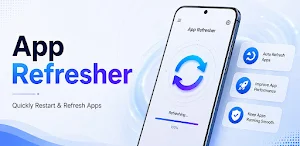
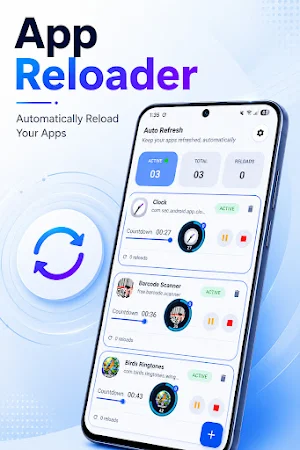
Auto App Refresher and Auto App Reloader helps you automatically refresh apps, reload apps, and restart selected apps on your preferred schedule. Use Auto Refresh Apps to automate repeated app refresh tasks without manually reopening or refreshing apps again and again. Simply select the apps you want to refresh, set an automatic app refresh timer, choose your reload limits and conditions, and let the app handle repetitive refresh and reload tasks for you.
Automatically Refresh & Reload Apps
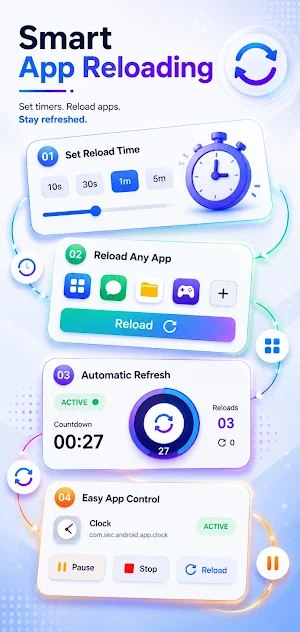
Add any installed app for automatic refresh or reload. Search for an app or select it from the available installed apps list, then configure how often you want it to refresh or reload. This makes it easy to automate repeated app refresh tasks according to your preferred schedule.
Flexible Auto Refresh Timer
Set a refresh interval that fits your needs, from short intervals of seconds to longer periods of minutes or hours. You can choose a preset duration or create a custom timer for more flexible automatic app refresh and reload control.
Custom Reload Limits
Control how many times your selected apps should reload automatically. Choose unlimited reloads, select a predefined reload limit, or create your own custom limit when you want more control over repeated app reloads.
Smart Reload Conditions
Choose the conditions under which automatic app refresh or reload should work. You can configure network preferences such as Wi-Fi or mobile data, use screen-related conditions, and set battery conditions to control when the automation runs.
App Behavior & Customization
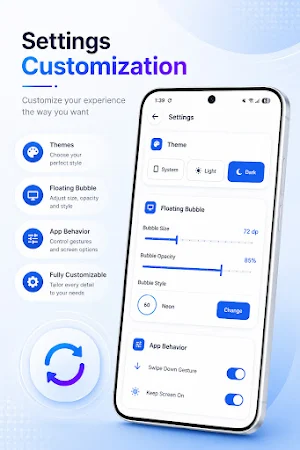
Customize the way your selected apps are refreshed and reloaded. Configure the target action, use the swipe-down gesture, keep the screen on when required, enable vibration on reload, and show the reload count to keep track of your automatic refresh activity.
Floating Bubble Controls
Use the floating bubble for quick access to your reload controls while using your device. Adjust the bubble size and opacity, and personalize its appearance with different styles such as Classic, Neon, Glass, Galaxy, Sunset, Ocean, Aura, Marble, Cyber, and Minimal.
Light & Dark Theme
Choose between Light and Dark themes to personalize the app interface and make the controls comfortable to use in different environments.
Useful for Different Tasks
Automatic app refresh can be useful for freelancers, traders, remote workers, monitoring tasks, and regular users who frequently need to refresh or reload selected apps. Automate repetitive refresh actions and reduce the need to manually reopen or refresh apps again and again.
Whether you need an auto refresh timer, automatic app reload, scheduled app refresh, app refresher, or a convenient way to reload selected apps automatically, this app gives you flexible controls to manage your app refresh routine with less manual effort.
Automatically Refresh & Reload Apps
Add any installed app for automatic refresh or reload. Search for an app or select it from the available installed apps list, then configure how often you want it to refresh or reload. This makes it easy to automate repeated app refresh tasks according to your preferred schedule.
Flexible Auto Refresh Timer
Set a refresh interval that fits your needs, from short intervals of seconds to longer periods of minutes or hours. You can choose a preset duration or create a custom timer for more flexible automatic app refresh and reload control.
Custom Reload Limits
Control how many times your selected apps should reload automatically. Choose unlimited reloads, select a predefined reload limit, or create your own custom limit when you want more control over repeated app reloads.
Smart Reload Conditions
Choose the conditions under which automatic app refresh or reload should work. You can configure network preferences such as Wi-Fi or mobile data, use screen-related conditions, and set battery conditions to control when the automation runs.
App Behavior & Customization
Customize the way your selected apps are refreshed and reloaded. Configure the target action, use the swipe-down gesture, keep the screen on when required, enable vibration on reload, and show the reload count to keep track of your automatic refresh activity.
Floating Bubble Controls
Use the floating bubble for quick access to your reload controls while using your device. Adjust the bubble size and opacity, and personalize its appearance with different styles such as Classic, Neon, Glass, Galaxy, Sunset, Ocean, Aura, Marble, Cyber, and Minimal.
Light & Dark Theme
Choose between Light and Dark themes to personalize the app interface and make the controls comfortable to use in different environments.
Useful for Different Tasks
Automatic app refresh can be useful for freelancers, traders, remote workers, monitoring tasks, and regular users who frequently need to refresh or reload selected apps. Automate repetitive refresh actions and reduce the need to manually reopen or refresh apps again and again.
Whether you need an auto refresh timer, automatic app reload, scheduled app refresh, app refresher, or a convenient way to reload selected apps automatically, this app gives you flexible controls to manage your app refresh routine with less manual effort.
What’s new
Version 1.0.12 · Updated September 16, 2026
Removed Crashes
Alternatives to Auto Refresher: App Reloader
Looking for apps like Auto Refresher: App Reloader? Here are 6 similar Android apps on Google Play. All of them are free to download.





| App | Rating | Price | Installs | Last updated | Compare |
|---|---|---|---|---|---|
| Auto Refresher: App Reloader | – | Free | 1,000+ | Sep 16, 2026 | |
| Lucy VPN GO: Fast VPN Proxy | – | Free | 1,000+ | Aug 4, 2026 | Compare |
| MyPlan: Bills and Lists | – | Free | 5,000+ | – | Compare |
| deAIfy | – | Free | 0+ | Jul 7, 2026 | Compare |
| BuildingFlow | – | Free | 10+ | – | Compare |
| Spectra Viewer | – | Free | 10+ | Sep 4, 2026 | Compare |
| CNP IoT | – | Free | 1+ | – | Compare |
Similar apps on Google Play
- Lucy VPN GO: Fast VPN Proxy
- MyPlan: Bills and Lists
- deAIfy
- BuildingFlow
- Spectra Viewer
- CNP IoT
- Fastpari
- Dumb Down
- Hewad Aziz Portal
- Kerala Vision Smart
- Advanced Time SeriesResearcher
- 12 Testers: Closed Testing
- OmniTool: Sensor Toolkit
- Device Analyzer
- Limlapp Acenta
- USB Keyboard Tester
- Accurator - Gallery Cleaner
- Zimo Print
- AntiqueValue: Antique Identify
- Status Saver & Recover Chats
- Tmahur Reports
- SecondCheck: Device Info Test
- Flux Files: File Manager
- TidyPhone: Duplicates & Junk
- Easy Print