About Pinyiner Free
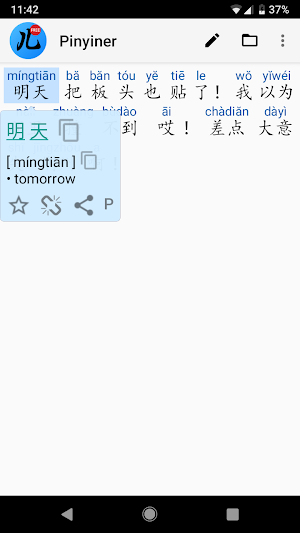
Reading Chinese is extremely important, if you live in a Chinese speaking country, plus it's the best way to learn the language. But reading raw characters has always been difficult. Pinyiner makes it easy. It breaks the characters into words, shows Pinyin above and displays the English meaning if you click on a word. Just copy&paste some text, "Share" it from another app or open a file.
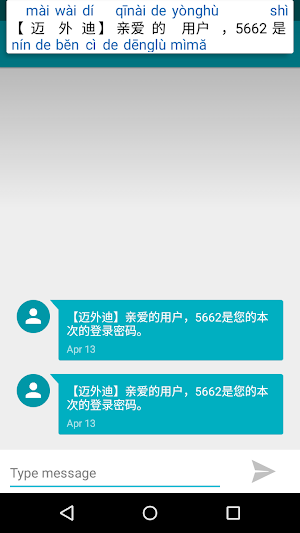
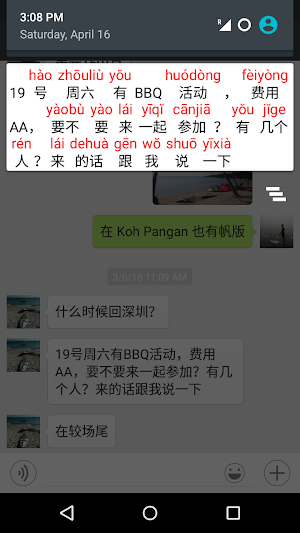
Perfect for reading messages from your friends, Chinese texts on the Web and even whole books. You can also use it as a Simplified/Traditional converter.
Check out the ad-free paid version!
Note: on Android Oreo the Clipboard monitoring might not always work because of the "Battery optimization". In this case, go to Settings -> Apps & Notifications -> Advanced-> Special app access -> Battery optimization -> Select "All apps" at the top -> find Pinyiner, click on it and select "Don't optimize" -> Done.
FEATURES
+ Works fully offline and very fast
+ Clipboard monitoring: any copied text containing Chinese characters is automatically annotated in the notification area
+ Paste the text or use "Share" from another app to annotate with Pinyin
+ Edit the original text
+ Convert between Simplified and Traditional characters
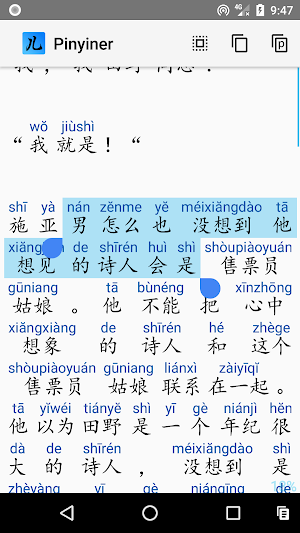
+ Open and annotate text files, even large books (UTF-8 encoded)
+ Save text and its Pinyin into a file. If saving both, you can read the resulting TSV file with e.g. MS Excel (Data->From text->Delimited->Tab)
+ Mark interesting words and export them to Pleco / Anki / AnkiDroid Flashcards for effective learning
+ Add bookmarks to the text
+ Integrates with other dictionaries: GoldenDict, ColorDict, Pleco, Hanping, etc
+ Rearrange how the characters are grouped into words
+ Zoom in/out, configure the color, pinyin style
+ One great short story is included (to realize that reading Chinese is actually easy and fun!)
Pinyiner Free details
Pinyiner Free is a free Books & Reference app for Android with 10,000+ installs on Google Play and a 4.4/5 average rating from 237 ratings. It was released on February 26, 2014 and last updated on January 24, 2020. It's developed by Astratech. The app contains ads.
- Category
- Books & Reference
- Rating
- 4.4 / 5 (237 ratings)
- Installs
- 10,000+
- Price
- Free
- In-app purchases
- No
- Ads
- Contains ads
- Size
- 20M
- Requires Android
- Varies with device
- Content rating
- Rated for 3+
- Released
- February 26, 2014
- Last updated
- January 24, 2020
- Developer
- Astratech
What’s new in Pinyiner Free
Android 10 clipboard monitoring Bug fixes
Updated January 24, 2020
Alternatives to Pinyiner Free
Looking for apps like Pinyiner Free? Here are 6 similar Android apps on Google Play. The highest rated is FLOOX (4.2/5), and all 6 are free to download.

BW Cutter
Приложение-компаньон для управления плоттером BW с поддержкой Bluetooth BLE...

Broneweek
Предназначено для ипользования совместно с плоттерами Broneweek и позволяет вырезать гидро-гелевые защитные...

Relo Music Instrument
All music instruments are absolute pitch: every key / fingering always corresponds...

Cosmonaut VR
The only true-scale VR Solar System app!You start by hovering about 300...

FLOOX
Have you ever wanted to read some book, but it felt like...

Pinyiner RU
Чтение на китайском чрезвычайно важно, если вы живете в стране, говорящей по-китайски,...
| App | Rating | Price | Installs |
|---|---|---|---|
| Pinyiner Free | 4.4 / 5 | Free | 10,000+ |
| BW Cutter | – | Free | 0+ |
| Broneweek | – | Free | 10+ |
| Relo Music Instrument | – | Free | 100+ |
| Cosmonaut VR | – | Free | 500+ |
| FLOOX | 4.2 / 5 | Free | 1,000+ |
| Pinyiner RU | – | Free | 1,000+ |