
Pixstel IconPack
Personalization
Amazing Combination of Pastel Colors & Line Icons.
- Rating
- 4.8
- 77 ratings
- Downloads
- 1.2K+
- on Google Play
- Price
- $0.99
- No in-app purchases
- Updated
- Aug 29
- 2025 · v3.8
Screenshots
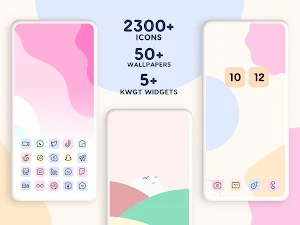
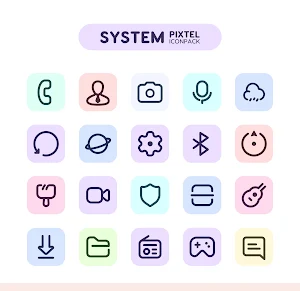
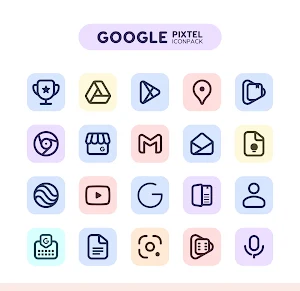
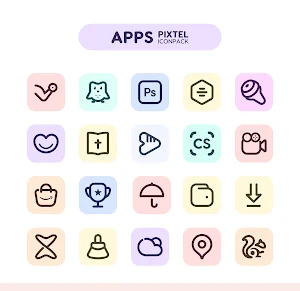


About Pixstel IconPack
Pixstel icon pack is designed with Warm vibe for instant visual bliss for your home screen. it includes a Line and Pastel Color & Beautiful Dark Colorised Lines to beautify your homescreen.
In this Iconpack We are taking Proper Design guidelines, and applying our own creative touch to make it standout! Every icon is desigend with lots of time and attention to the smallest details.
There's always something new:
Pixstel Icon pack is still new with 2000+ Icons. and we will add more icons with each updates
Why Choose Pixstel Icon Pack over other Packs?
• 2300+ ICONS WITH TOP NOTCH QUALITY.
• Frequent Updates with new icons and Updated activities
• Work on any android device.
• Lots of alternative icons to make customization to the next level.
• Exclusive Wall collection
• Custom folder icons and app drawer icons.
• Icon preview and search.
• Dynamic Calendar support.
• Slick Material Dashboard.
• Material Design with creative touch
• Suppport Muzei Live Wallpaper
• Server Base Icon Request
Still Confuse?
Undoubtedly, Pixstel Iconpack Pack is very attractive and unique. and we do offer a 100% refund in case you didn't like it.
Support
ASSISTANCE / GRIEVANCE CELL
♦ If you have any issue while using Pixstel ICON PACK you can Email [email protected]
♦ Twitter :- https://twitter.com/asn360
How to use this Icon pack?
Step 1 : Install supported theme Launcher (Recommended NOVA LAUNCHER or Lawnchair).
Step 2 : Open Icon Pack and click on Apply.
DISCLAIMER
• A supported launcher is required to use this icon pack!
• FAQ section inside the app which answers a lot of questions you may have. Please read it before you emailing your question.
Icon Pack Supported Launchers
Action Launcher • ADW Launcher • Apex Launcher •Atom Launcher • Aviate Launcher • CM Theme Engine • GO Launcher • Holo Launcher • Holo Launcher HD • LG Home • Lucid Launcher • M Launcher • Mini Launcher • Next Launcher • Nougat Launcher •Nova Launcher(recommended) • Smart Launcher •Solo Launcher •V Launcher • ZenUI Launcher •Zero Launcher • ABC Launcher •Evie Launcher
Icon Pack Supported Launchers not Included in Apply Section
Arrow Launcher • ASAP Launcher •Cobo Launcher •Line Launcher •Mesh Launcher •Peek Launcher • Z Launcher • Launch by Quixey Launcher • iTop Launcher • KK Launcher • MN Launcher • New Launcher • S Launcher • Open Launcher • Flick Launcher •
This icon pack has been tested, and it works with these launchers. However, it may also work with others too. In case you do not found an apply section in dashboard. You can apply icon pack from a theme setting.
Extra Notes
• in this Iconpack, every icon does not aim for 100% Material design rules.
instead, it aims for a creative look by keeping material design in mind.
• Icon pack needs a launcher in order to work. (Few device support iconpack with their stock launcher like Oxygen OS, Mi Poco)
• Google Now Launcher and ONE UI do not support any icon packs.
• Missing an Icon? feel free to send me an icon request and I will try to update this pack with your requests.
CREDITS
• Jahir Fiquitiva for providing such a great dashboard.
In this Iconpack We are taking Proper Design guidelines, and applying our own creative touch to make it standout! Every icon is desigend with lots of time and attention to the smallest details.
There's always something new:
Pixstel Icon pack is still new with 2000+ Icons. and we will add more icons with each updates
Why Choose Pixstel Icon Pack over other Packs?
• 2300+ ICONS WITH TOP NOTCH QUALITY.
• Frequent Updates with new icons and Updated activities
• Work on any android device.
• Lots of alternative icons to make customization to the next level.
• Exclusive Wall collection
• Custom folder icons and app drawer icons.
• Icon preview and search.
• Dynamic Calendar support.
• Slick Material Dashboard.
• Material Design with creative touch
• Suppport Muzei Live Wallpaper
• Server Base Icon Request
Still Confuse?
Undoubtedly, Pixstel Iconpack Pack is very attractive and unique. and we do offer a 100% refund in case you didn't like it.
Support
ASSISTANCE / GRIEVANCE CELL
♦ If you have any issue while using Pixstel ICON PACK you can Email [email protected]
♦ Twitter :- https://twitter.com/asn360
How to use this Icon pack?
Step 1 : Install supported theme Launcher (Recommended NOVA LAUNCHER or Lawnchair).
Step 2 : Open Icon Pack and click on Apply.
DISCLAIMER
• A supported launcher is required to use this icon pack!
• FAQ section inside the app which answers a lot of questions you may have. Please read it before you emailing your question.
Icon Pack Supported Launchers
Action Launcher • ADW Launcher • Apex Launcher •Atom Launcher • Aviate Launcher • CM Theme Engine • GO Launcher • Holo Launcher • Holo Launcher HD • LG Home • Lucid Launcher • M Launcher • Mini Launcher • Next Launcher • Nougat Launcher •Nova Launcher(recommended) • Smart Launcher •Solo Launcher •V Launcher • ZenUI Launcher •Zero Launcher • ABC Launcher •Evie Launcher
Icon Pack Supported Launchers not Included in Apply Section
Arrow Launcher • ASAP Launcher •Cobo Launcher •Line Launcher •Mesh Launcher •Peek Launcher • Z Launcher • Launch by Quixey Launcher • iTop Launcher • KK Launcher • MN Launcher • New Launcher • S Launcher • Open Launcher • Flick Launcher •
This icon pack has been tested, and it works with these launchers. However, it may also work with others too. In case you do not found an apply section in dashboard. You can apply icon pack from a theme setting.
Extra Notes
• in this Iconpack, every icon does not aim for 100% Material design rules.
instead, it aims for a creative look by keeping material design in mind.
• Icon pack needs a launcher in order to work. (Few device support iconpack with their stock launcher like Oxygen OS, Mi Poco)
• Google Now Launcher and ONE UI do not support any icon packs.
• Missing an Icon? feel free to send me an icon request and I will try to update this pack with your requests.
CREDITS
• Jahir Fiquitiva for providing such a great dashboard.
What’s new
Version 3.8 · Updated August 29, 2025
3.8 • 100+ New Icons • New and Updated Activities
User reviews

🧡✨👍

Amazing icon pack🤩🤩🤩

Nice icon pack love it

Very nice looking icons clean & minimal. Huge coverage for apps.

Very beautiful 😍

Beautiful pastel colored Icons, Love these
Alternatives to Pixstel IconPack
Looking for apps like Pixstel IconPack? Here are 5 similar Android apps on Google Play. The highest rated is Flat Squircle - Icon Pack (4.9/5), and 3 of the 5 are free to download.
-
Sunrise Icon Pack 4.5
-
Flat Squircle - Icon Pack 4.9
-
BASIT Icon Pack 4.4
-
Umbra - Icon Pack 4.7
-
Appstract Icon Pack 4.5
| App | Rating | Price | Installs | Last updated | Compare |
|---|---|---|---|---|---|
| Pixstel IconPack | 4.8 / 5 | $0.99 | 1,000+ | Aug 29, 2025 | |
| Sunrise Icon Pack | 4.5 / 5 | Free | 100,000+ | Apr 15, 2018 | Compare |
| Flat Squircle - Icon Pack | 4.9 / 5 | 2.29 USD | 10,000+ | Aug 27, 2026 | Compare |
| BASIT Icon Pack | 4.4 / 5 | Free | 100,000+ | Oct 6, 2026 | Compare |
| Umbra - Icon Pack | 4.7 / 5 | 0.99 USD | 50,000+ | Nov 8, 2020 | Compare |
| Appstract Icon Pack | 4.5 / 5 | Free | 100,000+ | Nov 15, 2020 | Compare |
Compare Pixstel IconPack with the top alternatives: ratings, updates, ASO score and keyword gaps →