

CBW Tablet Banking
Community Bank of Wichita, Inc Finance
Mobile tablet app for customers of Community Bank Wichita, KS
- Downloads
- 100+
- on Google Play
- Price
- Free
- No in-app purchases
- Updated
- Aug 23
- 2023 · v1.5
Screenshots


About CBW Tablet Banking
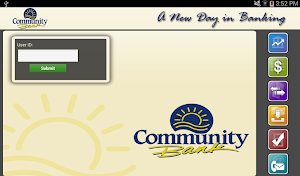
Bank conveniently and securely with Community Bank of Wichita® Mobile Banking,* optimized for your Android™ device
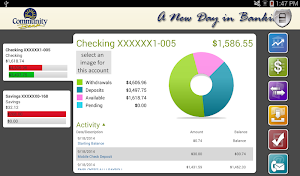
You can manage your accounts, make deposits, find ATMs and more.
Now it’s easy to bank 24/7, right from your Android™ device. To start, just enroll in Community Bank of Wichita’s Online Banking.
PERFORM TRANSACTIONS
• Pay bills and credit cards(1)
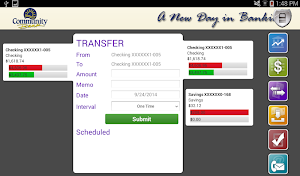
• Transfer money between Community Bank of Wichita accounts
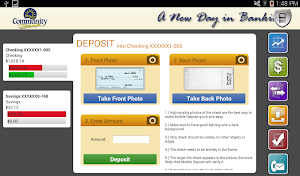
• Deposit checks with Mobile Check Deposit(2)
• Transaction search by multiple criteria
• View account statements, available in Adobe Acrobat format (PDF)
• Account data can be exported to popular financial management applications such as QuickbooksTM,
• QuickenTM and Microsoft MoneyTM plus comma separated (.csv) files
• Scheduled transfers
CONTACT COMMUNITY BANK
• Find the nearest branch and ATMs
• Speak with a customer service representative
MONITOR YOUR ACCOUNT
• View account balances and transaction history
• Manage and receive account alerts through the Community Bank Mobile App
•Balance inquires on checking, savings, CDs and loans accounts
•View front and back of check images and deposit slips
•Interest information, current and previous year
•Maturity dates
•Change login user ID and password
•Change e-mail address
All accounts can be enabled or disabled for internet banking access on a customer or account level.
Notes on Permissions:
• Location permissions are needed to determine your current location in order to find Community Bank
branches and ATMs near you
• Camera permissions are needed to deposit checks via Mobile Deposits
* Must be enrolled in Online Banking.
1) Must enroll in Bill Pay via Online Banking.
2) Deposits subject to verification and not available for immediate withdrawal. See terms in app for limits/availability, other restrictions.
Terms/Service Agreement: www.communitybankwichita.com/serviceagreement
Disclosure:
Some features are available for eligible customers and accounts only.
There maybe a charge for some services; message and data rates may apply. Such charges include those from your communications service provider. Delivery of account alerts may be delayed for various reasons, including service outages affecting your mobile device, wireless or internet provider; technology failures; and system capacity limitations. Any time you review your balance, keep in mind it may not reflect all transactions including recent debit card transactions or checks you have written.
Android is a registered trademark of Google, Inc.
Community Bank of Wichita and related trademarks and logos are trademarks of Community Bank of Wichita, Inc.
Community Bank of Wichita, Inc. Member FDIC and Equal Housing Lender © 2014 Community Bank of Wichita Corporation
You can manage your accounts, make deposits, find ATMs and more.
Now it’s easy to bank 24/7, right from your Android™ device. To start, just enroll in Community Bank of Wichita’s Online Banking.
PERFORM TRANSACTIONS
• Pay bills and credit cards(1)
• Transfer money between Community Bank of Wichita accounts
• Deposit checks with Mobile Check Deposit(2)
• Transaction search by multiple criteria
• View account statements, available in Adobe Acrobat format (PDF)
• Account data can be exported to popular financial management applications such as QuickbooksTM,
• QuickenTM and Microsoft MoneyTM plus comma separated (.csv) files
• Scheduled transfers
CONTACT COMMUNITY BANK
• Find the nearest branch and ATMs
• Speak with a customer service representative
MONITOR YOUR ACCOUNT
• View account balances and transaction history
• Manage and receive account alerts through the Community Bank Mobile App
•Balance inquires on checking, savings, CDs and loans accounts
•View front and back of check images and deposit slips
•Interest information, current and previous year
•Maturity dates
•Change login user ID and password
•Change e-mail address
All accounts can be enabled or disabled for internet banking access on a customer or account level.
Notes on Permissions:
• Location permissions are needed to determine your current location in order to find Community Bank
branches and ATMs near you
• Camera permissions are needed to deposit checks via Mobile Deposits
* Must be enrolled in Online Banking.
1) Must enroll in Bill Pay via Online Banking.
2) Deposits subject to verification and not available for immediate withdrawal. See terms in app for limits/availability, other restrictions.
Terms/Service Agreement: www.communitybankwichita.com/serviceagreement
Disclosure:
Some features are available for eligible customers and accounts only.
There maybe a charge for some services; message and data rates may apply. Such charges include those from your communications service provider. Delivery of account alerts may be delayed for various reasons, including service outages affecting your mobile device, wireless or internet provider; technology failures; and system capacity limitations. Any time you review your balance, keep in mind it may not reflect all transactions including recent debit card transactions or checks you have written.
Android is a registered trademark of Google, Inc.
Community Bank of Wichita and related trademarks and logos are trademarks of Community Bank of Wichita, Inc.
Community Bank of Wichita, Inc. Member FDIC and Equal Housing Lender © 2014 Community Bank of Wichita Corporation
What’s new
Version 1.5 · Updated August 23, 2023
Enhancements and bug fixes
Alternatives to CBW Tablet Banking
Looking for apps like CBW Tablet Banking? Here are 6 similar Android apps on Google Play. The highest rated is Frost Bank (4.9/5), and all 6 are free to download.
-
SouthState Mobile 4.7
-
Axos All-In-One Mobile Banking 4.2
-
Quorum Mobile Banking 4.6
-
First County Bank 4.2
-
Bank of Charlotte Mobile 4.8
-
Frost Bank 4.9
| App | Rating | Price | Installs | Last updated | Compare |
|---|---|---|---|---|---|
| CBW Tablet Banking | – | Free | 100+ | Aug 23, 2023 | |
| SouthState Mobile | 4.7 / 5 | Free | 100,000+ | Sep 18, 2026 | Compare |
| Axos All-In-One Mobile Banking | 4.2 / 5 | Free | 100,000+ | Oct 15, 2026 | Compare |
| Quorum Mobile Banking | 4.6 / 5 | Free | 10,000+ | Oct 26, 2026 | Compare |
| First County Bank | 4.2 / 5 | Free | 10,000+ | May 12, 2026 | Compare |
| Bank of Charlotte Mobile | 4.8 / 5 | Free | 1,000+ | – | Compare |
| Frost Bank | 4.9 / 5 | Free | 500,000+ | – | Compare |
Compare CBW Tablet Banking with the top alternatives: ratings, updates, ASO score and keyword gaps →