
Video to Audio - mp4 to mp3
Asaru Labs Ltd Video Players & Editors In-app purchases Contains ads
convert mp4 video to mp3
- Downloads
- 1.1K+
- on Google Play
- Price
- Free
- In-app purchases
- Updated
- Dec 16
- 2025 · v1.2
Screenshots


About Video to Audio - mp4 to mp3
Transform your videos into high-quality audio files with Video to Audio - the simplest and most powerful audio extraction tool for iPhone and iPad.
**Extract Audio from Any Video**
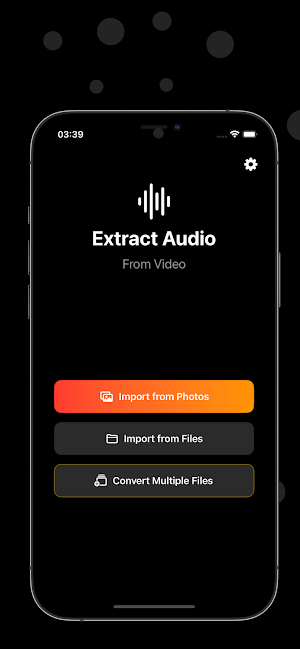
Whether you want to save music from YouTube videos, create podcasts from video recordings, or extract sound effects from your favorite clips, Video to Audio makes it effortless. Import videos directly from your Photos library or Files app, then extract the audio in seconds.
**Precise Audio Trimming**
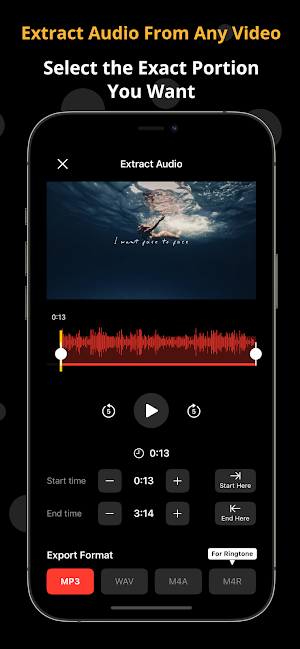
Need just a specific part of the audio? Our intuitive timeline editor lets you select the exact start and end points with precision. Use the waveform visualization to see the audio levels, and drag the handles to trim your audio perfectly. Set trim points with a single tap using our "Start Here" and "End Here" buttons.
**Multiple Export Formats**
Export your audio in the format that works best for you:
- MP3 - Universal compatibility for music players and devices
- WAV - Uncompressed audio quality for professional use
- AAC - High-quality compressed format with smaller file sizes, ideal for mobile devices
- FLAC - Lossless audio compression that preserves original sound quality
- OGG - Open-source compressed format with efficient quality-to-size balance
**Batch Conversion (Premium)**
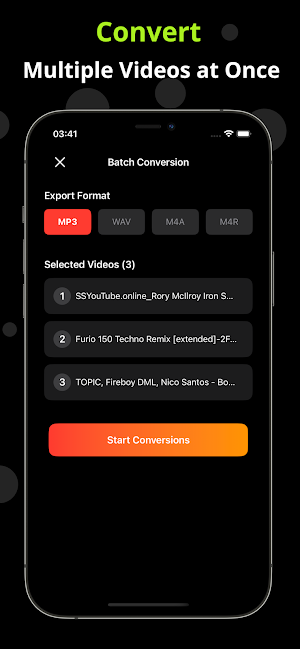
Save time by converting multiple videos at once. Select multiple files, choose your format, and let Video to Audio handle the rest. Watch the progress as each video is converted, with clear status indicators for each file.
**Beautiful, Intuitive Interface**
Experience a modern, dark-themed interface designed for ease of use. Navigate effortlessly through the app with our clean design and smooth animations. Everything you need is just a tap away.
**Free to Start**
Get started with 5 free conversions to try out all the features. Need more? Watch a short ad for additional conversions, purchase tokens for individual conversions, or upgrade to Premium for unlimited conversions and an ad-free experience.
**Premium Features**
Unlock the full potential with Premium:
- Unlimited audio extractions
- Batch conversion for multiple files
- No ads - enjoy a distraction-free experience
- Priority support
**Why Choose Video to Audio?**
- Fast and reliable audio extraction
- High-quality output in multiple formats
- Precise trimming with visual feedback
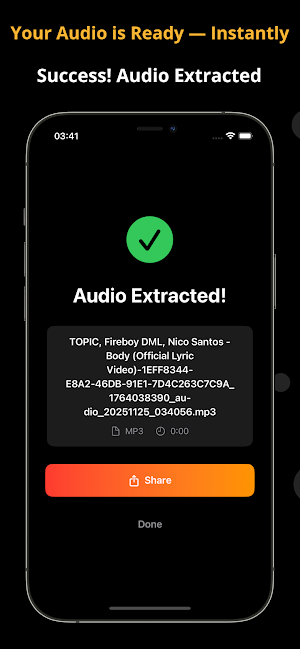
- Easy sharing via Share Sheet
- Works offline - no internet required for conversions
- Supports all common video formats
- Multilingual support in 15 languages
Perfect for content creators, musicians, podcasters, or anyone who wants to extract audio from videos quickly and easily.
Download Video to Audio today and start extracting audio from your videos!
---
**Privacy & Support**
We respect your privacy. All conversions happen locally on your device - your videos never leave your iPhone. For support or questions, contact us through the app settings.
**Extract Audio from Any Video**
Whether you want to save music from YouTube videos, create podcasts from video recordings, or extract sound effects from your favorite clips, Video to Audio makes it effortless. Import videos directly from your Photos library or Files app, then extract the audio in seconds.
**Precise Audio Trimming**
Need just a specific part of the audio? Our intuitive timeline editor lets you select the exact start and end points with precision. Use the waveform visualization to see the audio levels, and drag the handles to trim your audio perfectly. Set trim points with a single tap using our "Start Here" and "End Here" buttons.
**Multiple Export Formats**
Export your audio in the format that works best for you:
- MP3 - Universal compatibility for music players and devices
- WAV - Uncompressed audio quality for professional use
- AAC - High-quality compressed format with smaller file sizes, ideal for mobile devices
- FLAC - Lossless audio compression that preserves original sound quality
- OGG - Open-source compressed format with efficient quality-to-size balance
**Batch Conversion (Premium)**
Save time by converting multiple videos at once. Select multiple files, choose your format, and let Video to Audio handle the rest. Watch the progress as each video is converted, with clear status indicators for each file.
**Beautiful, Intuitive Interface**
Experience a modern, dark-themed interface designed for ease of use. Navigate effortlessly through the app with our clean design and smooth animations. Everything you need is just a tap away.
**Free to Start**
Get started with 5 free conversions to try out all the features. Need more? Watch a short ad for additional conversions, purchase tokens for individual conversions, or upgrade to Premium for unlimited conversions and an ad-free experience.
**Premium Features**
Unlock the full potential with Premium:
- Unlimited audio extractions
- Batch conversion for multiple files
- No ads - enjoy a distraction-free experience
- Priority support
**Why Choose Video to Audio?**
- Fast and reliable audio extraction
- High-quality output in multiple formats
- Precise trimming with visual feedback
- Easy sharing via Share Sheet
- Works offline - no internet required for conversions
- Supports all common video formats
- Multilingual support in 15 languages
Perfect for content creators, musicians, podcasters, or anyone who wants to extract audio from videos quickly and easily.
Download Video to Audio today and start extracting audio from your videos!
---
**Privacy & Support**
We respect your privacy. All conversions happen locally on your device - your videos never leave your iPhone. For support or questions, contact us through the app settings.
Alternatives to Video to Audio - mp4 to mp3
Looking for apps like Video to Audio - mp4 to mp3? Here are 4 similar Android apps on Google Play. The highest rated is Pitch Gauge – Roof Calculator (3.3/5), and all 4 are free to download.



| App | Rating | Price | Installs | Last updated | Compare |
|---|---|---|---|---|---|
| Video to Audio - mp4 to mp3 | – | Free | 1,000+ | Dec 16, 2025 | |
| Pitch Gauge – Roof Calculator | 3.3 / 5 | Free | 5,000+ | Apr 11, 2026 | Compare |
| Golf Handicap Tracker | – | Free | 100+ | Jan 26, 2026 | Compare |
| VIN Check | – | Free | 1,000+ | Jan 5, 2026 | Compare |
| Mortgage Calculator | – | Free | 1,000+ | Jul 28, 2026 | Compare |