

Magnetar Mobile
ArrCee Productivity
Share, review, send and sync links through your own providers and Magnetar.
- Downloads
- 43+
- on Google Play
- Price
- $4.49
- No in-app purchases
- Updated
- Aug 6
- 2026 · v1.2.3
Screenshots
About Magnetar Mobile
Magnetar Mobile is the Android companion app for Magnetar.
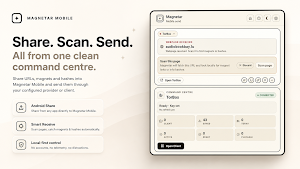
Share links, pages, magnets and hashes into Magnetar Mobile, review what the app finds, then send, save, browse, play or download through the provider or client you configure.
Magnetar Mobile 1.2 adds Magnetar Sync, organised folders, mobile Review queue support and TorBox Airlock.
MAGNETAR SYNC
Pair Magnetar Mobile with the Magnetar browser extension using a private QR code.
Once paired, Magnetar Sync can keep supported Magnetar data in step across Android and desktop, including:
- saved items
- sent history
- mobile Review items
- organised folders
- folder names
- folder colours
- folder contents
Provider API keys and client passwords stay local to the device where they were entered.
SEND TO MOBILE
Send single items or batches from the Magnetar browser extension to Magnetar Mobile.
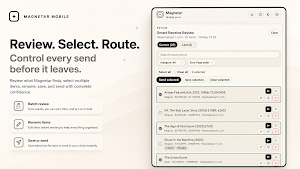
Items arrive in the mobile Review queue, where you can check them before saving, sending or browsing.
ORGANISED FOLDERS
Create organised Magnetar folders for the items you want to keep together.
Organised folders are Magnetar folders, not provider folders. They do not move, rename, delete or change files inside TorBox, Real-Debrid, AllDebrid, Premiumize or any other provider.
Folder names, colours and contents can sync between Magnetar Mobile and the browser extension when Sync is enabled.
TORBOX AIRLOCK
For supported TorBox items, Magnetar Mobile can show and toggle Airlock.
Airlock is TorBox state. If you Airlock an item in Magnetar Mobile, TorBox updates. The browser extension can see the current state after refreshing TorBox with its own local TorBox setup.
LOCAL-FIRST WORKFLOW
Magnetar Mobile is built around a clear local-first workflow:
- share from Android into Magnetar Mobile
- scan shared pages for useful links, magnets and hashes
- review results before sending
- save items for later
- view sent history
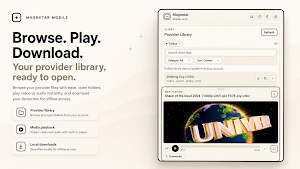
- browse your configured provider or client library
- organise items into Magnetar folders
- open folders, play supported media and download files locally
SUPPORTED SETUP OPTIONS
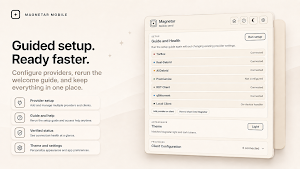
Magnetar Mobile works with your own configured services and clients.
Supported setup options include:
- TorBox
- Real-Debrid
- AllDebrid
- Premiumize
- RDT Client
- qBittorrent
- Local client workflows
Provider accounts are not included.
PRIVACY
Magnetar Mobile does not use ads, telemetry or tracking.
Your provider configuration stays on your device. Provider API keys and client passwords are not synced.
If you enable Magnetar Sync, synced Magnetar data is encrypted before it reaches the sync server. Sync is used for Magnetar metadata such as saved items, sent history, Review items and organised folders. Provider files are not uploaded to Magnetar Sync.
IMPORTANT
Magnetar Mobile does not provide content, accounts or provider access. You are responsible for the services, files and links you choose to use with the app.
Share links, pages, magnets and hashes into Magnetar Mobile, review what the app finds, then send, save, browse, play or download through the provider or client you configure.
Magnetar Mobile 1.2 adds Magnetar Sync, organised folders, mobile Review queue support and TorBox Airlock.
MAGNETAR SYNC
Pair Magnetar Mobile with the Magnetar browser extension using a private QR code.
Once paired, Magnetar Sync can keep supported Magnetar data in step across Android and desktop, including:
- saved items
- sent history
- mobile Review items
- organised folders
- folder names
- folder colours
- folder contents
Provider API keys and client passwords stay local to the device where they were entered.
SEND TO MOBILE
Send single items or batches from the Magnetar browser extension to Magnetar Mobile.
Items arrive in the mobile Review queue, where you can check them before saving, sending or browsing.
ORGANISED FOLDERS
Create organised Magnetar folders for the items you want to keep together.
Organised folders are Magnetar folders, not provider folders. They do not move, rename, delete or change files inside TorBox, Real-Debrid, AllDebrid, Premiumize or any other provider.
Folder names, colours and contents can sync between Magnetar Mobile and the browser extension when Sync is enabled.
TORBOX AIRLOCK
For supported TorBox items, Magnetar Mobile can show and toggle Airlock.
Airlock is TorBox state. If you Airlock an item in Magnetar Mobile, TorBox updates. The browser extension can see the current state after refreshing TorBox with its own local TorBox setup.
LOCAL-FIRST WORKFLOW
Magnetar Mobile is built around a clear local-first workflow:
- share from Android into Magnetar Mobile
- scan shared pages for useful links, magnets and hashes
- review results before sending
- save items for later
- view sent history
- browse your configured provider or client library
- organise items into Magnetar folders
- open folders, play supported media and download files locally
SUPPORTED SETUP OPTIONS
Magnetar Mobile works with your own configured services and clients.
Supported setup options include:
- TorBox
- Real-Debrid
- AllDebrid
- Premiumize
- RDT Client
- qBittorrent
- Local client workflows
Provider accounts are not included.
PRIVACY
Magnetar Mobile does not use ads, telemetry or tracking.
Your provider configuration stays on your device. Provider API keys and client passwords are not synced.
If you enable Magnetar Sync, synced Magnetar data is encrypted before it reaches the sync server. Sync is used for Magnetar metadata such as saved items, sent history, Review items and organised folders. Provider files are not uploaded to Magnetar Sync.
IMPORTANT
Magnetar Mobile does not provide content, accounts or provider access. You are responsible for the services, files and links you choose to use with the app.
What’s new
Version 1.2.3 · Updated August 6, 2026
This update improves synchronisation across the Magnetar ecosystem, including Magnetar Mobile and the new self-hosted My Magnetar. It also improves background reliability, updates the My Magnetar link, and includes general fixes and polish.
Alternatives to Magnetar Mobile
Looking for apps like Magnetar Mobile? Here are 6 similar Android apps on Google Play. All of them are free to download.




| App | Rating | Price | Installs | Last updated | Compare |
|---|---|---|---|---|---|
| Magnetar Mobile | – | $4.49 | 10+ | Aug 6, 2026 | |
| PornBlock | – | Free | 1,000+ | – | Compare |
| WAW Fibra | – | Free | 5,000+ | – | Compare |
| TechoStop: Client Portal | – | Free | 1+ | Aug 23, 2026 | Compare |
| Aphelia | – | Free | 50+ | Nov 20, 2025 | Compare |
| RouXp | – | Free | 10+ | Jul 2, 2026 | Compare |
| USASF Members | – | Free | 100+ | Aug 19, 2026 | Compare |
Compare Magnetar Mobile with the top alternatives: ratings, updates, ASO score and keyword gaps →
Similar apps on Google Play
- PornBlock
- WAW Fibra
- TechoStop: Client Portal
- Aphelia
- RouXp
- USASF Members
- RRA Track & Trace
- PiOps
- Vihintoh
- FUJITEX Mobile
- Lockin
- ZenLock - Screen Lock & Focus
- Zoroastrian Almanac
- Original Net
- Replyly.io
- Vextro: Onsite Invoices
- AirPlay Receiver & Server
- Mango Ops
- Silver
- ClearTask
- Donc
- ClearTask
- My Control HR
- Doc Editor Pro
- Anoloc