

ProcessKill
ARGISHT Tools Contains ads
Monitor apps and auto-exit them after a custom time limit.
- Downloads
- 43+
- on Google Play
- Price
- Free
- No in-app purchases
- Updated
- Oct 24
- 2026 · v1.4.9
Screenshots


About ProcessKill
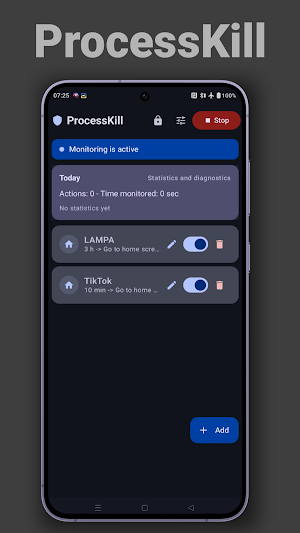
ProcessKill helps you stay focused by monitoring selected apps and responding when a period of inactivity occurs.
Use ProcessKill to:
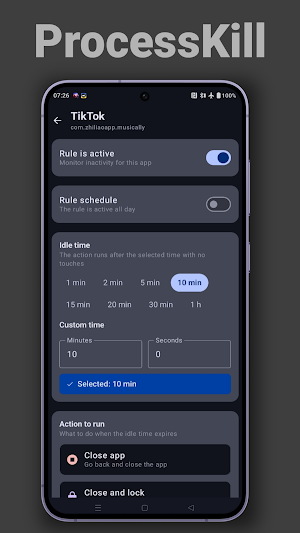
• Set individual inactivity limits for each app
• Automatically return to the home screen when the limit is reached
• Track app activity and usage time
• Create simple rules for different apps
• Restore settings via backup
How it works:
ProcessKill uses Android accessibility services and usage data access to determine when a chosen app is active. As long as you interact with the app (scrolling, tapping the screen, pressing buttons), the timer resets. If no activity occurs within the specified time, the app performs the action defined in the rule — minimizing, closing, or locking the screen.
Key features:
• Inactivity limits for each app
• Simple rule management
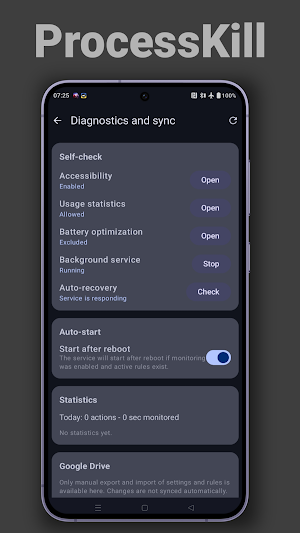
• Usage statistics and diagnostics
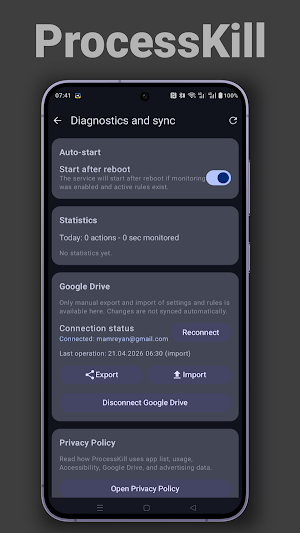
• Optional backup and restore via Google Drive
• Lightweight interface focused on quick setup
Important:
• Some features require enabling accessibility services, usage data access, and battery‑related permissions
• App behavior may vary depending on device manufacturer and Android version
• ProcessKill is designed as a productivity tool and as support for parental control or self‑control
Use ProcessKill to:
• Set individual inactivity limits for each app
• Automatically return to the home screen when the limit is reached
• Track app activity and usage time
• Create simple rules for different apps
• Restore settings via backup
How it works:
ProcessKill uses Android accessibility services and usage data access to determine when a chosen app is active. As long as you interact with the app (scrolling, tapping the screen, pressing buttons), the timer resets. If no activity occurs within the specified time, the app performs the action defined in the rule — minimizing, closing, or locking the screen.
Key features:
• Inactivity limits for each app
• Simple rule management
• Usage statistics and diagnostics
• Optional backup and restore via Google Drive
• Lightweight interface focused on quick setup
Important:
• Some features require enabling accessibility services, usage data access, and battery‑related permissions
• App behavior may vary depending on device manufacturer and Android version
• ProcessKill is designed as a productivity tool and as support for parental control or self‑control
What’s new
Version 1.4.9 · Updated October 24, 2026
Release notes: • Bug fixes.
Alternatives to ProcessKill
Looking for apps like ProcessKill? Here are 4 similar Android apps on Google Play. All of them are free to download.




| App | Rating | Price | Installs | Last updated | Compare |
|---|---|---|---|---|---|
| ProcessKill | – | Free | 10+ | Oct 24, 2026 | |
| Who Wants to Be a Millionaire? | – | Free | 1,000+ | – | Compare |
| Sven PS750 remote control | – | Free | 500+ | Sep 22, 2026 | Compare |
| Freefilms | – | Free | 1,000+ | Sep 22, 2026 | Compare |
| My IP | – | Free | 100+ | – | Compare |
Compare ProcessKill with the top alternatives: ratings, updates, ASO score and keyword gaps →